
tubehaus
A private YouTube client: self-hosted web version (one docker compose) and native apps for Android, Windows, macOS, Linux and iPad/iPhone. No Google account, no tracking. Not affiliated with YouTube or Google.
Automatically checked · GitHub checked 2026-11-12
Overview
TubeHaus
YouTube as you know it, without Google looking over your shoulder.
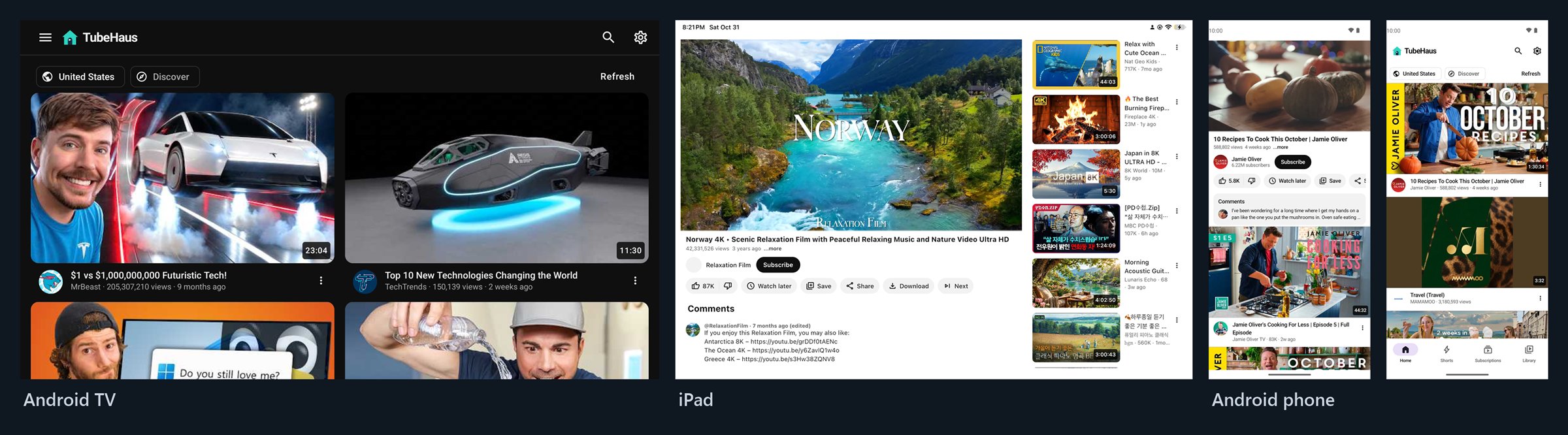
On the TV, the phone, the PC and the iPad. Run it on your own server, or just install the app.





⬇ Get the app · 🖥️ Run the server · ✨ What's new in 1.6 · English · 한국어


Independent open-source software, not affiliated with YouTube or Google. Please read the disclaimer.
At a glance
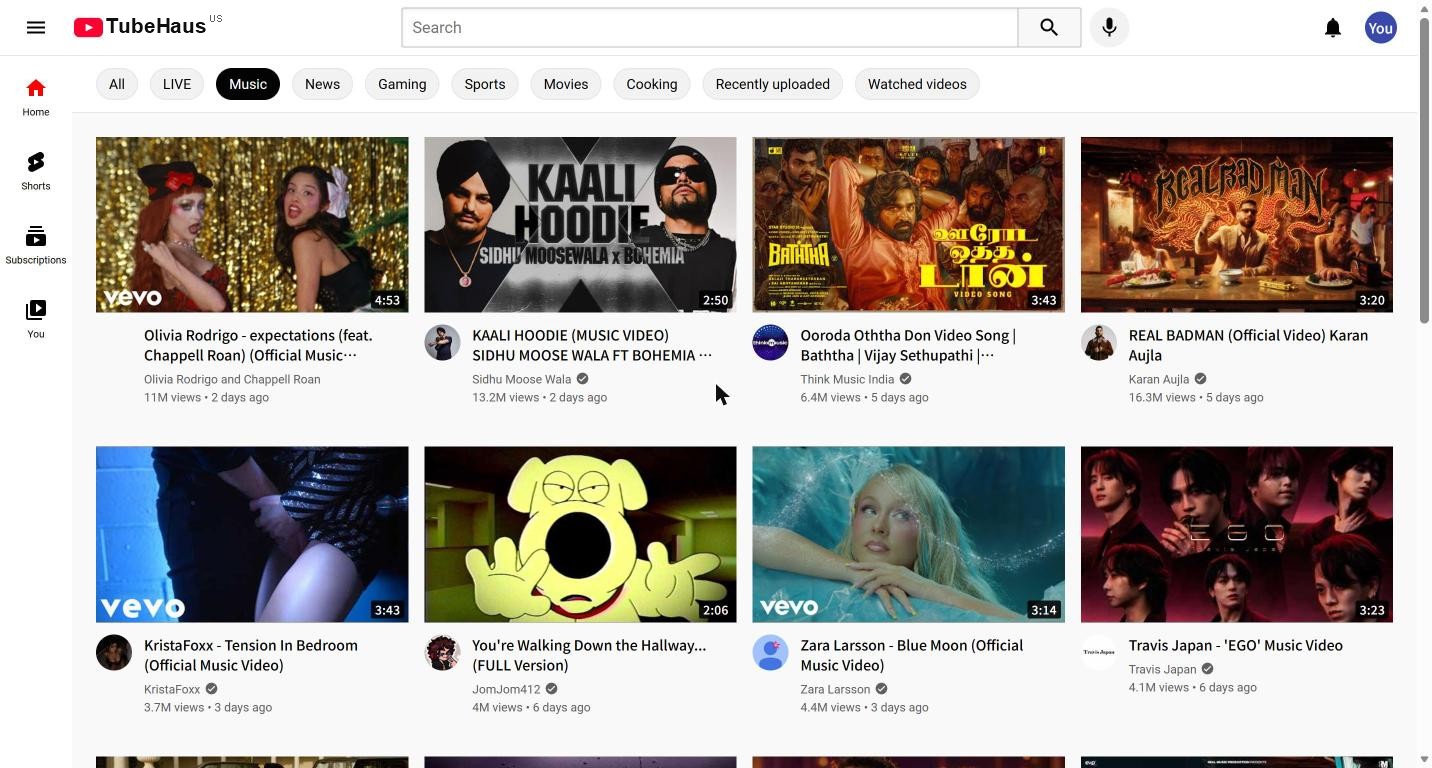
🎬 It is the YouTube layoutSame home grid, same player, same keyboard shortcuts. Nobody in the house has to learn anything new, and the TV gets a remote-friendly version of it. |
🔒 Nothing for GoogleNo Google account, no ads, no tracking scripts. Subscriptions, history and playlists are yours, on your device or your server, and they export to any format. |
🏠 One library for the housePause on the TV, carry on on the phone. Every device and every browser in the house shares one library, or each person gets their own. |
Pick your TubeHaus
There are two ways to run it. Same name, same look; they differ in where the work happens.
| 📱 The app | 🖥️ The server (this branch) | |
|---|---|---|
| Best for | One phone, TV or PC, today, with nothing to set up | A whole household, iPhone/iPad without sideloading, or keeping YouTube away from your devices |
| Runs on | Android, Android TV / Google TV, Windows, macOS, Linux, iPad/iPhone | Any Docker host: a VPS, a home PC, a Raspberry Pi. You watch in any browser |
| Talks to YouTube | The device itself, with the app's own engine | Your server, with its own engine, through Cloudflare WARP. Devices only talk to your server |
| YouTube sees | Your device's address, like any YouTube app | A Cloudflare WARP address, not your home |
| Library | On the device, or shared through your TubeHaus server | On the server, for every device and person |
| Only here | Offline downloads, background play and picture-in-picture, the mpv player on desktop, on-device recommendations | Live captions (whisper.cpp), send to TV, full-quality downloads, TV mode in any TV browser |
| Get it | Download | docker compose up |
Both? The app can connect to your server (Settings → TubeHaus server): one library everywhere, while each app still plays the video itself.
Get the app
| Platform | Download | Notes |
|---|---|---|
| 🤖 Android & TV | APK | Android 8+. On Android TV, Downloader code 3155410. Updates with Obtainium |
| 🪟 Windows | MSI | Or scoop bucket add tubehaus https://github.com/biolend83/tubehaus then scoop install tubehaus |
| 🍏 macOS | Apple Silicon · Intel | Or brew tap biolend83/tubehaus https://github.com/biolend83/tubehaus && brew trust biolend83/tubehaus && brew install --cask tubehaus (mpv is inside the app) |
| 🐧 Linux | .deb · .rpm | ARM64 and tar.gz in all files; Arch: packaging/aur |
| 📱 iPad / iPhone | .ipa (beta) | iOS 16+, installed with Sideloadly and your Apple ID (re-signed every 7 days with a free one). Apple's player up to 4K, background play, picture-in-picture, offline downloads. Rather not sideload? Use the server in Safari |
All files, Windows portable and ARM builds: latest release. Install notes and source per platform: android-app · windows-app · mac-app · linux-app · ios-app. The rest of this README is about the server.
New in 1.6: its own YouTube engine, and fast
The server no longer sits on Invidious. It talks to YouTube itself, so the stack is three containers lighter (no Invidious, no companion, no PostgreSQL). 1.6.3 then made it quick: a video starts on the streams alone and the title, description and related videos fill in a moment later, answers are kept and refreshed in the background, the stream connections to YouTube stay open, and a video's comments are fetched as it opens.
| TubeHaus 1.6.3 | Invidious | |
|---|---|---|
| A video starts playing | 0.16 s ▇▇ | 1.29 s ▇▇▇▇▇▇▇▇▇▇▇▇▇ |
| The whole video page (title, description, related) | 0.59 s ▇▇▇▇▇▇ | 1.29 s ▇▇▇▇▇▇▇▇▇▇▇▇▇ |
| A channel | 0.38 s ▇▇▇▇ | 0.66 s ▇▇▇▇▇▇▇ |
| A channel's videos | 0.28 s ▇▇▇ | 0.61 s ▇▇▇▇▇▇ |
| A search | 0.56 s ▇▇▇▇▇▇ | 0.56 s ▇▇▇▇▇▇ |
| Comments, once the video is open | 0.002 s ▏ | 0.16 s ▇▇ |
| Anything opened again | 0.002 s ▏ | – |
| Each piece of the stream | 0.07 s ▇ | – |
Medians of 10–12 first visits each, on one server through the same WARP address (TubeHaus measured 2026-11-17; Invidious in the 1.6.0 comparison, before it left the server). A search or channel is mostly YouTube's own time, so it can't go much lower; what TubeHaus adds is that the video plays before the page is complete, the next clicks are fetched while you look, and nothing is fetched twice. Stream pieces reuse open connections (a new one takes 0.17 s).
Hovering a video or showing search results already fetches the first few, so a click usually lands on a page that is ready. It still answers in Invidious' API format, so the web app, the apps' server mode and other tools that speak that API keep working. Up to 1.5 TubeHaus was built on Invidious and invidious-companion, and much of what it knows about YouTube was learned from them: thank you, Invidious team. Updating from 1.5? See below.
Why TubeHaus
|
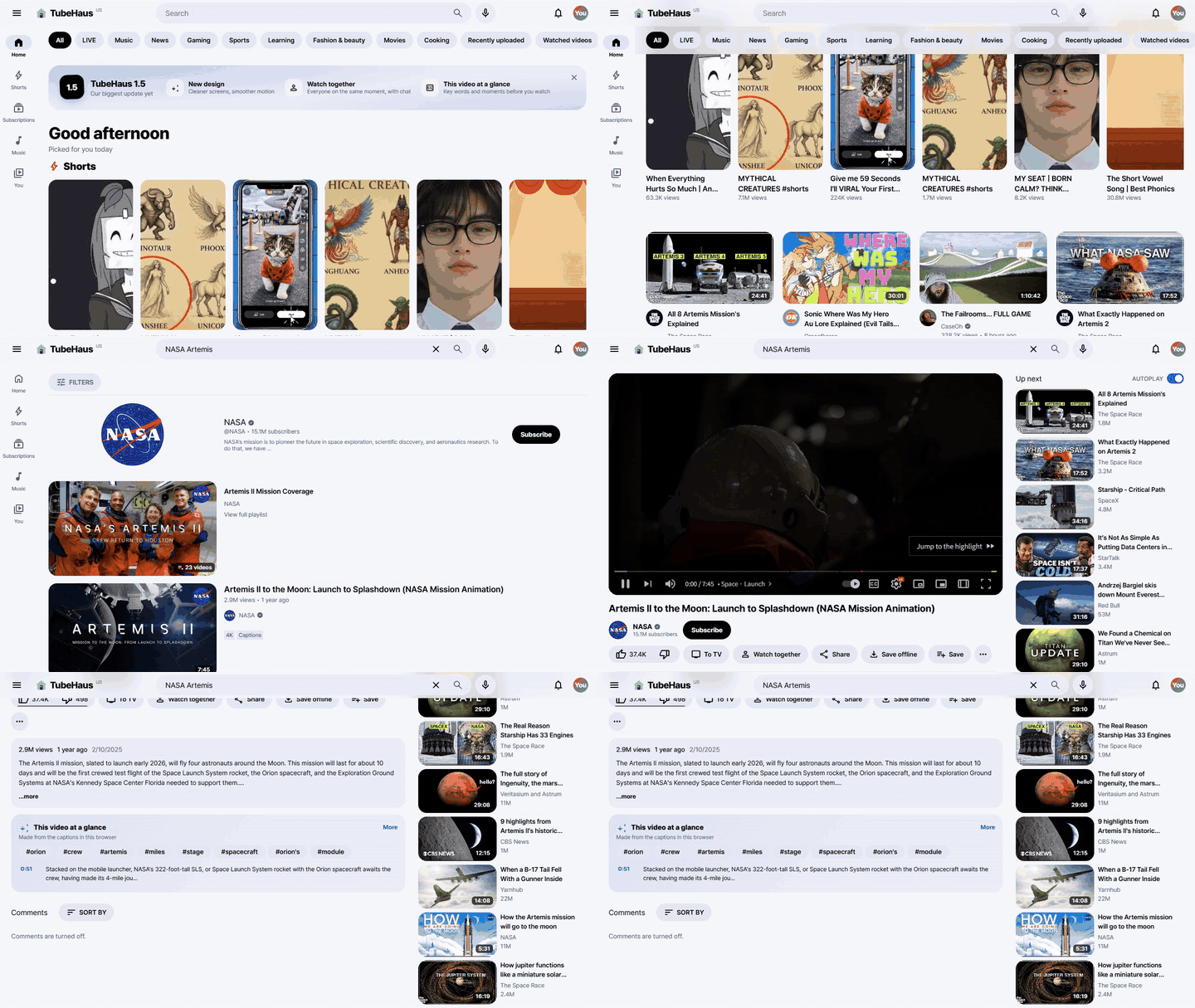
⚡ Instant, and always the best picture |
🔒 Your devices never talk to Google |
|
🎙️ Captions for live streams |
📺 Made for the TV, too |
|
🌿 Calm mode |
🧠 Shorts that learn, on your server |
|
🚫 No clickbait, no sponsor reads |
💾 Keep it, in full quality |
|
☁️ Happy on a cheap cloud VM |
🌍 13 languages |
Everything else it does
- YouTube's layout throughout: home, search, channels, playlists, subscriptions, history, library, trending, and YouTube's own topic pages (Music, Live, News, Gaming, Sports, Learning, Fashion & beauty) shelf by shelf
- A player on Shaka Player (DASH/HLS): chapters, storyboard seek previews, the "Most replayed" wave over the progress bar, speed, sleep timer, stats, mini player, theater and ambient modes, Media Session (lock screen and Bluetooth keys)
- One library for every device: subscriptions with an RSS-based feed, watch history, resume positions, Watch Later, likes, playlists
- Comments, transcripts, the exact upload time on hover
- Import from Google Takeout, Invidious, NewPipe, FreeTube, OPML or a TubeHaus backup; export to all of them
Optional lookups the browser makes itself: SponsorBlock and DeArrow (both by a hash prefix, not the video ID) and Return YouTube Dislike. DeArrow's thumbnails come through the server, so DeArrow sees the server rather than each viewer.
(Formerly HomeTube, renamed to avoid a clash with an unrelated project of the same name.)
How it compares
FreeTube and NewPipe are great, mature projects, and TubeHaus owes a lot to them. The difference is mostly where it runs and how it looks:
| TubeHaus | FreeTube | NewPipe | |
|---|---|---|---|
| Runs on | Android phones and Android TV / Google TV, Windows, macOS, Linux, iPad/iPhone (sideloaded), and any browser through the server | Windows, macOS, Linux | Android phones and tablets |
| Looks like | YouTube itself: same layout, same keyboard shortcuts | Its own design | Its own design |
| Google account | Not needed | Not needed | Not needed |
| Home screen | Recommendations learned on the device from what you watch, like, skip and hide; nothing leaves it | Subscriptions, trending and popular | Subscriptions feed and trending |
| One library on several devices | Optional: connect the apps to your own TubeHaus server | Export and import a file | Export and import a file |
| SponsorBlock and DeArrow | Both built in | Both built in | Not in the official app (the Tubular fork has SponsorBlock) |
| On a TV | Made for the remote: a TV layout with arrow-key navigation | No TV version | Works, but made for phones |
| Track record | Young (2026), beta, one maintainer | Since 2018, large community | Since 2015, large community, on F-Droid |
When to pick something else: for a desktop app with the longest track record, FreeTube is excellent. For an Android phone only, with a long history and F-Droid, NewPipe is excellent. TubeHaus is for one YouTube-like app on the TV, the phone, the PC and the iPad, optionally sharing one library.
Quick start (Docker)
| You need | |
|---|---|
| A server | Linux with Docker and docker compose, x86-64 or ARM64 (a free Oracle Cloud ARM VM is plenty) |
| CPU / RAM | 2+ cores, about 4 GB RAM; live captions use one more core while someone watches live with captions on |
| Disk | about 10-20 GB, mostly images. Videos are streamed, not stored |
| An address | a domain or a free wildcard name such as sslip.io for HTTPS, or plain HTTP on a LAN |
git clone https://github.com/biolend83/tubehaus && cd tubehaus
cp .env.example .env        # set your domain
docker compose pull         # prebuilt images, amd64 and arm64
docker compose up -d
That's it: Caddy, the TubeHaus server with its YouTube engine and Cloudflare WARP, the PO-token provider for live streams and whisper.cpp for live captions come up together. Open your domain. WARP registers itself on first start and keeps its registration in a volume.
[!NOTE] On TrueNAS? TubeHaus is in the TrueNAS app catalog: Apps → Discover Apps, search for TubeHaus (community train). Nothing to clone.
[!IMPORTANT] Going on a public domain? Set a login in
.envfirst:TUBEHAUS_AUTH=basic,TUBEHAUS_USERandTUBEHAUS_PASSWORD_HASH(the hash comes fromdocker compose run --rm caddy caddy hash-password; write every$as$$). Without it, everyone who opens the address shares the same library. More ways: Add a login before you expose it.
[!TIP] Updating from 1.5 or older? Invidious, its companion and PostgreSQL are no longer needed. After
git pull, rundocker compose pull && docker compose up -d --remove-orphansto stop them; their secrets in.envcan go. Your library is in thetubehaus-datavolume and stays as it is. Details: Updating and backups.
No domain, or behind your own reverse proxy
Caddy can serve plain HTTP on any port. In .env:
# plain HTTP on a LAN, at http://192.168.1.10:8080
TUBEHAUS_SITE=:80
TUBEHAUS_HTTP_BIND=8080
TUBEHAUS_URL=http://192.168.1.10:8080

# behind your own nginx, Traefik or Caddy, which handles HTTPS for tube.example.com
TUBEHAUS_SITE=:80
TUBEHAUS_HTTP_BIND=127.0.0.1:8080       # only your proxy reaches it
TUBEHAUS_HTTPS_BIND=127.0.0.1:8443      # unused, kept off the public 443
TUBEHAUS_URL=https://tube.example.com
Then point your proxy at http://127.0.0.1:8080 for everything, unbuffered (video and live streams), e.g. in nginx:
proxy_pass http://127.0.0.1:8080; proxy_buffering off; proxy_read_timeout 1h; proxy_set_header Host $host;
Complete nginx and Traefik examples are in docs/reverse-proxy.md.
With Flisk instead of docker compose
The same three containers are also described for Flisk and read the same .env. Optional; docker compose stays the main way.
npm install -g @flisk-sh/flisk   # Flisk 1.4.26 or later
git clone https://github.com/biolend83/tubehaus && cd tubehaus
cp .env.example .env
flisk up                          # flisk status / flisk logs --service tubehaus / flisk down
Pick one of the two for a server, not both. Ports, volumes, updates and moving an existing install are in docs/FLISK.md. Thanks to @odykyi for the Flisk setup (#40, #42).
Building the image yourself
docker compose up -d --build builds the TubeHaus image from your clone (for example after changing the code). The first build takes a few minutes because of whisper.cpp.
Add a login before you expose it
TubeHaus has no accounts by default: without a login, everyone who opens the address shares the same library.
- Built-in password:
TUBEHAUS_AUTH=basic,TUBEHAUS_USERandTUBEHAUS_PASSWORD_HASHin.env(hash fromdocker compose run --rm caddy caddy hash-password; every$as$$) - An account for each person:
TUBEHAUS_AUTH=accountsgives a sign-in page and a library per person - Single sign-on: with accounts on,
TUBEHAUS_OIDC_ISSUER,TUBEHAUS_OIDC_CLIENT_IDandTUBEHAUS_OIDC_CLIENT_SECRETadd a "Continue with …" button for your OpenID Connect provider (Authentik, Authelia, Keycloak, Pocket ID, …; redirect URI<TUBEHAUS_URL>/api/p/auth/oidc/callback).TUBEHAUS_OIDC_ONLY=1turns passwords off - Your own gate: Authelia, Authentik or a passkey gate in front with
forward_auth - Not exposed at all: keep it on your home network, or reach it from anywhere over Tailscale or WireGuard
All of them, step by step: Opening TubeHaus to your household.
Check that everything works
docker compose exec tubehaus python3 /app/server/tubehaus_server.py --doctor
One line each for WARP, YouTube, a search, a real video lookup with a few bytes of its stream, and the optional tools. If something fails, see Troubleshooting.
The two images: tubehaus and tubehaus-web
They aren't two editions to choose from: one is the server, the other the web app, and a working setup always has the server plus one way of serving the web app.
| Image | What it is | Ports |
|---|---|---|
ghcr.io/biolend83/tubehaus | The server. Talks to YouTube, keeps the library, live captions, offline saves, watch-together rooms. No pages of its own | 3010 (inside) |
ghcr.io/biolend83/tubehaus-web | The web app and its front door. The pages, plus Caddy sending every other request to the server. The only port you open | 8080 |
docker compose upfrom this repository uses onlytubehaus: the web app comes from your clone'sweb/folder, served by the plaincaddyimage- App stores (Umbrel, CasaOS, TrueNAS) use both: you install one app, only port 8796 opens
- Unraid shows two templates, TubeHaus and TubeHaus-Web; or the whole set with the Docker Compose Manager plugin and
deploy/docker-compose.home.yml - A home server without a clone:
deploy/docker-compose.home.ymlis the store set (one port, no WARP, no extra permissions)
Both are published together on each server release with the same version number; keep them on the same version.
How it fits together
browser ──► Caddy ─┬─ /y/*, page navigations ──► web/ (the app)
                   └─ everything else ─────────► TubeHaus server
                                                   │  library, live streams, captions, downloads,
                                                   │  and its own YouTube engine (/api/v1/*,
                                                   │  video streams, captions, pictures)
                                                   ▼
                                       Cloudflare WARP (proxy mode)
                                                   │
                                                YouTube
The engine asks YouTube the way YouTube's own apps do: lists (search, channels, playlists, comments) from the web client, the video streams from the visionOS client (plain addresses, no PO token), and the exact upload time and category from the web player, over kept-open, compressed connections. It answers in Invidious' API shapes (/api/v1/videos, /api/v1/search, ...; ?local=true included), so tools that speak that API can use it too. Streams, captions and pictures come through the server, so the viewer's browser only ever talks to it. More in docs/ARCHITECTURE.md.
Manual setup
Without Docker: Python, Caddy or nginx, and the WARP client
You need a Linux server with Python 3.10+ and Caddy (or nginx).
1. Cloudflare WARP in proxy mode. Install the official client (pkg.cloudflareclient.com), then set proxy mode before connecting, or the whole server's routing moves into WARP:
warp-cli --accept-tos registration new
warp-cli --accept-tos mode proxy        # listens on 127.0.0.1:40000
warp-cli --accept-tos connect
curl -x http://127.0.0.1:40000 https://www.cloudflare.com/cdn-cgi/trace   # warp=on
(Unofficial WARP clients such as wgcf get rate-limited by Cloudflare; use the official one.)
2. The TubeHaus server.
git clone https://github.com/biolend83/tubehaus /opt/tubehaus
cd /opt/tubehaus && cp .env.example .env    # edit it
sudo cp deploy/tubehaus.service /etc/systemd/system/ && sudo systemctl enable --now tubehaus
Optional extras:
- Live streams: yt-dlp with the bgutil-ytdlp-pot-provider plugin (PO tokens keep live URLs alive)
- Live captions: build whisper.cpp and download
ggml-base-q5_1.bin; setHT_WHISPER_BIN/HT_WHISPER_MODEL - Offline save:
ffmpeg
3. Caddy or nginx. Copy web/ to /srv/tubehaus/web and adapt deploy/Caddyfile.example. For nginx, start from deploy/nginx.conf.example and replace the hostname, certificate paths and upstream addresses; it keeps video streams, long polls and downloads unbuffered with extended timeouts.
Without HT_ACCOUNTS=1, anyone who can open it shares the same library: put your own login in front (Caddy basic_auth, or forward_auth to Authelia / Authentik / a passkey gate) before exposing it. Set window.TUBEHAUS_LOGIN_URL in index.html if expired sessions should be sent to your login page.
FAQ
Do I still need Invidious?
No, not since 1.6: the server asks YouTube itself. It answers in Invidious' API format, so apps that can use an Invidious instance's API (Yattee, FreeTube's API mode, ...) may work with it too; the parts that need an Invidious account (its own subscriptions and login) aren't there. A running Invidious instance doesn't get in the way; TubeHaus just no longer uses it.
Where does the content come from? Does it store videos?
Everything comes from YouTube. Nothing is stored except your library (subscriptions, history, playlists) and short-lived files for offline downloads.
Is there a recommendation algorithm?
For Shorts, yes, and it runs entirely on your server (see Shorts that learn above). For regular videos you get your subscriptions feed, trending and topic pages, and YouTube's related list for each video. Nothing is learned by Google, since no Google account is involved.
Age-restricted videos?
They usually don't play, since there's no signed-in account to pass the age check.
Can I bring my subscriptions in, and take my data out?
Yes. Under Settings → My data (or the subscriptions page), Import from file takes Google Takeout (the subscriptions CSV and watch-history.json), Invidious, NewPipe and FreeTube exports, OPML, and TubeHaus backups. Export gives you a full TubeHaus backup (subscriptions, history, resume points, playlists, likes), an Invidious-format file, a Takeout-style CSV, or OPML for any feed reader. Your data is never stuck here.
Does anything phone home?
No. There is no telemetry. The only outside requests are YouTube (from the server, through WARP), DeArrow's thumbnail server (from the server, for the optional DeArrow thumbnails) and, from the browser, the optional SponsorBlock, DeArrow and Return YouTube Dislike lookups.
How do phones and TVs connect?
It's a web app: open your address in the browser, or use "Add to Home Screen" to install it like an app. TV browsers get a TV mode with remote-control navigation. Or use the TubeHaus apps, on their own or connected to your server.
Running a public instance
Let people try it without installing: TUBEHAUS_PUBLIC=1
Set TUBEHAUS_PUBLIC=1 in .env (or HT_PUBLIC_MODE=1 for a manual install). Then:
- Every visitor's library lives in their own browser. The server stores nothing about its visitors, and visitors never see each other's data. A note in Settings tells them to export a backup now and then
- The server only does stateless work: fetching feeds for the channels a browser sends, parsing imports and converting exports, and playing video
- Switched off: send to TV and server-side downloads (they would be shared between strangers), and Shorts recommendations don't learn
Handling a crowd. TubeHaus protects itself, and your YouTube access, when many people show up at once:
Setting (.env) | Default | What it does |
|---|---|---|
TUBEHAUS_MAX_VIEWERS | 0 (off) | people watching at once; newcomers beyond it get "busy, try again in a few minutes", people already watching are never cut off |
TUBEHAUS_MAX_HEIGHT | 0 (off) | highest quality offered, e.g. 1080, to keep bandwidth in check |
TUBEHAUS_RATE_PER_MIN | 120 on public instances | API requests per visitor per minute; more get "slow down" (429) |
HT_MAX_CONNECTIONS | 256 | requests handled at the same time; beyond it the server answers "busy" at once instead of falling over |
Always on: when many people open the same video (or the same channel feeds) at once, YouTube is asked once and the answer is shared; live streams are fetched once per stream however many people watch; idle connections are dropped after 30 seconds; and public instances don't pre-load recommended videos.
The ready-made public setup. deploy/docker-compose.public.yml puts all of this together:
- Anubis in front: every visitor's browser solves a short proof-of-work check before anything else loads, which keeps scrapers and bulk bots out
- Sign-up required (
HT_ACCOUNTS=1): a user name and a password, no e-mail or other personal details. Passwords are stored as PBKDF2 hashes (600,000 rounds); sessions are signed HttpOnly cookies; sign-ups and log-ins are rate-limited per network - Load limits, memory/CPU caps, no access log
docker compose --env-file .env -f deploy/docker-compose.public.yml up -d
Also firewall the box so the containers can reach the internet only: no private networks, no cloud metadata service, none of your other servers. Before you open one:
- Bandwidth: video is streamed through your server. Watch your provider's traffic limits
- YouTube blocks: many viewers on one address get it flagged sooner; WARP rotation helps but has limits
- Trust: visitors' requests pass through your server. Be clear about what you log (TubeHaus logs no viewing history), and don't put the built-in password on it
- Leave
TUBEHAUS_AUTH=none, and consider rate limiting in Caddy
Public instances
| Address | Region | Limits | Run by |
|---|---|---|---|
| none listed yet |
Running one? Add it here (or in the discussion) so others can find it.
Configuration
All settings (environment variables, see .env.example)
| Variable | Default | |
|---|---|---|
HT_BIND, HT_PORT | 127.0.0.1, 3010 | where the API listens |
HT_STATE | ./state | library and subtitle cache |
HT_PUBLIC_URL | http://localhost:8080 | the address browsers use |
HT_YT_PROXY | 127.0.0.1:40000 | WARP proxy (empty = direct) |
HT_WARP_ROTATE | 1 | reconnect WARP when YouTube blocks |
HT_REGION | US | default region of searches and trending |
HT_HL | (the viewer's language) | YouTube's language for its texts |
HT_YTDLP | yt-dlp | for live streams |
HT_WHISPER_BIN, HT_WHISPER_MODEL, HT_WHISPER_LANG | empty, empty, auto | live captions |
HT_SUB_LANG, HT_LIBRETRANSLATE | en, empty | default subtitle translation target (the app asks for its own language), optional fallback |
HT_DOWNLOAD_DIR | /var/tmp/tubehaus-dl | offline save workspace |
HT_PUBLIC_MODE | 0 | public instance: libraries stay in visitors' browsers (see above) |
HT_ACCOUNTS, HT_MAX_ACCOUNTS | 0, 1000 | require sign-up (user name + password) before anything else |
HT_MAX_VIEWERS, HT_MAX_HEIGHT, HT_RATE_PER_MIN, HT_MAX_CONNECTIONS | 0, 0, 120 public / 0, 256 | load limits (see Handling a crowd) |
HT_VID_PREFETCH (TUBEHAUS_PREFETCH) | 4 | videos you're likely to click next, looked up ahead so they start at once (0 = only what you ask for) |
TUBEHAUS_AUTH=accounts | Docker: a sign-in page and a library for each person (HT_ACCOUNTS=1 in a manual setup); TUBEHAUS_MAX_ACCOUNTS closes sign-ups | |
HT_OIDC_ISSUER, HT_OIDC_CLIENT_ID, HT_OIDC_CLIENT_SECRET (TUBEHAUS_OIDC_*) | empty | with accounts: sign in through your OpenID Connect provider; redirect URI <HT_PUBLIC_URL>/api/p/auth/oidc/callback. A first sign-in makes the account, named after the preferred_username claim (HT_OIDC_USER_CLAIM) |
HT_OIDC_NAME, HT_OIDC_ONLY, HT_OIDC_SCOPES | SSO, 0, openid profile email | the button's name ("Continue with …"), 1 = no passwords at all, the scopes asked for |
HT_PUBLIC_PROXIES | 0 | proxies with public addresses in front of your own (they can't be told from visitors); see SECURITY.md |
HT_MAX_BODY_MB | 64 | largest request body (YouTube history imports) |
HT_NAME, HT_LINKS (TUBEHAUS_NAME, TUBEHAUS_LINKS) | empty | your instance's own name, and extra side-menu links as JSON [{"name": "…", "url": "https://…"}] (or /path; a .apk link downloads). Any name can be one per language, {"ko": "홈튜브", "en": "HomeTube"}: visitors see theirs, else English |
Community
- Questions and setup help: Discussions (please include the
--doctoroutput) - Bugs and feature requests: Issues
- Contributing: see CONTRIBUTING.md. Start with a
good first issue; ROADMAP.md shows what's planned and docs/ARCHITECTURE.md maps the code - Translations: interface text lives in
web/y/lang/<code>.js(the key is the original Korean text). The 13 languages are complete; corrections are very welcome - Security problems: report them privately, see SECURITY.md
- What changed: CHANGELOG.md and Releases
Thanks
People who made TubeHaus better, with code, translations, testing or ideas:
Code and design
 @onedge: a Translate link on comments, translated on the device itself (iPhone, iPad, Mac); what plays in Control Center and on the lock screen with the media keys (iPad, macOS); "Back to music" in the music player (#49 to #52, #68, #69, #73 to #75)
 @Aaqibhafeezkhan: the house-and-play icon, remembering the playback speed, an nginx example, Spanish polish (#28, #29, #30, #31)
 @bh-official: the exact upload date on hover, and tests for exact upload times (#26, #27)
 @eran3d: iPhone and iPad start in the original audio track instead of a dub (#80)
 @Neatly9509: iPhone playback with Safari's own player and the top safe area, server captions with no lost lines after a pause, and caption settings (#41, #53, #54)
 @odykyi: running the whole stack with Flisk (#40, #42), and recommending TubeHaus in a YouTube Community thread (#43)
 @adebayomoses: unit tests for the sidx parser (#48)
 @onyks-os: the first contribution, fixing the install instructions (#1)
Translations
 @SakarPaisen: Turkish (#8)
 @rahul05ranjan: Bengali, and a Hindi review by a native speaker (#16, #17)
Ideas and bug reports
 @JamesMowery: import from file and data export (which became v0.4.0), the wrong posted time on new videos, and a bigger volume slider (#14, #15, #20, #32)
 @DEDSECex0dus: fifteen reports and ideas from daily use, from Linux resets, crashes and RAM use to picture-in-picture, a drag-and-drop queue and custom themes (#63 to #67, #70 to #72, #77 to #79, #82, #84, #85, #87)
 @DarekRobert: old videos showing as "just now" with 0 views in the subscription feed (#33)
 @attiamohammed: the APK for self-hosted servers (#34)
 @JonnyWalker115: search history (#35)
 @krrishroy: an app crash and freeze (#44)
 @dachronos: mpv not being recognized, and choosing the audio device (#45, #46)
 @iamprabhuantony: "mpv is missing" (#61)
 @teruis: an AppImage package and translated subtitles (#62)
 @MrCableYolo: "This video is not available" (#76)
 @hilloIsTheBest: OIDC sign-in (#81)
 @karimabousleiman: ended live stream recordings failing in the web player (#86)
 @arcastro: opening YouTube links in TubeHaus (#88)
Testing and feedback on Reddit (mostly r/DigitalEscapeTools)
- u/Proper_Witness9173: brightness and volume swipes, the tablet layout, comments beside the video, picture-in-picture and most of 0.3.8
- u/DryYam2258: the first Mac tester; asked for text size, removing subscriptions and channel pictures, and suggested subscription groups
- u/Gloomy_Acadia_445: asked for Linux, which led to the .deb, .rpm and tar.gz builds
- u/Victor_Orbis35: reported "mpv is missing" on Windows, which turned out to be a missing Vulkan runtime (fixed in 0.3.5)
- u/ValerieAnne84: crashes and D-pad trouble on Android TV (onn 4K Pro)
- u/Low-Term5893: testing on an Android smart TV
- u/Training_Constant_84: ran the Docker server and on Kubernetes behind Authentik, and reported downloads in the wrong audio language
- u/human-rights-4-all: asked for Invidious to be credited up front, which it now is
Opened a useful issue, sent a pull request or tested an app? You belong here too.
Credits
- Invidious and invidious-companion (AGPL-3.0): the backend this sat on until 1.5, and the API format it still answers in
- Shaka Player (Apache-2.0): bundled in
web/y/lib/ - Layout after varun-jasti/Youtube-UI-UX (MIT); progress bar and volume after pncsoares/youtube-video-player-clone (MIT)
- Icons: Material Symbols (Apache-2.0)
- whisper.cpp (MIT), SponsorBlock, DeArrow, Return YouTube Dislike
- Cloudflare WARP
Disclaimer
[!CAUTION] TubeHaus is independent, free, open-source software. It is not affiliated with, endorsed by or sponsored by YouTube or Google. "YouTube" is a trademark of Google LLC.
- TubeHaus does not host, store or distribute any videos. They come straight from YouTube to your own device (the app) or to a server you run yourself (the server version).
- Downloaded videos are for your own personal viewing. Their copyright belongs to their owners. If you share, upload, sell or otherwise distribute them, that is entirely your own responsibility, and the authors are not liable for it.
- It is provided "as is", without warranty of any kind, as the license says. The authors and contributors are not responsible for how it is used or for anything that results from using it.
- You are responsible for using it in line with the laws where you live and the terms of the services you connect to.
- The maintainer does not run a public instance or any other service for it.
- Rights holders: if you believe something in this repository infringes your rights, open an issue with the details (or ask there for a private contact). It will be looked at and, where justified, removed promptly.
License
AGPL-3.0, like Invidious. See the disclaimer above.