
trawl
Self-hosted scraping engine — bypasses any JS challenge & captcha: Cloudflare, Turnstile, reCAPTCHA, hCaptcha, GeeTest. FlareSolverr & Byparr alternative and drop-in replacement for your *arr stack.
Automatically checked · GitHub checked 2026-11-12
Overview

TRAWL
Self-hosted web scraping for applications and AI agents. Get page content through an API or MCP, with built-in handling for supported browser challenges and CAPTCHAs.
TRAWL starts with HTTP, reuses verified clearance and opens Camoufox when a browser is needed. Repeat requests fetch fresh content without repeating a full solve whenever the site accepts the saved session.
HTTP + supported PoW walls → cached browser session → fresh browser solve → residential proxy
The HTTP tier can clear supported ALTCHA and Friendly Captcha v1 access forms with bounded local computation. Ordinary embedded widgets keep their browser lifecycle. Coverage and limits.
Website · Documentation · Latest release
Features
- Challenge handling: Cloudflare, Anubis, NCBI proof of work, Akamai, Imperva, DDoS-Guard and supported AWS WAF and DataDome flows. Built-in CAPTCHA paths include Turnstile, reCAPTCHA v2, hCaptcha, GeeTest Slide, ALTCHA, Friendly Captcha, CAP and supported Shumei spatial puzzles. Coverage and limits.
- Fast repeat requests: automatic HTTP clearance reuse, Redis or in-memory caching, and browser fallback when required. No named session is needed for shared clearance reuse.
- MCP for agents: read Markdown, scrape HTML, extract structured JSON, capture screenshots and inspect browser activity from known URLs.
- Isolated browser sessions: retain cookies, localStorage, sessionStorage and browser identity. Scrape within a session, keep a page open for JavaScript eval and read cookies. Session API.
- API and forward proxy: use
/scrape, the FlareSolverr-compatible/v1endpoint, or a challenge-aware HTTP/HTTPS proxy with WebSockets and Range support. - Local dashboard: persistent request history, tier outcomes, failure causes and live updates.
- Local solving by default: optional 2Captcha fallback and opt-in Firefox TLS/HTTP2 impersonation; Bun fetch remains the default HTTP transport.
Sponsors
View/Collapse All
|
|
Bright Data - The most powerful platform for Web Unlocker, SERP API and web scraping tools. Why Bright Data? • Web Unlocker - bypass any anti-bot protection • SERP API - real-time Google, Bing & more results • Scraping Browser & dedicated scrapers • Massive residential proxy network • Built for scale and reliability Get started for free with Bright Data! |
|
|
NodeMaven - The most efficient proxy provider for Web Scrapping and Automation with the Highest Quality IP on the market. Why NodeMaven? • ZIP targeting • 99.9% uptime • IP filtering: all proxies have fraud score <97% • No KYC required • Unique free tools: Proxy Bandwidth Checker, Meta Tag Checker, IP Lookup and others! Special codes for TRAWL users: • TRAWL35 - 35% off to Mobile and Residential Proxies• TRAWL40 - 40% off to ISP (Static) Proxies• TRAWL2X - 2X traffic for Black Friday
|
|
|
Thordata - Residential Proxies & Web Data APIs Give TRAWL reliable upstream access with 100M+ residential IPs across 190+ countries, including city and ASN targeting. Why Thordata?• Residential Proxies: rotating and sticky sessions for scraping and browser automation • SERP API: structured Google, Bing, and other search results for research workflows • Web Scraper API: collect public web data through a simple API TRAWL users: • Start with free trial traffic and get 10% off with code TRAWL10
|
Performance
Selected same-machine comparisons show faster first and repeat responses than FlareSolverr and Byparr on the default Cloudflare workload:
| Protected page | Best first | Best repeat |
|---|---|---|
| NopeCHA Cloudflare demo | 6.0 s | 879 ms |
| 1337x | 3.8 s | 85 ms |
| EZTV | 4.6 s | 473 ms |
Measured 2026-10-17 on a development build after v1.8.0. These are verified minima from the recorded sample. First requests used a warm browser with an empty target cache; repeats are fresh fetches with reusable clearance. Results vary by site, IP and session state.
Full comparison, medians and CPU/RAM · Method · Performance guide · Low-resource setup
Quick start
Run one browser with MCP, an in-memory clearance cache and persistent dashboard history:
docker run -d --name trawl \
  -p 127.0.0.1:8191:8191 \
  --shm-size=1gb \
  -e SESSION_CACHE_DRIVER=memory \
  -e BROWSER_POOL_SIZE=1 \
  -e MCP_ENABLED=true \
  -e METRICS_DASHBOARD_ENABLED=true \
  -v trawl_metrics:/data/metrics \
  ghcr.io/germondai/trawl:1.11.1

curl http://localhost:8191/health
Open the local dashboard. Keep the API and MCP endpoint on a trusted network; dashboard history survives container recreation through the mounted volume.
For Redis and Compose deployments, see the quick-start guide and Compose examples. Use :1.11.1-baseline on older CPUs or NAS hardware.
Dashboard preview
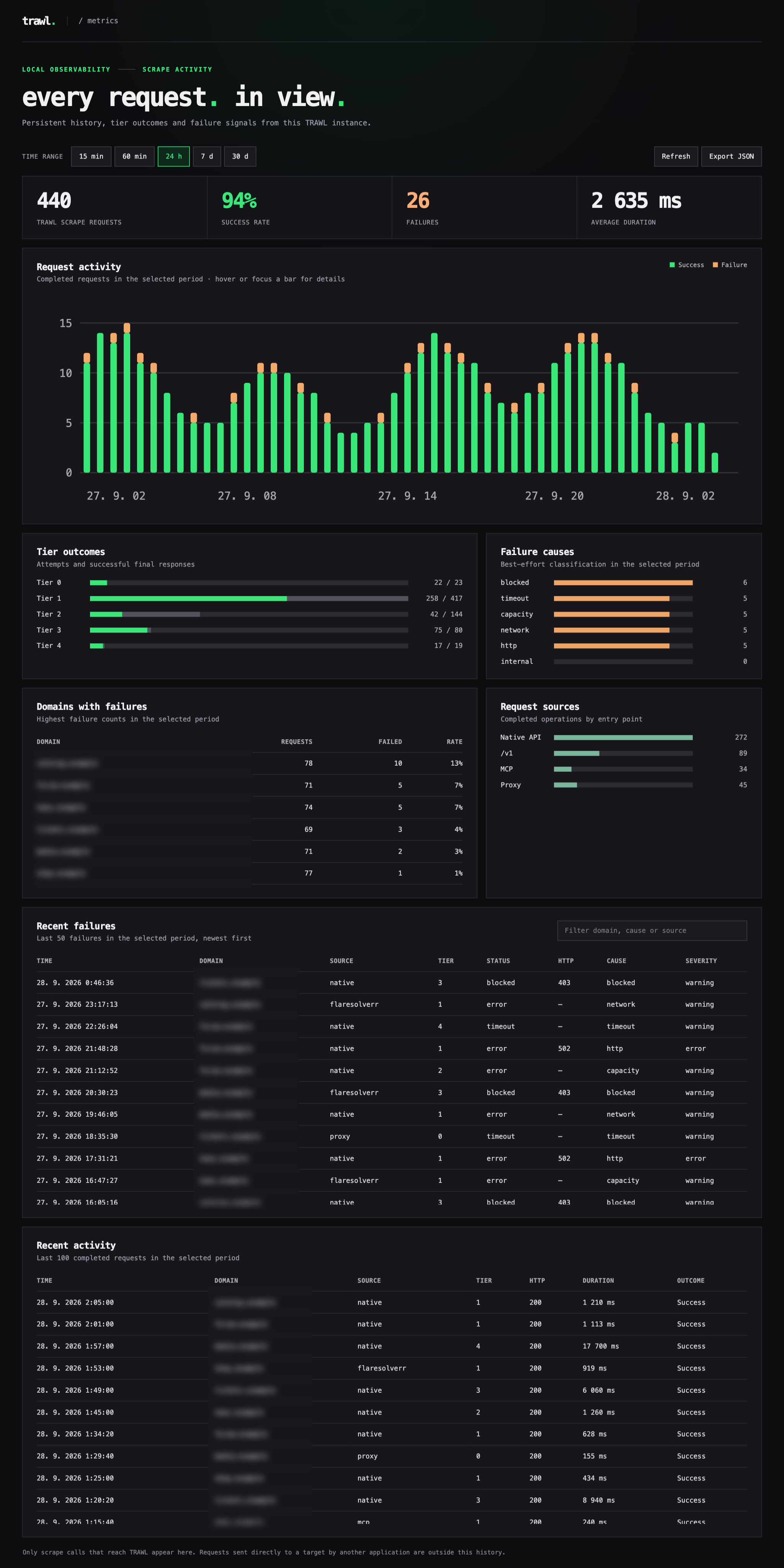
The screenshot uses illustrative traffic. Your dashboard shows requests actually handled by your instance. Metrics setup.
API
Native scraping
curl -X POST http://localhost:8191/scrape \
  -H 'Content-Type: application/json' \
  -d '{"url":"https://nopecha.com/demo/cloudflare","solveEmbeddedCaptchas":false}'
Returns HTML, cookies, the winning tier and timings. Set solveEmbeddedCaptchas: false for page content only; omit it to attempt supported embedded form widgets. Access challenges still need to clear. A delivered page does not by itself prove a form CAPTCHA was solved.
JavaScript and TypeScript client
The packages/client workspace provides a typed client for Node.js, Bun, Deno and
browser applications, including scrape options, session handles and structured errors.
Build it locally before the first npm publication. Client guide.
Prowlarr, Jackett and FlareSolverr clients
curl -X POST http://localhost:8191/v1 \
  -H 'Content-Type: application/json' \
  -d '{"cmd":"request.get","url":"https://nopecha.com/demo/cloudflare"}'
Set your client's FlareSolverr URL to http://trawl:8191 on a shared Docker network, or the TRAWL host address otherwise. /v1 prioritizes page delivery and skips optional embedded widget solving by default.
Prowlarr setup · Jackett setup · Compatibility reference
MCP for AI clients
With MCP_ENABLED=true, connect your client using Streamable HTTP at http://localhost:8191/mcp or the TRAWL host address. Tools: read, scrape, extract, screenshot and inspect, plus the scrape_url compatibility alias.
TRAWL loads known public URLs; it does not provide web search. Reuse browser sessions with sessionId; create sessions used by MCP with publicOnly: true. MCP guide.
Browser sessions
Create an isolated session and pass its ID on subsequent requests:
curl -X POST http://localhost:8191/sessions \
  -H 'Content-Type: application/json' \
  -d '{"id":"research"}'

curl -X POST http://localhost:8191/sessions/research/scrape \
  -H 'Content-Type: application/json' \
  -d '{"url":"https://nopecha.com/demo/cloudflare","solveEmbeddedCaptchas":false}'

curl -X DELETE http://localhost:8191/sessions/research
Sessions preserve browser storage between requests and keep login state out of the shared clearance cache. Requests within one session are sequential. /scrape with sessionId remains equivalent to /sessions/:id/scrape.
By default, request pages close after each operation. Create a session with "keepPage": true to retain one main page and use /sessions/:id/eval to run JavaScript in it. Sessions expire when idle and do not survive an API restart.
Session API, authentication and lifecycle
Challenge and CAPTCHA support
TRAWL detects supported walls and runs the matching browser flow before returning content. Coverage includes JavaScript and proof-of-work challenges, interactive controls, and supported CAPTCHA widget variants.
Some challenges need a particular browser mode, a different egress IP or an external provider. For example, DataDome Device Check uses the opt-in headful pool; built-in hCaptcha support does not include image grids. Passive reCAPTCHA v3 scripts are not treated as blocking widgets.
The optional 2Captcha fallback supports captured Cloudflare Challenge Pages and supported declarative Turnstile/reCAPTCHA v2 widgets without a site profile. Other documented tasks require a site profile. It is disabled without a provider key; paid-service acceptance remains unverified.
Full coverage matrix and external task catalogue · Solver configuration
HTTP/HTTPS forward proxy
Enable MITM_ENABLED=true and point your HTTP-compatible client at port 8192. Normal traffic is forwarded directly; detected challenge responses escalate through TRAWL's browser tiers. HTTPS clients must trust the generated TRAWL CA. Keep the proxy private and persist its CA directory.
Proxy setup · Install the CA · Prowlarr and other clients
Docker images
| Tags | Use case |
|---|---|
:latest, :1.11.1 | Standard release for modern hardware |
:baseline, :1.11.1-baseline | Older x86 CPUs and NAS kernels |
:nightly, :nightly-<dev-sha> | Development builds from dev |
All tags use ghcr.io/germondai/trawl. Both release variants are published for Linux AMD64 and ARM64. Standalone containers and source builds.
Compose variants and NAS app catalogs
- docker-compose.yml: scraper and Redis.
- docker-compose.minimal.yml: scraper with in-memory caching.
- docker-compose.prod.yml: Redis, restart policy and health checks.
- TrueNAS Community Apps and Unraid Community Apps: community-maintained packages.
Configuration
| Setting | Default | Purpose |
|---|---|---|
BROWSER_POOL_SIZE | 1 | Warm browsers available for concurrent work |
SESSION_CACHE_DRIVER | redis | Choose Redis or single-process memory caching |
SCRAPE_MAX_TIMEOUT_MS | 60000 | Default scrape deadline; request timeouts take precedence |
TIER1_TRANSPORT | bun | Set wreq for optional Firefox TLS/HTTP2 impersonation |
BROWSER_SESSION_MAX_ENTRIES | 4 | Maximum named browser sessions per instance |
PROXY_URL / RESIDENTIAL_PROXY_URL | unset | Optional upstream proxies and proxy pools |
All settings · Environment example · Upgrade guide
Documentation and development
- Architecture and tier routing
- Clearance cache and HTTP reuse
- Browser pool and resource management
- Troubleshooting
- Release history
- Contributing and local development
Monorepo structure and stack
| Workspace | Purpose |
|---|---|
apps/api | Bun + Elysia API, MCP, dashboard and forward proxy |
apps/web | Nuxt landing page |
apps/docs | VitePress documentation |
packages/browser | Camoufox pool and clearance cache |
packages/tiers | Routing, browser sessions and challenge solvers |
packages/types | Shared types |
Star History
Contributors
Made with ❤️ by @germondai