
Thingport
A self-hosted library that imports, organises, designs, and never loses your favourites 3d print models.
Automatically checked · GitHub checked 2026-11-12
Before you switch
Evaluate hosting, migration and feature requirements before switching.
Overview

Keep every model that matters.
A self-hosted library that imports, organises, designs, and never loses your favourites 3d print models.


About
To put it simply, if you're into 3D printing, you probably hunt for models across MakerWorld, Printables, Thingiverse, MyMiniFactory and a bunch of other sites. And if you're anything like me, you've ended up with a scattered collection of bookmarks and downloads that lives everywhere and nowhere.
Then models disappear. Authors update them and the version you loved is gone. Or the internet just decides to take a day off.
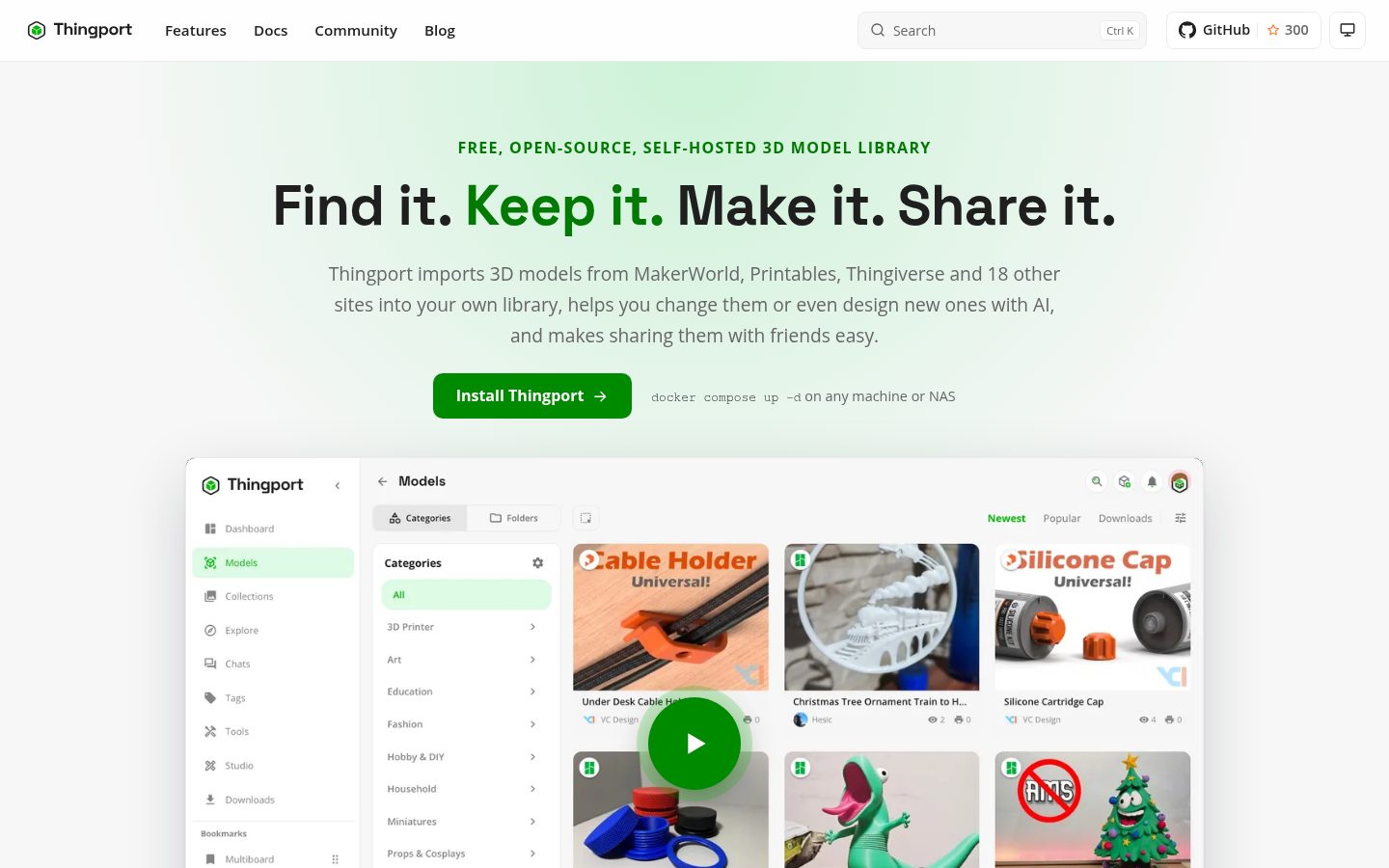
Thingport is a self-hosted 3D model library that pulls everything into one place you actually own. It imports from a long list of providers, keeps your collections in sync, and makes sure new bookmarks land in your library automatically.
Beyond that, it’s a proper workshop: AI that can improve descriptions and categorize models, a built-in CAD studio that can generate parts from a single prompt (or let you design by hand), print-quality checks, OpenSCAD support, and a growing set of tools. You can also share models with your household or connect different Thingport instances.
Your collection stays yours — offline, organised, and ready whenever you need it.
Demo


Installation


These guides, and the one for Docker Compose below, are also on the Thingport website.
Docker Compose
Runs entirely from the pre-built images on GHCR -- no local build, no git clone needed. Works on any Docker host, including a NAS (Synology, QNAP, Unraid, etc).
Create a folder for Thingport and add these two files to it:
docker-compose.yml
services:
  db:
    image: postgres:16-alpine
    restart: unless-stopped
    environment:
      - POSTGRES_USER=${POSTGRES_USER:-thingport}
      - POSTGRES_PASSWORD=${POSTGRES_PASSWORD:-thingport}
      - POSTGRES_DB=${POSTGRES_DB:-thingport}
    volumes:
      - thingport_db:/var/lib/postgresql/data
    networks:
      - app-net
    healthcheck:
      test: ["CMD-SHELL", "pg_isready -U ${POSTGRES_USER:-thingport}"]
      interval: 5s
      timeout: 5s
      retries: 10

  flaresolverr:
    image: ghcr.io/flaresolverr/flaresolverr:latest
    restart: unless-stopped
    environment:
      - LOG_LEVEL=${FLARESOLVERR_LOG_LEVEL:-info}
      - TZ=${TZ:-UTC}
    networks:
      - app-net

  backend:
    image: ghcr.io/tautvydasderzinskas/thingport-backend:latest
    restart: unless-stopped
    environment:
      - PUID=${PUID:-1000}
      - PGID=${PGID:-1000}
      - AUTH_SECRET=${AUTH_SECRET:-changeme-secret}
      - AUTH_TOKEN_TTL=${AUTH_TOKEN_TTL:-43200}
      - PUBLIC_URL=${PUBLIC_URL:-}
      - SMTP_HOST=${SMTP_HOST:-}
      - SMTP_PORT=${SMTP_PORT:-587}
      - SMTP_SECURE=${SMTP_SECURE:-false}
      - SMTP_USER=${SMTP_USER:-}
      - SMTP_PASS=${SMTP_PASS:-}
      - SMTP_FROM=${SMTP_FROM:-Thingport <no-reply@localhost>}
      - FILE_STORAGE=/app/storage
      - DATABASE_URL=postgresql://${POSTGRES_USER:-thingport}:${POSTGRES_PASSWORD:-thingport}@db:5432/${POSTGRES_DB:-thingport}?schema=public
      - CORS_ORIGINS=${CORS_ORIGINS:-}
      - FLARESOLVERR_URL=${FLARESOLVERR_URL:-http://flaresolverr:8191/v1}
      - FLARESOLVERR_REQUIRE_HTTPS=${FLARESOLVERR_REQUIRE_HTTPS:-false}
    depends_on:
      db:
        condition: service_healthy
      flaresolverr:
        condition: service_started
    volumes:
      - thingport_storage:/app/storage
      # Optional consume folder: files and folders dropped in it are imported automatically
      # (Administration -> Storage -> Consume Folder). Uncomment and point it at a host folder.
      # - /path/to/consume:/app/consume
      # Optional: another Thingport instance's database dump and storage folder, read by Administration -> Migrate.
      # - /path/to/old-thingport:/app/migrate:ro
    networks:
      - app-net

  frontend:
    image: ghcr.io/tautvydasderzinskas/thingport-frontend:latest
    restart: unless-stopped
    ports:
      - "${WEB_PORT:-80}:80"
    depends_on:
      - backend
    networks:
      - app-net

volumes:
  thingport_storage:
  thingport_db:

networks:
  app-net:
    driver: bridge
.env
# Required
# AUTH_SECRET signs login tokens -- use your own random value
AUTH_SECRET=b1193c7014e833a063f750d6e4644d615e90e6ee81dbde619e1818e9675a3374
POSTGRES_PASSWORD=change-this-password

# Optional (defaults shown)
PUID=1000
PGID=1000
WEB_PORT=80
POSTGRES_USER=thingport
POSTGRES_DB=thingport
# e.g. https://thingport.example.com -- needed for links in emails and for single sign-on (OIDC).
# Read on the first run only; after that it's managed in Administration -> Auth.
PUBLIC_URL=
# access token lifetime, in seconds; the browser renews it
AUTH_TOKEN_TTL=43200
# how long a browser stays signed in without being used, in seconds (0 = off); until set in Administration -> Auth
# REMEMBER_SESSION_TTL=2592000
SMTP_HOST=
SMTP_PORT=587
SMTP_SECURE=false
SMTP_USER=
SMTP_PASS=
SMTP_FROM=Thingport <no-reply@localhost>
# first-run default only; once Thingport has started, change it in Administration -> Connections -> FlareSolverr
FLARESOLVERR_URL=http://flaresolverr:8191/v1
# true refuses a plain HTTP FlareSolverr unless it runs locally (flaresolverr, localhost); System Health says when it's safe
FLARESOLVERR_REQUIRE_HTTPS=false
TZ=UTC
Then start it:
docker compose up -d
Thingport will be available at http://<host>:<WEB_PORT> (default port 80). The first
account you register becomes the admin account. To give it a domain name or HTTPS, put it
behind a reverse proxy.
Then open Administration → Overview → System Health and click Run full test. Ideally everything is green: anything marked Required or Recommended that isn't means Thingport, or part of it, won't work properly until it's fixed, and each problem says how. It's also the first place to look whenever something stops working. See System Health.
Just want to try it? On Linux or macOS, one command creates a
thingportfolder with the same two files, generates the secrets in.envand starts Thingport on port 80:curl -fsSL https://thingport.net/install.sh | shEdit
.envthere and rundocker compose up -dagain to change settings. Pick the folder and port up front withcurl -fsSL https://thingport.net/install.sh | WEB_PORT=8080 sh -s -- ~/thingport. The script is install.sh in this repo.
Building from source instead
git clone https://github.com/TautvydasDerzinskas/Thingport.git
cd Thingport
cp .env.example .env
docker compose up -d
This builds the images locally rather than pulling from GHCR.
Consume folder
To have Thingport import whatever you drop into a folder on the server, uncomment the consume volume in
docker-compose.yml. See the consume folder guide.
Features
- A library that keeps everything: models, files, print profiles, collections, tags, authors and licences, with 3D previews, search and bulk editing
- Imports from 23 sites: MakerWorld, Printables, Thingiverse, MyMiniFactory and 19 more, with synced collections
- Opens in your slicer as if it were made there: a 3MF from any site, adapted to your slicer and the printer you print on
- AI that tidies up: better descriptions and categories, on a local model or Claude
- Studio, a CAD of its own: describe a part in one prompt and the AI builds it, or design it by hand
- Print quality checks: problems found before you slice
- Tools and OpenSCAD: planners, generators and calculators, and models that come with an OpenSCAD script, customized in the library
- Share it: with your household, or with other Thingport instances you connect to
Companion Apps


Find out more about Thingport Grab…
Guides


Contributing
Bug reports and pull requests are welcome. See CONTRIBUTING.md for the branch, commit and pull request workflow, and docs/DEVELOPMENT.md for how to run Thingport locally with hot reload. Adding a model site is in docs/PROVIDER_DEVELOPMENT.md, and writing a tool for the Tools page in docs/TOOL_DEVELOPMENT.md.
Honourable contributors
 Ruivalim 


|
 kreativmonkey
|
Support
If Thingport is useful to you, consider supporting its development:
License
Thingport is free software: you can redistribute it and/or modify it under the terms of the GNU Affero General Public License, version 3 (AGPL-3.0-only), as published by the Free Software Foundation.