
ScaleTail
Ready-to-run Docker Compose stacks for 120+ self-hosted apps, each with a Tailscale sidecar and automatic HTTPS
Automatically checked · GitHub checked 2026-11-12
Overview
ScaleTail


ScaleTail is a collection of ready-to-run Docker Compose stacks that connect self-hosted applications to your Tailnet. Each stack runs a Tailscale sidecar container, so the application joins your Tailnet as its own device. Most stacks publish the application at an HTTPS address such as https://vaultwarden.<tailnet>.ts.net, reachable from your Tailnet only.
Table of contents
- Featured by Tailscale
- Quick Start
- Available configurations
- Update a stack
- Keep your changes out of the clone
- Remove a stack
- Get help
- Tailscale Serve and Funnel
- Documentation
- Contributors
- Contributing
- Star history
- License
Featured by Tailscale
In this video from the Tailscale YouTube channel, Alex deploys a ScaleTail service in under 10 minutes.

Quick Start
You need:
- A Linux host with Docker Engine, Docker Compose 2.23.1 or later, and Git. Check the Compose version with
docker compose version. - MagicDNS and HTTPS certificates enabled for your Tailnet, on the DNS page of the admin console. Without them, the
https://address of a stack does not work. With HTTPS enabled, device names appear in public certificate transparency logs.
-
Create an auth key on the Keys page of the admin console.
- Leave Ephemeral off. Tailscale removes an ephemeral device 30 to 60 minutes after it goes offline, for example when you stop the stack.
- Turn on Pre-approved if your Tailnet uses device approval.
- Turn on Reusable to use the key for more than one stack.
-
Get the stacks and choose a service.
git clone https://github.com/tailscale-dev/ScaleTail.git
cd ScaleTail/services/<service>
Replace
<service>with the directory from the Details link in Available configurations, for exampleuptime-kuma. -
Read the service README. "Before you start" lists what the service needs beyond these steps, such as secrets to generate. Until you set them, Compose stops with an error such as
required variable DB_PASSWORD is missing a value. -
Edit
.env. Open the hidden file.env, for example withnano .env. Paste your auth key afterTS_AUTHKEY=and set the values that the service README asks for. -
Start the stack.
docker compose up -d
docker compose ps
The application starts after the
tailscalecontainer reportshealthy. If a container is not running, read the logs withdocker compose logs. -
Open the service. From a device in your Tailnet, open the address from "At a glance" in the service README, usually
https://<SERVICE>.<tailnet>.ts.net.<SERVICE>is the value ofSERVICEin.env.<tailnet>.ts.netis your Tailnet DNS name, for exampletail1234.ts.net.- The first request can take up to a minute, because Tailscale requests the certificate at that moment.
Then follow "First run" in the service README. Some stacks have no web interface, and their service README says how to reach them.
-
Keep the device connected. Its node key expires after 180 days by default. To prevent that, disable key expiry for the device on the Machines page.
Every stack starts from the same standard setup, which explains the containers, the Tailnet address, the data folders, and the settings in .env.
Available configurations
Networking and security
| Service | Description | Link |
|---|---|---|
| AdGuard Home | DNS server that blocks ads and trackers on every device that uses it. | Details |
| AdGuard Home Sync | Tool that copies the configuration of one AdGuard Home instance to replicas. | Details |
| Caddy | Web server and reverse proxy with automatic HTTPS. | Details |
| DDNS Updater | Updater that keeps DNS records pointed at your current public IP address. | Details |
| FlareSolverr | Proxy that solves Cloudflare and DDoS-GUARD challenges. | Details |
| Nessus | Vulnerability scanner from Tenable, with the limited free Nessus Essentials license. | Details |
| NetBox | Network documentation tool for IP addresses, racks, devices, connections, and circuits. | Details |
| Pi-hole | DNS sinkhole that blocks ads and trackers for every device that uses it. | Details |
| Pocket ID | OpenID Connect provider that signs users in to your services with passkeys. | Details |
| RustDesk Server | Your own ID and relay server for RustDesk clients, so they skip the public servers. | Details |
| Tailscale App Connector Node | App connector that sends Tailnet traffic for chosen domains through this host. | Details |
| Tailscale Exit Node | Exit node that routes the internet traffic of other Tailnet devices through this host. | Details |
| Tailscale Subnet Router Node | Subnet router that gives your Tailnet access to a local network. | Details |
| Technitium DNS | Authoritative and recursive DNS server with ad blocking and your own zones. | Details |
| Traefik | Reverse proxy and load balancer that routes requests to Docker containers by label. | Details |
| Vaultwarden | Unofficial password manager server for the Bitwarden apps and extensions. | Details |
Media and entertainment
| Service | Description | Link |
|---|---|---|
| ArtistTrackarr | Tracker for new albums, EPs, singles, and compilations from Spotify. | Details |
| Audiobookshelf | Server for audiobooks and podcasts, with playback progress synced across devices. | Details |
| AudioMuse-AI | Tool that analyzes your music library and builds playlists for your media server. | Details |
| Bazarr | Subtitle manager for movies and series in Radarr and Sonarr. | Details |
| BookLore | Book manager and browser reader, with Kobo and KOReader sync. In maintenance mode. | Details |
| Configarr | Tool that applies YAML settings and TRaSH Guides profiles to Radarr and Sonarr, then exits. | Details |
| FreshRSS | RSS and Atom feed reader that uses SQLite, with no separate database server. | Details |
| Fusion | Lightweight feed reader for RSS, Atom, and JSON feeds, with a Fever API. | Details |
| Hytale | Hytale game server in a community image, for players on your Tailnet. | Details |
| ImageMaid | Cleaner that removes unused poster and background images from the Plex metadata folder. | Details |
| Immich | Photo and video library that backs up mobile media, with search and sharing. | Details |
| Jellyfin | Media server that organizes and streams your movies, series, and music. | Details |
| Kavita | Digital library for comics, manga, and books, with progress synced across devices. | Details |
| MeTube | Web UI for yt-dlp that downloads videos and audio from YouTube and other sites. | Details |
| Minecraft | Minecraft Java Edition server that players reach over your Tailnet. | Details |
| Miniflux | Minimalist feed reader for RSS, Atom, and JSON feeds, with a PostgreSQL database. | Details |
| Navidrome | Music server that streams your collection to its web player and Subsonic-compatible apps. | Details |
| Picard | MusicBrainz tag editor that writes tags and cover art, used in your browser. | Details |
| Plex | Media server that streams your movies, series, and music to Plex apps; needs a Plex account. | Details |
| Posterizarr | Poster, background, and title card generator for Plex, Jellyfin, and Emby libraries. | Details |
| Prowlarr | Indexer manager for Usenet and torrent trackers, used by apps such as Radarr and Sonarr. | Details |
| qBittorrent | BitTorrent client with a web interface. | Details |
| Radarr | Movie manager that searches Usenet and BitTorrent and sorts files into your library. | Details |
| Recyclarr | Tool that applies TRaSH Guides quality profiles from a YAML file to Radarr and Sonarr on a schedule. | Details |
| Seerr | Request manager for Plex, Jellyfin, and Emby that sends approved requests to Radarr and Sonarr. | Details |
| Slink | Image hosting platform that shares uploads through links. | Details |
| Sonarr | Series manager that searches Usenet and BitTorrent for new episodes. | Details |
| Storyteller | Platform for reading ebooks with synced audiobook narration. | Details |
| Swing Music | Music player and streaming server for your local audio files. | Details |
| Tautulli | Monitoring tool for Plex Media Server, with viewing history, statistics, and notifications. | Details |
Productivity and collaboration
| Service | Description | Link |
|---|---|---|
| Actual Budget | Personal finance app for budgeting. | Details |
| AFFiNE | Workspace for documents, whiteboards, and databases. | Details |
| Anchor | Note-taking app that works offline and syncs notes when you are back online. | Details |
| BentoPDF | PDF toolkit that works in your browser, without uploading files. | Details |
| ClipCascade | Server that syncs your clipboard across devices, with end-to-end encryption. | Details |
| Copyparty | File server with resumable uploads, browser access, and WebDAV. | Details |
| Cozy | Personal cloud (now Twake Workplace) for files, photos, notes, and contacts. | Details |
| Docmost | Team wiki with real-time collaborative editing. | Details |
| Donetick | Task and chore manager for households and small groups. | Details |
| DumbDo | To-do list app that keeps its lists in one file, with no database. | Details |
| Eigenfocus | Project and task manager with boards, time tracking, and focus tools. | Details |
| EspoCRM | Customer relationship manager for contacts, companies, and sales opportunities. | Details |
| Excalidraw | Virtual whiteboard for sketching diagrams in a hand-drawn style. | Details |
| File Browser | Archived. Web file manager for one folder on your server, with no further security fixes. | Details |
| flatnotes | Note-taking app that stores notes as plain Markdown files, with no database. | Details |
| Formbricks | Survey and feedback platform for websites, apps, and links. | Details |
| Ghost | Publishing platform for blogs and newsletters. | Details |
| Gokapi | File sharing server with links that expire after a number of downloads or days. | Details |
| Gramps Web | Genealogy web app for browsing and editing family trees together. | Details |
| Haptic | Markdown note editor that keeps notes in the browser, not on the server. | Details |
| Invoice Ninja | Invoicing app for quotes, invoices, expenses, and payments. | Details |
| Isley | Cannabis grow journal for plants, watering, feeding, harvests, and sensors. | Details |
| Joplin Server | Sync server for the Joplin note-taking apps, for personal non-commercial use. | Details |
| Kaneo | Open-source project tracker with boards and tasks, an alternative to Trello and Linear. | Details |
| Karakeep | Bookmark manager that archives links, notes, and images, with full-text search and AI tagging. | Details |
| LanguageTool | Grammar and spelling checker server for browser extensions, with no web interface. | Details |
| linkding | Bookmark manager to save, tag, and search links. | Details |
| Mail Archiver | Archives incoming mail and makes it searchable from the browser. | Details |
| Mattermost | Team chat platform with channels, direct messages, and integrations. | Details |
| Memos | Note-taking app for short Markdown notes, shown on a timeline. | Details |
| Nanote | Note-taking app that stores notes as Markdown files in folders. | Details |
| NextExplorer | Web file manager for one folder on your server. | Details |
| Open Notebook | Alternative to NotebookLM for chatting with your sources using AI. | Details |
| Open WebUI | Chat interface for AI models, through Ollama or OpenAI-compatible APIs. | Details |
| OpenClaw | Personal AI assistant that connects agents to your chat apps. | Details |
| OpenCloud | File sync and sharing platform with desktop and mobile clients. | Details |
| Paperless-ngx | Document management system that turns scans and files into a searchable archive. | Details |
| Pingvin Share | Archived. File sharing platform with links that can expire. | Details |
| Radicale | CalDAV and CardDAV server that syncs calendars, to-do lists, and contacts. | Details |
| Resilio Sync | Peer-to-peer tool that syncs folders between your devices, without a central server. | Details |
| Seafile | File sync and sharing platform that stores files in libraries. | Details |
| Stirling-PDF | PDF toolbox that runs on the server. The free plan covers five users. | Details |
| SubTrackr | Subscription tracker that shows monthly and yearly costs and when each one renews. | Details |
| Sure | Fork of the archived Maybe finance app, for tracking accounts, investments, and net worth. | Details |
| Syncthing | Peer-to-peer tool that keeps folders in sync between your devices. | Details |
| Vikunja | To-do and project app with lists, boards, and Gantt charts. | Details |
| Wallabag | Read-it-later app that saves web pages as articles. | Details |
| Wallos | Subscription tracker with payment reminders and budgets. | Details |
| XWiki | Wiki for documentation and knowledge management. | Details |
Dashboards and visualization
| Service | Description | Link |
|---|---|---|
| Dashy | Dashboard with status checks, widgets, and an editor in the web interface. | Details |
| Glance | Dashboard that puts feeds, such as RSS, weather, and markets, on one page. | Details |
| Homarr | Dashboard with user accounts that shows live data from the apps you connect. | Details |
| Homepage | Dashboard that you set up in YAML files, with bookmarks and live data from apps and Docker. | Details |
| Homer | Static start page for your services, set up in one YAML file. | Details |
| NewWallpaperWhoDis | Wallpaper server that rotates your collection on browsers, tablets, TVs, and dashboards. | Details |
Development tools
| Service | Description | Link |
|---|---|---|
| Arcane | Web UI to manage Docker containers, images, networks, volumes, and Compose projects. | Details |
| Coder | Platform for development environments and AI coding agents, from Terraform. | Details |
| CyberChef | Web app for encoding, decoding, encrypting, compressing, and analyzing data. | Details |
| Dockge | Web interface to manage Docker Compose stacks. | Details |
| Dockhand | Docker manager for local and remote hosts, free for home use. | Details |
| Dozzle | Real-time log viewer for Docker containers. | Details |
| Forgejo | Community-governed fork of Gitea. | Details |
| FossFLOW | Tool for drawing isometric infrastructure diagrams. | Details |
| Gitea | Git service with repositories, pull requests, issues, packages, and CI. | Details |
| GitSave | Backup tool for your Git repositories, run on a schedule. | Details |
| IT-Tools | Online tools for developers and IT staff, such as converters and generators. | Details |
| Mailpit | Email testing tool that captures outgoing mail over SMTP for viewing and debugging. | Details |
| Node-RED | Low-code, flow-based tool for event-driven applications. | Details |
| Ollama | Runtime for large language models, with an OpenAI-compatible API and no login. | Details |
| Portainer | Web interface to manage Docker containers, images, volumes, and networks. | Details |
| SearXNG | Metasearch engine that combines results from many search services without tracking. | Details |
| Semaphore UI | Web interface to run Ansible playbooks, Terraform, and scripts, with schedules. | Details |
Monitoring and analytics
| Service | Description | Link |
|---|---|---|
| Beszel Agent | Agent that sends system and Docker stats to a Beszel hub. | Details |
| Beszel Hub | Server monitor with history, Docker stats, and alerts. | Details |
| changedetection.io | Monitor that watches web pages and notifies you when their content changes. | Details |
| Gatus | Status page and scheduled health checks for websites and services. | Details |
| Grafana | Dashboards and alerts for metrics, logs, and traces from many data sources. | Details |
| Logchef | Log analytics interface for logs that already live in ClickHouse or VictoriaLogs. | Details |
| Portracker | Port tracker that discovers the services on your systems and maps the ports they use. | Details |
| Speedtest Tracker | Tool that runs scheduled internet speed tests and charts the results over time. | Details |
| Umami | Web analytics that uses no cookies and collects no personal data. | Details |
| Uptime Kuma | Monitor for websites and services that alerts you when they go down. | Details |
Smart home
| Service | Description | Link |
|---|---|---|
| Frigate | Network video recorder with real-time AI object detection for IP cameras, using an optional GPU or accelerator. | Details |
| Home Assistant | Home automation platform for local control of smart devices. | Details |
Utilities
| Service | Description | Link |
|---|---|---|
| ConvertX | Web file converter for more than a thousand formats. | Details |
| Gotify | Push notification server that shows messages from your scripts in its web interface and Android app. | Details |
| Hemmelig | Archived. Encrypted secret sharing by link, with secrets deleted after reading or on expiry. | Details |
| Homebox | Home inventory for items, with location, quantity, warranty, and purchase details. | Details |
| Kasm | Platform that streams desktops and apps to your browser, each in a container. | Details |
| LibreTranslate | Machine translation service with a web interface and an API, running on your own server. | Details |
| LubeLogger | Tracker for vehicle maintenance and fuel use. | Details |
| Mini QR | Web app to create, style, and scan QR codes. | Details |
| ntfy | Notification service that lets scripts and apps push messages to phones and browsers over HTTP. | Details |
| Tracktor | Tracker for vehicle fuel use, maintenance, insurance, and documents, with renewal dates. | Details |
| Transmute | Converter and compressor for images, video, audio, and documents, with a web UI and API. | Details |
Food and wellness
| Service | Description | Link |
|---|---|---|
| Clean Slate | Calorie tracker for food, recipes, and exercise. | Details |
| KitchenOwl | Grocery list and recipe manager for households, with meal planning and expenses. | Details |
| Mealie | Recipe manager and meal planner with shopping lists and imports from web addresses. | Details |
| openGym | Gym and body-weight tracker for routines and workouts. | Details |
| Tandoor Recipes | Recipe manager and meal planner with shopping lists. | Details |
Update a stack
Most stacks use the latest image tag. To get newer images, run this from the service directory:
docker compose pull
docker compose up -d
To get the latest version of the stacks, update your clone. Git does not overwrite files that you changed, such as .env, so set your changes aside first:
git stash
git pull
git stash pop
If git stash pop reports a conflict in .env, open the file, keep your values, delete the <<<<<<<, =======, and >>>>>>> lines, then run git reset and git stash drop.
Before you restart the stack, read the "Upgrading" section of the service README, if it has one.
Keep your changes out of the clone
This section is optional. The steps in Quick Start work as they are. Use one of these options when you run several stacks, or when git pull or switching branches runs into your .env or into data that the containers wrote as root.
Run the stack from a copy
Copy the service directory out of the clone, before the first start, and run the stack from the copy:
cp -R ScaleTail/services/<service> ~/stacks/<service>
cd ~/stacks/<service>
Your .env, the Tailscale state, and the application data now live outside the clone, so git pull in the clone never conflicts with them. A copy no longer follows the repository, so to pick up changes, update the clone and compare the files:
git -C ScaleTail pull
diff ScaleTail/services/<service>/compose.yaml ~/stacks/<service>/compose.yaml
diff ScaleTail/services/<service>/.env ~/stacks/<service>/.env
The .env comparison also lists the values you set yourself. Look for variables that are new upstream, such as a new required secret, and add them to your copy.
Read the "Upgrading" section of the service README before you apply a change.
Keep your changes in an override file
To stay in the clone, put your changes to compose.yaml in a file named compose.override.yaml (singular) next to it. Compose reads both files without extra options, and git pull never touches an untracked file. Entries in volumes and environment replace the entry with the same container path or variable name, so an override can also move data out of the clone:
services:
  tailscale:
    volumes:
      - /srv/scaletail/<service>/ts/state:/var/lib/tailscale
  application:
    volumes:
      - /srv/scaletail/<service>/data:/config
Use the container path from the volumes of the application in compose.yaml. Check the result with docker compose config. The override file does not cover .env, which is tracked, so keep using git stash for it, or run the stack from a copy.
Remove a stack
From the service directory, run docker compose down --volumes. To remove the stack completely, also remove the device on the Machines page and delete the service directory. It contains the Tailscale state in ./ts/state and the application data. The containers create some of these folders as root, so deleting them may need sudo.
Get help
- Read the "Troubleshooting" section of the service README, and check the logs with
docker compose logs. - Ask questions in the Tailscale Discord.
- Report a problem with a stack in a GitHub issue.
Tailscale Serve and Funnel
Every stack has two containers that share one network: a Tailscale container and the application. Tailscale Serve and Tailscale Funnel are two ways to let other people reach the application through the Tailscale container.
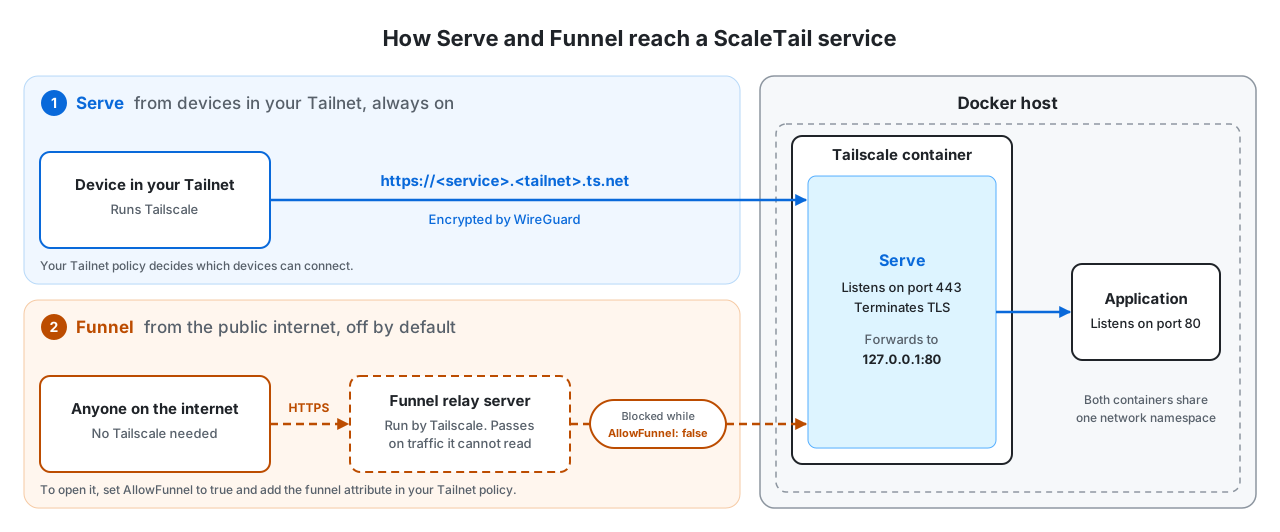
Serve: your Tailnet only
- A device in your Tailnet opens
https://<service>.<tailnet>.ts.net. The traffic travels through Tailscale, encrypted by WireGuard. - The Tailscale container receives it on port 443 and ends the HTTPS connection with a certificate for that name.
- Serve forwards the request to the application. Both containers share one network namespace, so the application is at
127.0.0.1and its internal port, for example127.0.0.1:80.
Serve is on in every stack that sets TS_SERVE_CONFIG. Only devices in your Tailnet can use it, and your Tailnet policy can restrict them further.
Funnel: the public internet
Funnel is off by default. Stacks that use Serve keep it off with "AllowFunnel":{"$${TS_CERT_DOMAIN}:443":false} in compose.yaml. Umami has an opt-in public mode; see its README.
When you turn Funnel on, a second path opens next to the first:
- A visitor without Tailscale opens the same address. The name resolves to a Funnel relay server run by Tailscale, not to your machine.
- The relay opens a TCP proxy to your Tailscale container. It passes the traffic on and cannot read it, because the HTTPS connection still ends in your container.
- From there, the request follows the same Serve route to the application.
The Serve route does not change. Funnel only adds a way in for visitors from outside your Tailnet.
Turn Funnel on
- Add
funneltonodeAttrsin your Tailnet policy file for the device, as described in Tailscale Funnel. - In
compose.yaml, changefalsetotruein theAllowFunnelline. - Recreate the stack with
docker compose up -d --force-recreate.
Funnel is in beta and listens only on ports 443, 8443, and 10000. It requires MagicDNS and HTTPS certificates, as in the Quick Start. Anyone on the internet can then reach the application, so turn on its login first.
Documentation
In this repository:
- The standard ScaleTail setup
- Free up port 53 on the Docker host
- Install Tailscale on an OpenPLi set-top box (without Docker)
From Tailscale:
- Tailscale documentation
- Docker and its configuration parameters
- Tailscale Serve
- Tailscale Funnel
- A deep dive into using Tailscale with Docker
Contributors
Thank you to everyone who has contributed to ScaleTail.
Made with contrib.rocks.
Contributing
To add or update a service, follow CONTRIBUTING.md and start from the service template.