
pleamar
A desktop shell language and runtime where animation does not depend on logic. Rust, wgpu, layer-shell, SDF — an alternative to Quickshell.
Automatically checked · GitHub checked 2026-11-14
Overview








A language and a Rust runtime for your desktop shell: bars, launchers, notification centres, docks, lock screens and widgets, written as scenes where every property is a spring and the animation never waits for the logic.
Install
Guide
Reference
pleamar-wm
Marea
Discord
examples/glass.plm, running: a clear lens, a plate that frosts itself where what is behind is busy, smoke and milk.
What it is
pleamar is a shell toolkit, like Quickshell. You write your bar, widgets and launchers with it, and they run on the compositor you already use — Hyprland, Sway, niri, KDE… No need to change anything else.
Two more pieces are built on it, both optional:
- pleamar-wm is a Wayland compositor where the window manager itself is a pleamar scene. Only if you want a whole desktop of it.
- Marea is my own shell, written in pleamar: a good example of how far a scene can go.
So if you are on Hyprland and just want a new bar, pleamar is all you need.
Where it runs
| Hyprland, Sway, niri, river, Wayfire, Labwc… | ✅ Its home: bars, panels and shells anchor to the screen (layer-shell) |
| KDE Plasma (Wayland) | ✅ Bars and shells work; what is Hyprland's own —its workspaces— does not |
| GNOME (Wayland) | ⚠️ Only scenes in a normal window: GNOME has no layer-shell, so a bar cannot anchor. pleamar-wm can be picked as a session next to it |
| pleamar-wm | ✅ A whole desktop of its own |
| X11 sessions | ❌ pleamar is for Wayland |
Gallery
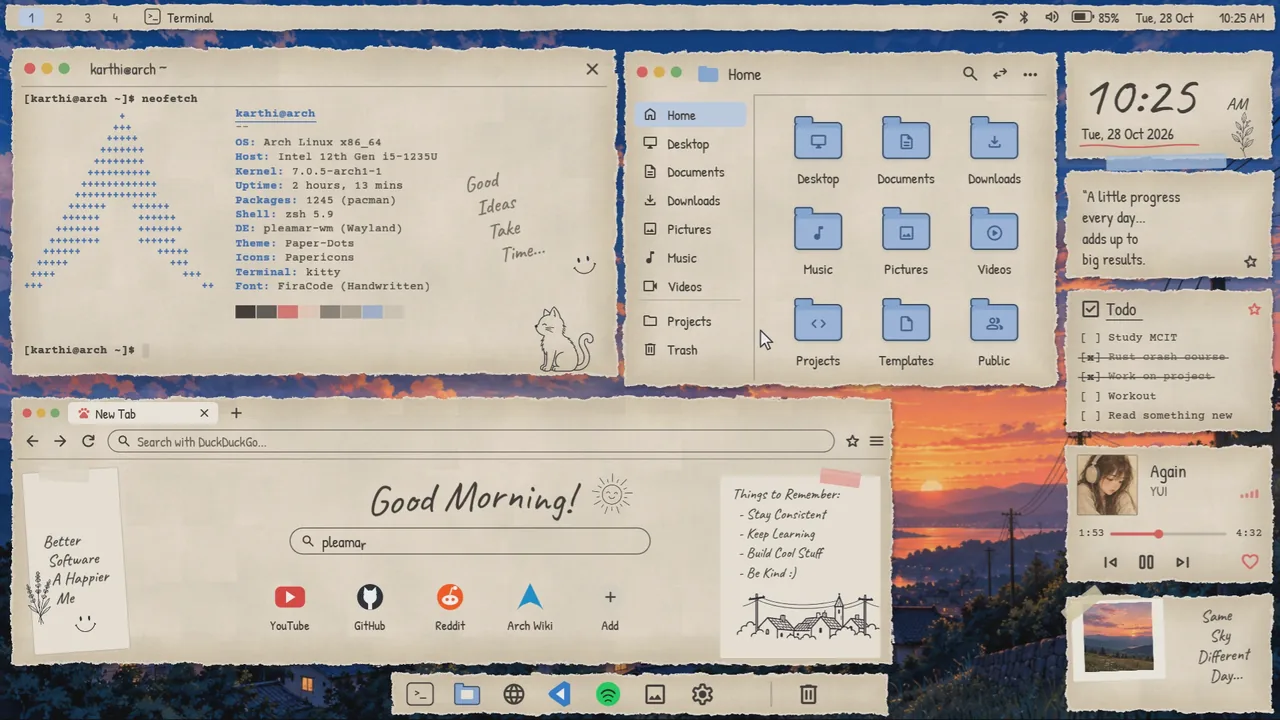
Someone on Reddit drew this desktop and said they didn't know how to build it. One scene and twenty minutes later, it moves: watch it.
Marea, a whole shell in one scene: here she changes her skin to liquid glass.
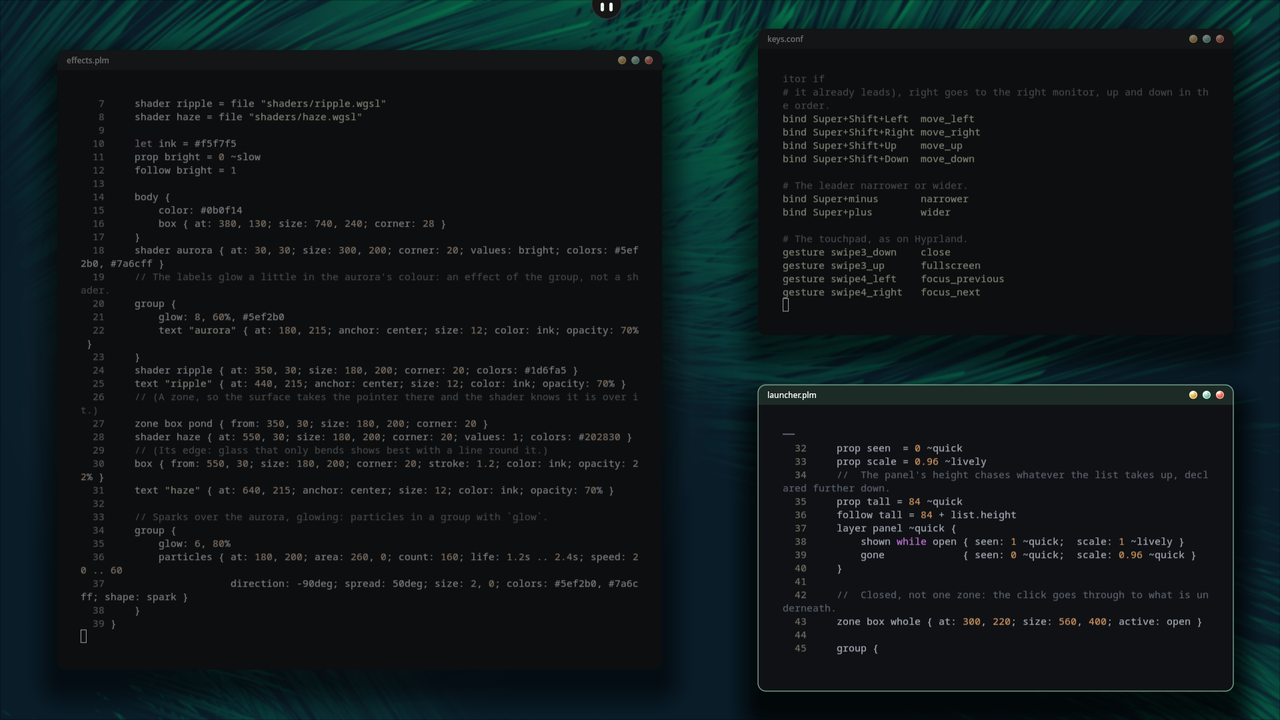
pleamar-wm with Marea: free windows, glass drop buttons, one scene each.
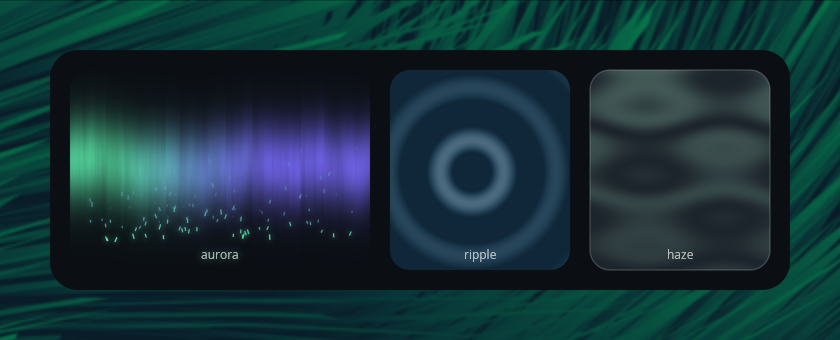
examples/effects.plm: a WGSL aurora with glowing particles, a ripple that follows the pointer, a heat haze.
Why pleamar
- Motion first: every property is a spring, and animation never waits for the logic; save the file and it reloads without losing what was in motion.
- Drawing: shapes that melt into each other, glass, blur, glow, particles and your own shaders.
- A whole desktop: bars, docks, launchers, lock screens, widgets, and with pleamar-wm the window manager itself.
More, with the numbers and a quick comparison with other toolkits: docs/why.md.
Install
One line installs pleamar, the pleamar-wm window manager and Marea in your home (nothing outside it), and keeps them up to date:
curl -fsSL https://raw.githubusercontent.com/k4ditano/pleamar/main/install.sh | sh
Only pleamar, for the compositor you already use, without the window
manager or Marea — fewer packages to build it, and pleamar-update keeps it
that way:
curl -fsSL https://raw.githubusercontent.com/k4ditano/pleamar/main/install.sh | sh -s -- --alone
It tells you what your distribution is missing to build it (pacman, apt, dnf,
zypper) and offers to install it, builds in ~/.local/share/pleamar/src, puts
pleamar, pleamar-wm, pleamar-session, marea and pleamar-update in
~/.local/bin, and makes your ~/.config/pleamar the first time.
pleamar-update | new changes, built and put in place (it says what is new) |
pleamar-update --alone | pleamar alone from now on: pleamar-wm and Marea leave ~/.local/bin |
pleamar-update --all | pleamar-wm and Marea too, from now on |
pleamar-update --session | also pleamar-wm in the login screen (asks for sudo) |
pleamar-update --agent | AI agents may use your windows in pleamar-wm, with a cursor of their own |
pleamar-update --remote | this desktop from a browser elsewhere: a password and codes made, and pleamar-wm remote started with the session |
pleamar-update --uninstall | the programs go; your ~/.config/pleamar stays |
Everything of yours lives in ~/.config/pleamar/ — the folder for your
dotfiles: your shells (shells/), what starts with the desktop (autostart;
on Hyprland or any other compositor, exec-once = pleamar --autostart), and for
pleamar-wm its session.conf, keys.conf and your own wm/session.plm.
On Nix or NixOS: docs/install-nix.md.
Your first scene
Writing scenes by hand? The guide takes you from zero to a working
bar, step by step; the recipes are patterns to copy, and the
reference lists every element and property. In your editor,
pleamar --lsp gives errors and completion (see editor/), and
pleamar --docs prints the documentation of the version you have installed.
language 0.1
scene Clock {
    surface { size: 240, 96; anchor: top; margin: 12 }
    permissions { services: "clock" }

    //  The time comes from the system: not a single line of logic here.
    service clock as now { time: text = "--:--"; date: text }

    prop hot = 0 ~quick

    body {
        color: #151616
        rim: 6%
        shadow: 0, 6, 18, 35%
        box { from: 0, 0; size: 240, 96; corner: 20 }
    }
    text now.time { at: 120, 44; anchor: center; size: 34; color: #f5f7f5 }
    text now.date { at: 120, 72; anchor: center; size: 12; color: #9ed6bd; opacity: 45% + hot * 55% }

    zone box whole { from: 0, 0; size: 240, 96; corner: 20 }
    on enter whole { hot: 1 }
    on leave whole { hot: 0 }
}
pleamar --scene clock.plm, and it is on your screen. Save the file and it
reloads without losing whatever was in motion.
Next: the language in five minutes, in docs/quick-tour.md.
With your AI agent
The installer writes pleamar's skill for every agent it finds — Claude Code,
Codex, OpenCode — and it refreshes itself on every update. Ask one «make me a
bar with the time, the volume and my workspaces» and it knows the language,
where the file goes, how to start it with your desktop, and how to check it
(it compiles it, opens it without a screen and looks at the picture) before
saying it is done. pleamar --install-skill does it by hand;
pleamar --docs prints the documentation of the version you have.
And it can use the desktop. A second skill, pleamar-desktop, teaches it
pleamar-wm's agent hands (pleamar-update --agent, or agent on in
session.conf): ask «go to reddit and find my last post» and it looks at the
window, clicks and types with a mint cursor of its own, on a seat apart from
yours — your mouse and keyboard stay free, the monitor it works on glows while
it does, and it stops to ask before publishing, sending or buying anything. It
speaks Cua Driver's protocol too.
Community shells
Desktops people have built with pleamar. Each one is its author's, under its own license; the picture is the one they posted in the shells forum.
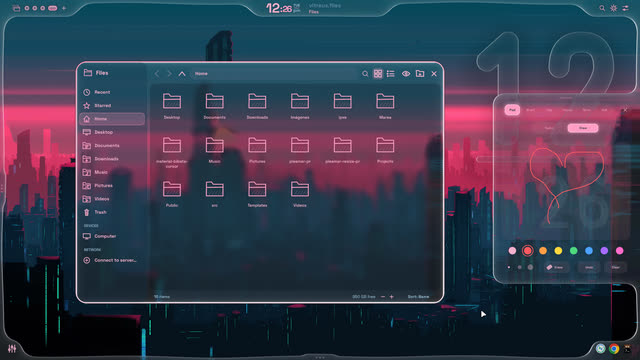 | Vitreus by natepayn3 · a liquid-glass shell for pleamar-wm, Hyprland and niri |
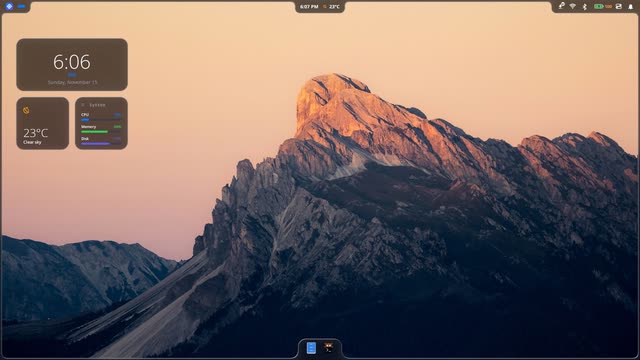 | Beskar by neerajlovecyber · a liquid-glass shell for niri |
All of them, and how to add yours: docs/shells.md.
Tools
pleamar --lsp gives errors and completion in your editor, pleamar --docs prints
the documentation of the version you have, and building from source or day-to-day
commands are in docs/tools.md. How it works inside:
docs/under-the-hood.md; what is missing and the known
limitations: docs/07-whats-missing.md,
docs/08-limitations.md.
Documentation
docs/guide.md | From zero to a bar, step by step |
docs/recipes.md | Patterns that already work, ready to copy |
docs/11-language-reference.md | The reference: grammar, types, every element and every property |
docs/10-luau-logic.md | What the logic can do, and what it cannot |
docs/07-whats-missing.md | Parity with Quickshell, told by real usage |
docs/08-limitations.md | Everything that fails or is missing, with its plan |
docs/02-how-it-works.md | Inside: the threads, the renderer, the why |
skill/ | The skill the installer gives your AI agents |
docs/why.md | Why pleamar, with the numbers and the quick comparison |
docs/quick-tour.md | The language in five minutes, and the logic |
docs/install-nix.md | Nix and NixOS |
docs/tools.md | The editor, building from source, day to day |
docs/under-the-hood.md | The three threads and the source tree |
docs/whats-new.md | The highlights of each release line |
docs/shells.md | Community shells |
The working notes (01, 03–06, 09) are the design logbook: how this got here.
Special Thanks
wgpu - For every pixel
Luau - For logic that can be sandboxed
cosmic-text - For real text
resvg - For reading svg
Smithay - For the compositor's protocol side
Quickshell - For showing what a desktop written in a language can be
Hyprland - For showing how good a desktop can feel
License
pleamar is under the BSD 3-Clause License, like Hyprland: use it,
change it, ship it, sell it — keep the copyright notice. Every dependency is
permissive (MIT, Apache-2.0, BSD-3-Clause, Zlib); THIRD-PARTY.md lists them,
and their notices travel with any binary you hand out.
Contributions are welcome, made with AI or without it: see the AI policy.
Made by @k4ditano — follow along on X for what comes next, and come and say hi, ask or show what you made on Discord. If it makes your desktop nicer, you can buy me a coffee on Ko-fi ☕