
open-nvr
The open platform for AI on your cameras: a self-hosted NVR (ONVIF/RTSP, recording, WebRTC) running any AI model through one open contract, with an app SDK and one-click apps. New capabilities arrive as software, not new boxes. Air-gapped or connected, audited end to end. Home Assistant built in. AGPLv3. A Frigate/Zone
Automatically checked · GitHub checked 2026-11-14
Overview

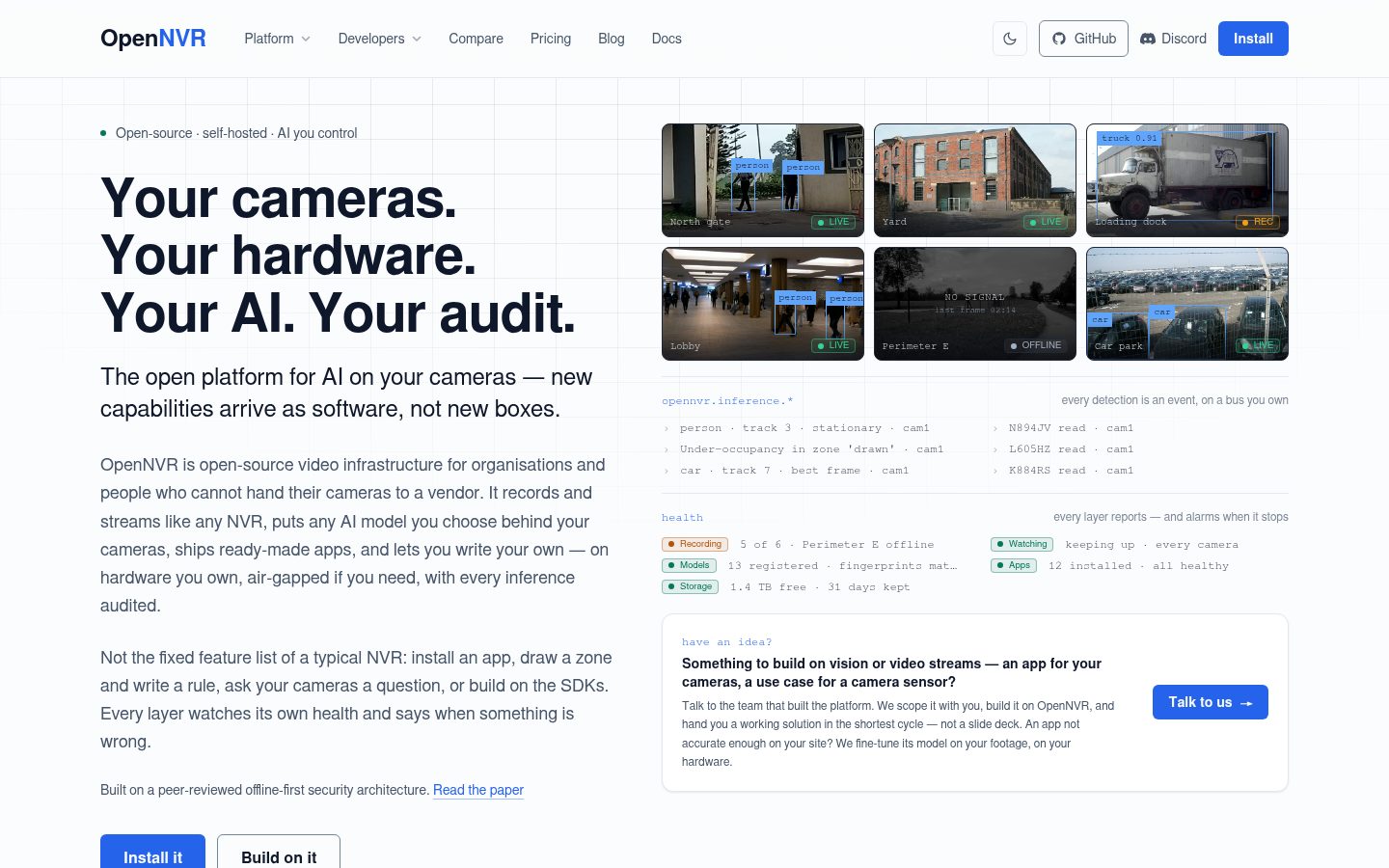
Your cameras. Your hardware. Your AI. Your audit.
The open platform for AI on your cameras — new capabilities arrive as software, not new boxes.
OpenNVR is open-source video infrastructure for organisations and people who cannot hand their cameras to a vendor. It records and streams like any NVR, puts any AI model you choose behind the cameras, ships ready-made applications, and lets you write your own — on hardware you own, air-gapped if you need, with every inference audited.









▶ Install walkthrough (video) · ⚡ Get it running · 🧩 Write an adapter · 📱 Write an app · 🏛 Government brief · 🔒 Security · 💬 Discord

Dashboard · Live view · Search · App Catalog · Vehicles (ANPR). The dark and light variants follow your GitHub theme.
📖 Contents
✨ Why OpenNVR
📷 Any cameraONVIF and RTSP cameras from any vendor, an Android phone, or the machine's own webcam. |
🧠 Any AI modelOne open contract: swap the detector, add plate reading or a vision-language model, and nothing else changes. |
🏠 Local by defaultRecording, AI and the assistant run on your hardware. Cloud models are opt-in and audited. |
🔒 Ready for air-gapped sitesAnd for what still reaches them. Runs fully offline, can keep the cameras on a network with no route out, and traces every alert to the model weights that produced it. |
🏡 Works with Home AssistantCameras, zones and apps appear as devices through MQTT discovery, with nothing to install in Home Assistant. |
🛠️ Build AI applicationsTwo Apache-2.0 SDKs: an app is your rule on the platform's events, an adapter is your model behind the contract. Your first app · your first adapter. |
⚡ Get it running
Two commands. You need Docker, nothing else (on Linux the installer offers to install it). No account, no API key, no cloud.
git clone https://github.com/open-nvr/open-nvr.git && cd open-nvr
./start.sh          # Windows: .\start.ps1
| Step | What happens |
|---|---|
| 1. Answer the wizard | Every question has a working default in [brackets], so Enter through all of them gives a running stack. It generates the secrets, pulls the images, and prints your URL and a one-time setup token. |
| 2. Open the URL | Accept the self-signed certificate and paste the token. |
| 3. Add a camera | Detection overlays appear within about 30 seconds. |
[!NOTE] First run takes 8–15 minutes, almost all of it downloading images. Every start after that is seconds.
[!TIP] No camera to hand? OpenNVR Cam turns an Android phone into an ONVIF camera, or let the agent use the machine's own webcam.
Day-two commands
| Situation | Command |
|---|---|
| Start now, no prompt | ./start.sh up |
| Re-print the setup token | ./start.sh token |
| Change settings or swap the example | ./start.sh reconfigure |
| Your LAN IP changed | ./start.sh refresh-certs (Linux/macOS) |
| Stop everything | ./start.sh down |
| Tail live logs | ./start.sh logs |
| Add an overlay or profile (fake cameras, an app) | set OPENNVR_EXAMPLE_COMPOSE / OPENNVR_EXAMPLE_PROFILE in .env, then ./start.sh up — not docker compose -f … by hand, which drops the hardware flavour |
| Reclaim disk after upgrades | ./start.sh prune |
| Remove OpenNVR from this machine: apps, database, footage and all | ./start.sh uninstall (shows the plan, then asks you to type the confirmation sentence, which it draws on the screen rather than printing it, so it cannot be copied from there; --dry-run to look first; other stacks on the machine are never touched) |
| Upgrade to a new release | back up, check out the tag, set CORE_TAG/ADAPTER_TAG, ./start.sh up: step by step |
Unattended installs: cp .env.example .env && ./scripts/generate-secrets.sh --write && ./start.sh up. Retention, hardening and every compose file: DOCKER_QUICKSTART.md.
🧭 What OpenNVR is
The NVR was built to record. Now recording is where it starts.
| A traditional NVR | OpenNVR |
|---|---|
| Features are fixed the day you buy it. | Features arrive as apps and models, installed in one click on the same box. |
| AI means the vendor's cloud or a new appliance. | Runs any model on your hardware. |
| Asks you to trust the vendor. | Shows you the audit log, the model fingerprints and the evidence pack. |
Three things in one install, each usable on its own.
| 📼 | A complete NVR | ONVIF and RTSP cameras in, recording and live view out, a detector always on. Works on day one with no AI configured at all. |
| 🧠 | An AI platform for cameras | Any model behind a REST or WebSocket endpoint becomes a capability through a published contract. Object detection, plates, faces, pose, scene description, open-vocabulary search, tracking, speech in and out all ship. Twelve installable applications sit on top: intrusion, loitering, occupancy, line crossing, plates, a doorbell that knows your family, a guard-scan check, a gate controller, and an agent you can talk to. |
| 🛠️ | A product you build on | Two Apache-2.0 SDKs on PyPI. Write a server-side application or an adapter for your own model in an afternoon, run it on your own site, keep it private or publish it. The platform supplies cameras, streams, recording, detections, an event store with evidence, alerts, auth and audit. You supply the rule. |
pip install opennvr-app-sdk        # write an application: your rule on the platform's events
pip install opennvr-adapter-sdk    # write an adapter: your model as a first-class capability
🛡️ Why organisations that cannot outsource trust run it
Governments, defence, critical infrastructure, healthcare and schools share one constraint: the footage, the models and the decisions must stay inside the perimeter and be explainable afterwards. Most camera software is built the other way round, with the vendor's cloud holding the keys. OpenNVR is built for the constraint.
| The guarantee | How OpenNVR keeps it | |
|---|---|---|
| 🚪 | Nothing leaves unless you open the door | Two independent default-deny gates, DEPLOYMENT_MODE=offline and AI_SOVEREIGNTY=local_only, return HTTP 403 to every cloud route and every non-local model until an operator opts in. Apps reach the outside world only through an egress proxy on an allowlist an administrator approved. |
| 🧱 | Offline is one door, not all of them | Air-gapped systems are still reached by USB sticks, contractor laptops, insiders, tampered models and plug-ins that phone home. Per-camera permissions, MFA and an append-only audit log answer the first three; fingerprinted models with declared permissions the fourth; a credential per app and an egress allowlist the last. |
| 🌑 | The camera network can stay dark | In dual-NIC mode, offered by start.sh and laid out in the reference appliance, the cameras sit behind one network card with no gateway and no route out, and operators, the phone app, alerts and updates reach OpenNVR on the other. The installer can add a firewall rule that drops forwarding between the two. Camera credentials are encrypted at rest, and video leaves the host only over RTSPS. |
| 🔏 | You can prove which model made every decision | Every model registers with the SHA-256 of its weights, re-checked every minute: a change raises a critical alert and an audit entry, and a model that asks for a new permission stops serving until an operator approves it again. One correlation id runs from the alert, through the gateway, to the model and the exact weights that answered. |
| 📋 | Procurement can check it | A §889 covered-vendor self-check is built in. The architecture is a peer-citable paper (DOI 10.5281/zenodo.22804254); this repository is its reference implementation. |
| 🤫 | The sensitive part can stay sensitive | Fine-tuned weights you cannot share, detection logic that is itself operationally sensitive, adapters under a classified licence: the Apache-2.0 SDK lets them run on the platform without ever being published. |
Two things worth reading before you rely on those guarantees
Connecting the management side is a mode, not a downgrade. The management side can stay sealed or reach the internet for remote viewing over a VPN, phone alerts and updates; the camera side stays exactly as dark and every default-deny gate stays on. Online, the box itself is what the internet can see, so keep it behind your firewall and never port-forward it.
What a fingerprint proves, and what it does not. A hash proves the weights did not change after you approved them, not that they were clean when you did; that is what declared permissions, the default-deny network policy and fine-tuning on your own footage are for.
| Read next | |
|---|---|
🏛 docs/GOVERNMENT_DEPLOYMENT.md | The procurement brief |
🔒 docs/SECURITY_ARCHITECTURE.md | The control-by-control threat model |
📑 docs/COMPLIANCE.md | The evidence pack mapping |
💾 Buy the hardware once
AI capability is arriving faster than any hardware refresh cycle. A camera system that needs a new appliance for each new capability will always be a generation behind. In OpenNVR a new capability is software.

A new model, an adapter, an app, an alert, on the box you already have. The fall-alert app is an illustration; the other tiles are apps that ship today.
- 🔁 A new model is an adapter, not a device. Swap the detector, add plate reading, add a vision-language model, upgrade to this month's weights: each is a container registered with the gateway, hot-swappable and fingerprint-tracked, on the box you already have.
- 🪶 The always-on detector is deliberately cheap. Tier-0 scans the camera's substream at a low frame rate and wakes the expensive models only when something is worth a closer look. That gate is why a mini-PC carries a whole site: the heavy models run on seconds of footage per hour, not all of it.
- 📐 It adapts to the box it finds. A smaller machine runs the same software with the heavier capabilities switched off; turning one on is a decision, never a surprise.
What runs comfortably where
| Your hardware | What's comfortable |
|---|---|
| 🍓 Raspberry Pi 4/5, 4 GB | Recording, streaming, Tier-0 detection, zone / line / dwell apps |
| 📦 Mini-PC, 8–16 GB | All of the above, plus plates, faces, the text camera agent |
| 🖥️ Desktop or server with an NVIDIA GPU | Everything, plus scene captioning, VQA, the hands-free voice agent |
| 🍎 Apple Silicon | As above, with the LLM on the host via Metal |
[!TIP] Detection using too much CPU is almost always video decode, not the model. Store the camera's substream URL, check
DETECT_FPS, attach a hardware decoder withDETECT_HWACCEL. The full strategy isdocs/DETECT_CPU.md.
Runs on what you have
The same images come in hardware flavours. One line in .env, OPENNVR_ACCEL=auto, picks the flavour from the hardware it finds, and every fallback to CPU is logged and exported rather than silent.
| Flavour | Hardware | What it accelerates |
|---|---|---|
| plain CPU | x86-64 and arm64 | Everything runs on the CPU |
-intel | Intel iGPU and NPU | The iGPU decodes the cameras and the Tier-0 detector runs on the NPU or iGPU through OpenVINO |
-qualcomm | Dragonwing and Snapdragon boards | The detector runs on the Hexagon NPU through the ONNX Runtime QNN plugin. Measured: sixteen cameras at 2 fps on an Arduino Ventuno Q where the CPU managed four. The captioner, the camera agent's LLM, speech to text and search's embedder run on the same NPU. Boards and support from Indus Technologies. |
| NVIDIA | — | Next |
The support matrix and benchmark protocol are in docs/HARDWARE.md. Make or own hardware we have not measured? Lend it to us or give us remote access and we port, benchmark and publish the numbers, good or bad.
🧱 Built to scale, built to be built on
Every part is its own service. Core, the media server, the message bus, the AI gateway, the detect pipeline, each adapter and each app run as separate containers that talk over NATS and HTTP. Compose is what ships; the service boundaries are what let you run the same images under any orchestrator and add replicas where the load is. Need more plate OCR throughput? Run more OCR adapters; the gateway registers each one and queues fairly per camera.
Writing your own is the normal path, not the advanced one.
| 📱 Write an app | opennvr-app new my-app, edit one method, run the tests, point it at the stack. Your first detector in 15 minutes. The rules that keep an app cheap on the box: Building efficient apps. |
| 🧩 Write an adapter | An adapter is about thirty lines around your model. Write your own adapter. |
| 🎁 Publishing is optional | An app or adapter you write runs on your site with no obligation to list it anywhere. If you do list it in the App Catalog, you keep the copyright, your name is on the card, OpenNVR takes no fee, and you can sell what the code needs through the built-in licence hook. The deal for developers. |
| 🎯 Fine-tune what ships | Every reference model is a swap away from your own weights: point the adapter at your fine-tune, or train one and keep it private. Not accurate enough on your site and no time to train? We fine-tune it on your footage, on your hardware. |
🔌 How it fits together

| 📼 Records never depends on AI | Footage is written in one-minute chunks whatever the models are doing. In the animation the AI wire goes quiet while a model is swapped and recording carries on. If every adapter on the box crashes, you still have the video. |
| 👁️ Watches asks for a task, never for a model | The always-on detector asks KAI-C, the socket, for object_detection. Whatever adapter is plugged in answers, and it is checked before it is trusted: weights fingerprint, declared permissions, the local-only policy. Swap YOLOv8 for your own fine-tuned model and nothing else on the wire changes. |
| ⚖️ Adapters answer "what is it", apps decide "does it matter" | An adapter reads a plate or recognises a face and says nothing about whether you should care. Apps hold the policy: this zone, these hours, that watchlist. Keeping them apart is what lets you swap a model without rewriting a rule, and write a rule without knowing which model is behind it. |
| 🗂️ Everything worth remembering lands on one bus and in one store | Events is the bus everything listens to. One row per visit, with its best frame and every claim the models made, carrying which model made it and how confident it was. The search page, the agent and any app you install next month all ask the same store, so they give the same answer. |
The three-tier model, the wire contracts and the offline-first design are in docs/ARCHITECTURE.md.
🧩 Add a capability in one click
App Catalog in the sidebar lists the installable applications. Pick one, click Install, choose which cameras it watches. Each app declares what it needs before you install it, which cameras, which hosts it may reach, whether it wants a licence key, and an administrator approves that, so an app cannot quietly acquire access it never asked for. Cameras get jobs too: assign camera 1 to plates and cameras 2–3 to counting on each camera's settings page (how assignments work).
🚧 Perimeter and safety
| Application | What it does |
|---|---|
intrusion-detection | People in restricted zones during restricted hours |
camera-tamper | A camera covered, defocused, moved or frozen, with no model to run |
gate-watch | A gate left open, judged by one question to the vision model |
garbage-dumping | Garbage dumped in a watched zone, found by open-vocabulary detection |
ppe-check | A person missing required safety kit, judged from Tier-0's best crop by open-vocabulary detection |
abandoned-object | Unattended items, with owner-proximity suppression |
guard-scan-compliance | Was every person wanded, and what did the scanner find |
🚶 People and flow
| Application | What it does |
|---|---|
loitering-detection | Dwell-time alerts on a live inference stream |
occupancy-counting | Zone occupancy with over/under alerts |
line-crossing | Directional tripwire and entry/exit counting |
🚗 Vehicles and access
| Application | What it does |
|---|---|
license-plate-recognition | Plate reads, registers, watchlists, per-camera scan modes |
gate-controller | Open the barrier for allowed vehicles only |
🚪 Doorstep
| Application | What it does |
|---|---|
smart-doorbell | Face recognition with enrolment, strangers alerted with a photo |
package-delivery | Arrival, linger and pickup per parcel |
🔎 Search, alerts and the assistant
| Application | What it does |
|---|---|
footage-search | "Red truck at the dock yesterday" over recorded footage |
alert-notifier | What actually deserves to reach the guard's phone |
camera-agent | Ask your cameras questions, by voice or text, all local |
Seventeen of the twenty shipped examples are listed above; inference-listener and alerts-subscriber are minimal subscriber templates, and home-assistant-relay is kept only as a NATS-to-MQTT bridge example now that Home Assistant support is built in. Every app is a copy-as-template starting point. Replace the predicate and you have a purpose-built NVR for your domain. Gallery and roadmap: examples/README.md, docs/ROADMAP.md.
OpenNVR also ships first-party apps whose source is not published, installed from the same App Catalog as a signed image: Attendly, attendance by face (classroom rosters, hostel and mess barriers, meal bookings, staff check-in). See docs/APP_LISTING_TERMS.md for how they are listed.
🏠 Works with Home Assistant
Turn on MQTT discovery and OpenNVR appears in Home Assistant's own MQTT integration, with nothing to install there.
| 📟 Devices | One device for the server, one per camera, one per zone, and one per app that declares entities. |
| 🎛️ Entities | Motion, detection and recording switches, last object and last plate, object counts, PTZ buttons, the site mode as an alarm panel, and an event entity that fires on every detection and alert, ready for automations. |
| 🔑 Permissions | Everything runs as an OpenNVR API token you choose. Home Assistant sees the cameras that token may see and can do only what it may do, and every command lands in the audit log. |
Setup is four steps: the Home Assistant guide. The native integration, which adds live video, the media browser and phone notifications with the picture, installs from HACS: hass-opennvr.
🎙️ Talk to your cameras
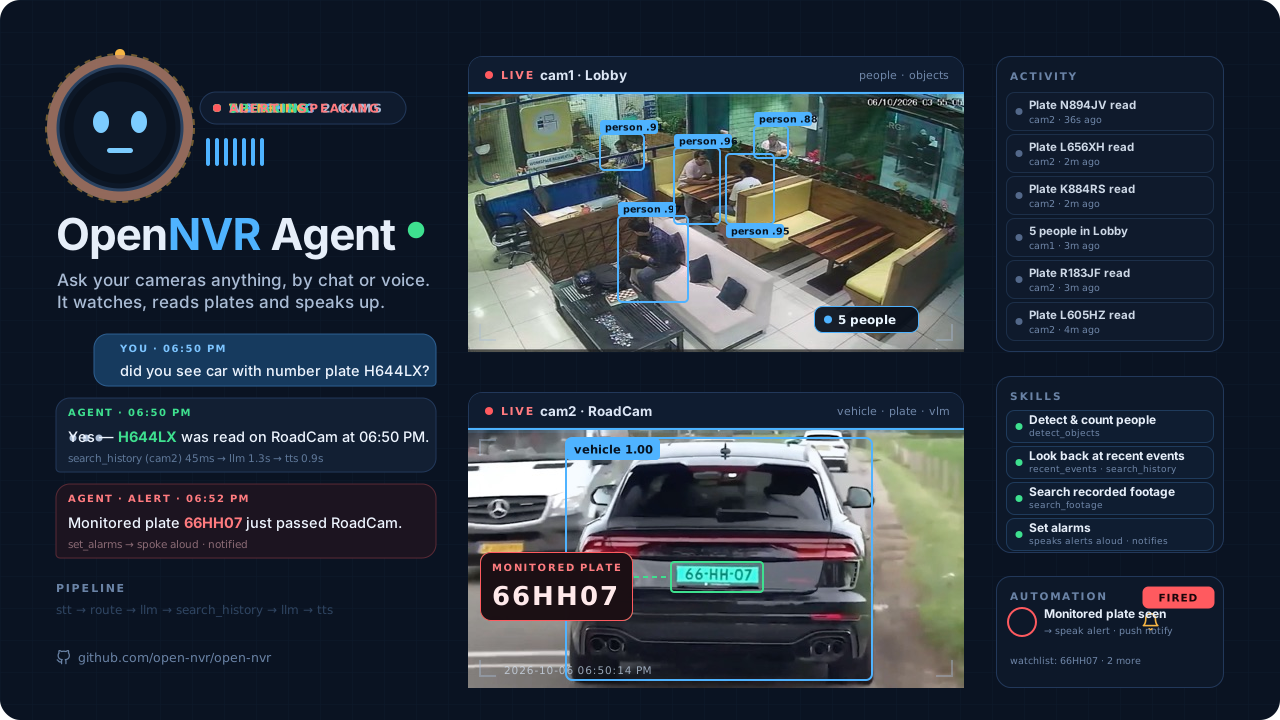
examples/camera-agent/quickstart.sh          # voice: click Start and speak
examples/camera-agent/quickstart.sh --chat   # chat: type and read
Open http://localhost:9100/demo. A local LLM does tool-calling over your live frames:
| You ask | It uses |
|---|---|
| "Is anyone in the kitchen?" | A detector |
| "What's at the back gate?" | A captioner |
| "Did a red truck come by the dock earlier?" | The event store |
| "Who was at the door this morning?" | Your face database |
The brain is a dial, not a dependency: the bundled runtime, Ollama on the host where the GPU is, or any OpenAI-compatible endpoint you bring. Model picks and hardware notes: examples/camera-agent/README.md.
🛠️ Build on it
📱 An application subscribes to the platform's events and holds one rule:
pip install opennvr-app-sdk && opennvr-app new my-app # scaffold, edit on_detections, uv run pytest
🧩 An adapter puts your model behind the contract:
from opennvr_adapter_sdk import AdapterApp, AdapterService, BodyShape, BODY_BYTES_KEY, InferResponse

class MyDetector(AdapterService):
    def load(self): ...                       # load your weights
    def is_ready(self) -> bool: return True
    def infer(self, payload) -> InferResponse:
        frame = payload[BODY_BYTES_KEY]       # ... your model ...
        return InferResponse(result={"detections": [...]})

app = AdapterApp(service=MyDetector(), name="my-detector", version="1.0.0",
                 vendor="me", license="MIT", tasks_advertised=["object_detection"],
                 body_shape=BodyShape.IMAGE).fastapi_app
Register the URL with the gateway and it is online: hot-swappable, audit-chained, fingerprint-tracked. Thirteen reference adapters and a one-command scaffold live in ai-adapter; the wire spec is docs/AI_ADAPTER_CONTRACT.md.
💡 Tell us the problem your cameras should solve
A camera system should make a site safer, more reliable and more productive, and it should be able to show its work. Most of what OpenNVR ships started as one organisation's specific problem: a jewellery showroom that had to prove every visitor was wanded, a society that wanted strangers' vehicles flagged and residents' waved through, a dock that wanted to search footage in plain words.
If you have a camera-based use case, describe it to us. We will tell you whether an existing app and adapter already solve it, whether a fine-tune of a shipped model gets you there, or whether it needs new work, and what that costs. Deployment assistance, adapter authoring under NDA, fine-tuning on your footage, compliance evidence packs and supported deployments are how the project is funded: [email protected]. The enterprise offer is in docs/ENTERPRISE.md.
⚖️ How it compares
Frigate is the right call for many homelabs, and we say so. OpenNVR solves a different problem: auditable AI surveillance with operator-controlled, sovereign AI.
| OpenNVR | Frigate | ZoneMinder | Verkada | |
|---|---|---|---|---|
| Self-hosted, runs air-gapped | ✅ | ✅ | ✅ | ❌ |
| Open adapter contract: any model, any licence, out of tree | ✅ | in-tree | ❌ | ❌ |
| Talk to your cameras, locally | ✅ | ❌ | ❌ | ❌ |
| End-to-end audit chain and model-drift detection | ✅ | ❌ | ❌ | ❌ |
| Default-deny sovereignty gates | ✅ | partial | ❌ | ❌ |
| §889 covered-vendor self-check | ✅ | ❌ | ❌ | ❌ |
🤝 Community
- 💬 Questions, and showing what you built: join the Discord.
- 🐛 Bugs: Issues.
- 🧭 Design questions: Discussions.
- 🔐 Security reports: a private advisory.
- 🌱 A first contribution: issues labelled good first issue are finishable in an evening.
The most valuable help, in order: build an app or adapter and tell us · follow the open-nvr organisation · star the repository.
📚 Documentation
| 🚀 Getting started | Docker quickstart · User manual · Camera assignments · Enrichment and search · Local dev setup · Use cases by industry · Home Assistant |
| 🛠️ Building apps and adapters | Your first detector · Building efficient apps · SDK reference · Platform client · Event contracts · Publishing an app · Developer program |
| 🏛️ Architecture and security | Security architecture · Compliance mapping · Government deployment brief · Enterprise · Reference appliance · AI Adapter Contract · Edge autonomy and robotics · The paper |
| 📦 Project | Roadmap · Support · Changelog · Contributing · Security policy |
📜 License and trademark
OpenNVR is dual-licensed.
| Part | Licence | What it means |
|---|---|---|
| The platform core | AGPL-3.0-or-later | Free forever, on any hardware, for anyone who honours the AGPL including its network clause. |
| The developer edges: the app SDK and the adapter SDK | Apache-2.0 | What you write can ship under any licence, including proprietary or classified. |
| What the AGPL does not cover | OpenNVR Commercial License | Pre-installed hardware under your brand, embedding in proprietary software, hosted offerings without source disclosure, white-labelling. |
Policy, decision matrix and FAQ: docs/LICENSING.md. Core contributions require a CLA; SDK contributions need a DCO sign-off.
"OpenNVR" and the logo are trademarks of the project; see TRADEMARK.md.
Cameras you connect. Hardware you own. AI you choose and author. Audit you can show.