
MarkdownDisplayView
A high-performance 100% pure native UIKit Markdown renderer for iOS built on TextKit 2, with a built-in native LaTeX math & chemistry (inorganic/organic) typesetting engine, configurable styles, background parsing, incremental UI updates, and real-time AI/SSE streaming.
Automatically checked · GitHub checked 2026-11-14
Overview
English | 中文
MarkdownDisplayView
A high-performance 100% pure native UIKit Markdown renderer for iOS built on TextKit 2, with a built-in native LaTeX math & chemistry (inorganic/organic) typesetting engine, configurable styles, background parsing, incremental UI updates, and real-time AI/SSE streaming.
- 100% Pure Native (Zero-WebView): In-house recursive-descent LaTeX parser and CoreGraphics/CoreText 2D geometric typesetting engine with zero web-view overhead and instant sub-millisecond rendering.
- Exclusive Chemical Formula Support: Native support for inorganic reaction equations (
\cewith auto subscripts/charges/equilibrium) and organic structural formulas (\chemfigvector-drawn benzene rings, aromatic rings, TNT, toluene, substituents). - Excellent Memory Efficiency: A 16 KB sample document (covering most styles) loads and scrolls in ~60–70 MB on an iPhone 14 Pro.
- Fluid AI Streaming: Handles random-length chunks with a peak memory of ~140 MB, dropping back to ~70 MB once streaming finishes; stays around ~40 MB in real multi-turn AI conversations.
- 20 Bundled KaTeX Vector Fonts: Automatically registers academic fonts dynamically, differentiating math italics from roman operators with publication-grade typography.
🚀 Designed for AI chat and document screens: render complete Markdown or append live AI/SSE deltas with publication-grade native math and chemistry typesetting.
Contents
Demo Effects
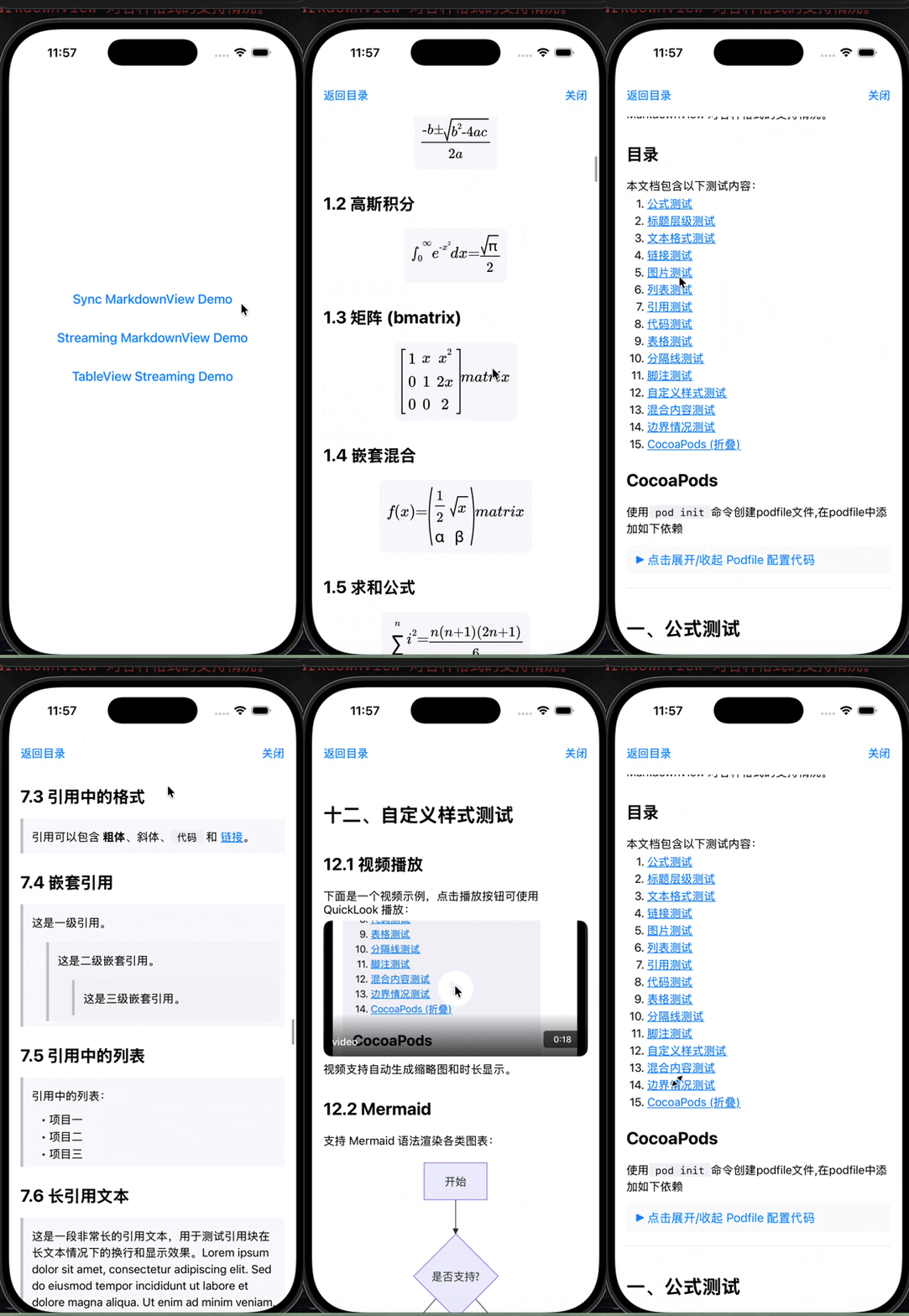
Normal Rendering
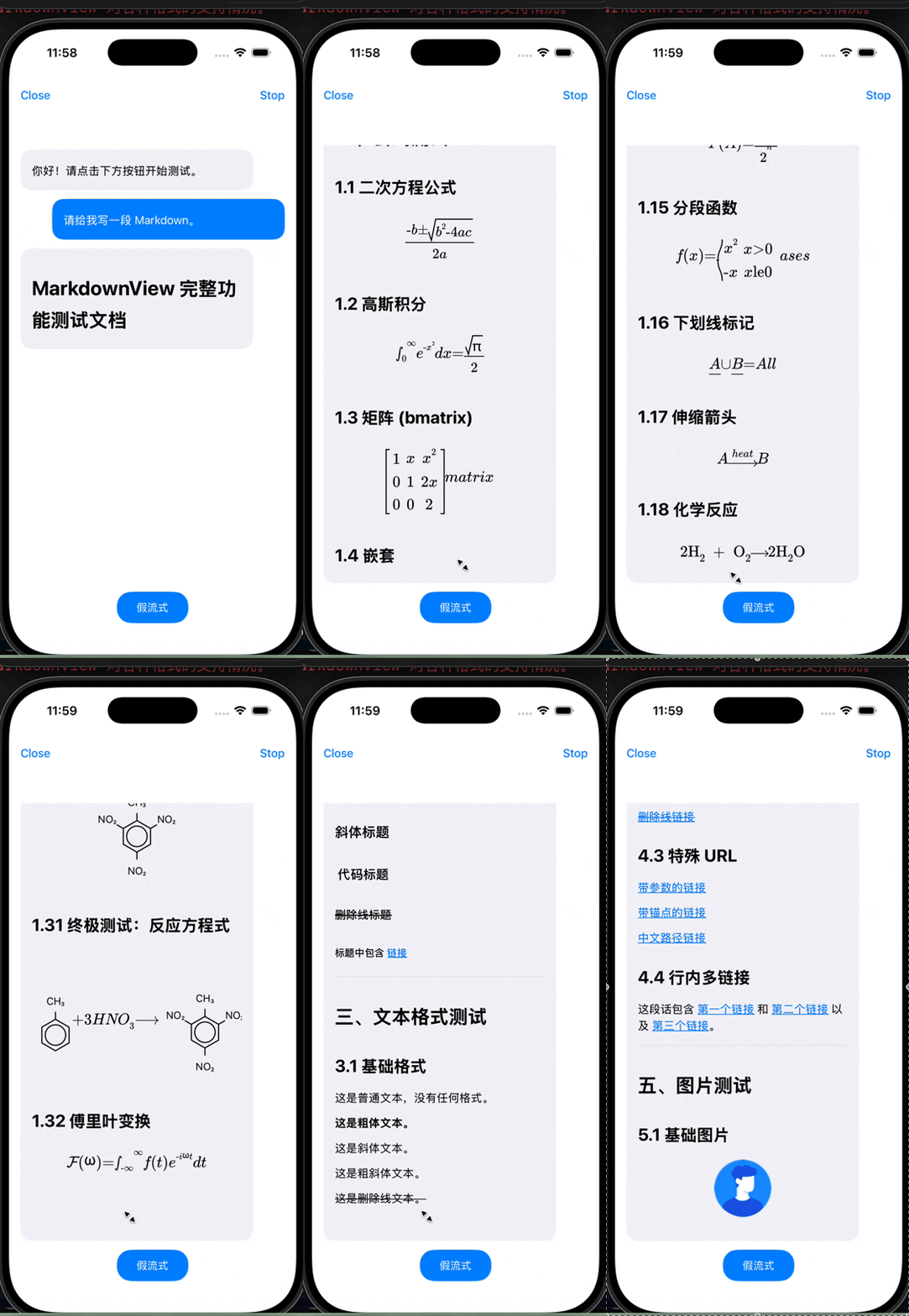
Streaming Rendering
- Real AI/SSE chunk streaming
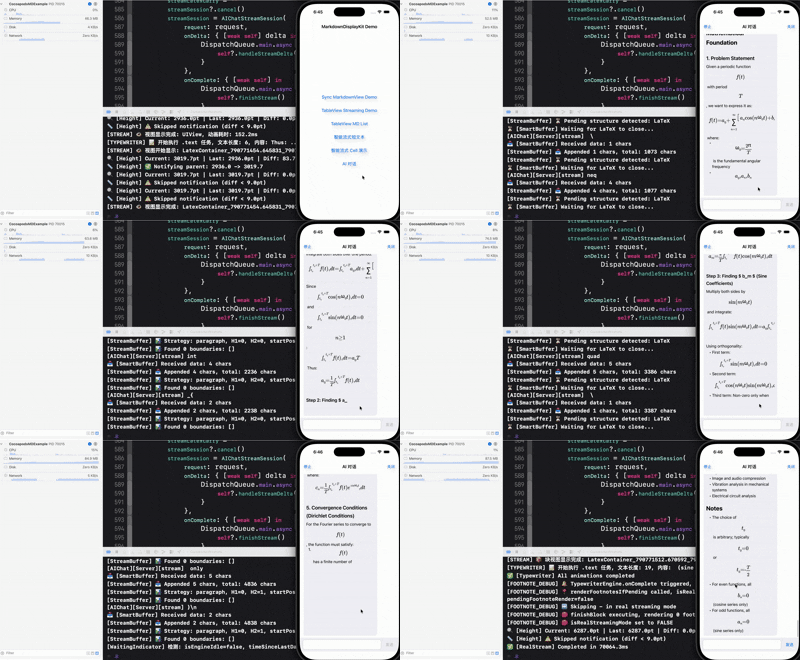
- Chat with AI model
Create an untracked Config.local.json in the example target when you want to run the real AI chat demo.
Show Config.local.json structure
{
  "host": "https://api.deepseek.com",
  "path": "/chat/completions",
  "apiKey": "replace-with-your-api-key",
  "model": "deepseek-chat",
  "systemPrompt": "You are a helpful assistant.",
  "temperature": 0.7,
  "stream": true,
  "timeoutSeconds": 30
}
Features
| Capability | What it provides |
|---|---|
| Rendering Architecture | TextKit 2, background parsing, first-screen-first and incremental UI updates, 100% native with zero WebView dependency |
| AI/SSE Streaming | Safe module buffering, ordered deltas, typewriter output, height caching, and optional haptics; zero-flicker streaming for complex STEM formulas |
| 🧮 Pure Native LaTeX & Chemistry | Custom math & chemistry engine with 20 bundled KaTeX fonts; supports calculus, matrices, cases, inorganic equations (\ce), and organic chemical structures (\chemfig) |
| Markdown Standard | Headings, lists, tables, blockquotes, images, LaTeX math, footnotes, details, and horizontally scrollable code blocks |
| Code Highlighting | Built-in syntax highlighting for 20+ common programming languages |
| Navigation | Generated table of contents, heading navigation, and internal anchors |
| Styling & Themes | Fonts, colors, spacing, light/dark presets, and block appearance (formulas & code blocks follow themes) |
| Extensions | Custom parsers, view providers, action handlers, and fenced-code renderers |
| Callbacks | Link, image, TOC, height, and streaming-step events |
Requirements
| Item | Requirement |
|---|---|
| Deployment target | iOS 15.0+ |
| Swift tools | Swift 5.9+ |
| Xcode | Xcode 15.0+ for the package; the checked-in example project uses the Xcode 26 project format |
Installation
| Package manager | Dependency name | Import |
|---|---|---|
| Swift Package Manager | MarkdownDisplayView | import MarkdownDisplayView |
| CocoaPods | MarkdownDisplayKit | import MarkdownDisplayKit |
Show installation steps and commands
Swift Package Manager
Method 1: Add via Xcode
- Open your project in Xcode.
- Choose
File→Add Package Dependencies... - Enter the repository URL:
https://github.com/zjc19891106/MarkdownDisplayView.git - Select the version and click
Add Package.
Method 2: In Package.swift
Add the dependency in Package.swift:
dependencies: [
    .package(url: "https://github.com/zjc19891106/MarkdownDisplayView.git", from: "2.1.1")
]
Then add the library product to your target:
.target(
    name: "YourTarget",
    dependencies: [
        .product(name: "MarkdownDisplayView", package: "MarkdownDisplayView")
    ]
)
Swift Package Manager resolves swift-markdown and Kingfisher automatically.
CocoaPods
Add the following lines to your Podfile:
pod 'MarkdownDisplayKit', '~> 2.2.3'
Then run:
pod install
Note: MarkdownDisplayKit.podspec declares AppleSwiftMDWrapper for Markdown parsing and Kingfisher (~> 8.9.0) for image loading, so CocoaPods resolves those dependencies during pod install.
Quick Start
Basic Usage
Use import MarkdownDisplayView with Swift Package Manager. CocoaPods exposes the same API through import MarkdownDisplayKit.
import UIKit
import MarkdownDisplayView

let markdownView = ScrollableMarkdownViewTextKit()
markdownView.configuration = .default
markdownView.markdown = "# Hello\n\nRender **Markdown** with TextKit 2."
Add markdownView to your view hierarchy and constrain it like any other UIScrollView. See the working layout in MarkdownExampleViewController.swift.
Show link and image callback examples
Handle Link Taps
markdownView.onLinkTap = { url in
    if UIApplication.shared.canOpenURL(url) {
        UIApplication.shared.open(url)
    }
}
Handle Image Taps
markdownView.onImageTap = { imageURL in
    print("Image tapped: \(imageURL)")
    // You can implement image preview functionality here
}
Custom Configuration
Using Preset Themes
Show preset theme code
// Use default light theme
markdownView.configuration = .default

// Use dark theme
markdownView.configuration = .dark
Custom Configuration
Show a complete configuration example
var config = MarkdownConfiguration.default

// Custom fonts
config.bodyFont = .systemFont(ofSize: 17)
config.h1Font = .systemFont(ofSize: 32, weight: .bold)
config.codeFont = .monospacedSystemFont(ofSize: 15, weight: .regular)

// Custom colors
config.textColor = .label
config.linkColor = .systemBlue
config.linkUnderlineEnabled = false    // Disable link underline
config.codeBackgroundColor = .systemGray6
config.blockquoteTextColor = .secondaryLabel

// Custom spacing
config.paragraphSpacing = 16
config.headingTopSpacing = 20
config.headingBottomSpacing = 12
config.imageMaxHeight = 500
config.lineSpacing = MarkdownLineSpacingConfiguration(
    body: 6,
    heading: 8,
    quote: 6,
    codeBlock: 4
)
config.softBreakStyle = .lineBreak          // Single newline wraps without paragraph spacing

// Apply configuration
markdownView.configuration = config
Configuration Reference
The following list highlights commonly used public options. Treat MarkdownConfiguration as the complete source of truth for the current release.
Show configuration properties
Font Configuration
public var bodyFont: UIFont              // Body font
public var h1Font: UIFont                // H1 heading font
public var h2Font: UIFont                // H2 heading font
public var h3Font: UIFont                // H3 heading font
public var h4Font: UIFont                // H4 heading font
public var h5Font: UIFont                // H5 heading font
public var h6Font: UIFont                // H6 heading font
public var codeFont: UIFont              // Code font
public var blockquoteFont: UIFont        // Blockquote font
Color Configuration
public var textColor: UIColor                          // Text color
public var headingColor: UIColor                       // Heading color
public var linkColor: UIColor                          // Link color
public var linkUnderlineEnabled: Bool                  // Whether links display underline (default: true)
public var codeTextColor: UIColor                      // Code text color
public var codeBackgroundColor: UIColor                // Code background color
public var blockquoteTextColor: UIColor                // Blockquote text color
public var blockquoteBarColor: UIColor                 // Blockquote border color
public var tableBorderColor: UIColor                   // Table border color
public var tableHeaderBackgroundColor: UIColor         // Table header background
public var tableRowBackgroundColor: UIColor            // Table row background
public var tableAlternateRowBackgroundColor: UIColor   // Table alternate row background
public var horizontalRuleColor: UIColor                // Horizontal rule color
public var imagePlaceholderColor: UIColor              // Image placeholder color
public var footnoteColor: UIColor                      // Footnote color
public var tocTextColor: UIColor                       // TOC text color
public var detailsSummaryTextColor: UIColor            // Details summary text color
Spacing Configuration
public var paragraphSpacing: CGFloat       // Paragraph spacing
public var headingTopSpacing: CGFloat      // Space before headings
public var headingBottomSpacing: CGFloat   // Space after headings
public var paragraphTopSpacing: CGFloat    // Space before paragraphs
public var paragraphBottomSpacing: CGFloat // Space after paragraphs
public var listIndent: CGFloat             // List indentation
public var blockquoteIndent: CGFloat       // Blockquote indentation
public var imageMaxHeight: CGFloat         // Maximum image height
public var imagePlaceholderHeight: CGFloat // Image placeholder height
public var softBreakStyle: MarkdownSoftBreakStyle // How a single newline inside a paragraph renders (default: .lineBreak)
Line Spacing Configuration
public var lineSpacing: MarkdownLineSpacingConfiguration // Role-based line spacing config

public struct MarkdownLineSpacingConfiguration {
    public var body: CGFloat
    public var heading: CGFloat
    public var quote: CGFloat
    public var codeBlock: CGFloat
}
LaTeX Formula Configuration
public var latexFontSize: CGFloat          // LaTeX formula font size (default: 22)
public var latexAlignment: NSTextAlignment // LaTeX formula alignment (.left, .center, .right)
public var latexTextColor: UIColor         // Default formula glyph and rule color
public var latexBackgroundColor: UIColor   // LaTeX formula background color
public var latexPadding: CGFloat           // LaTeX formula padding (default: 20)
🧮 Pure Native LaTeX & Chemistry Formula Syntax
The component features a 100% in-house native LaTeX lexer and parser (LatexLexer + LatexParser), coupled with a custom CoreGraphics / CoreText 2D geometric typesetting engine and 20 bundled KaTeX academic fonts for sub-millisecond rendering — completely free of any Web containers or JS engines.
1. Basic Formula Forms
- Inline math — wrap in single dollars
$...$; it flows inline inside paragraphs, headings, table cells, blockquotes, and list items:Energy is $E=mc^2$ and momentum is $p=mv$. - Display math — wrap in double dollars
$$...$$; it renders as a full-width, centered block with native single-touch horizontal scrolling support for ultra-wide formulas:$$ \int_{-\infty}^{\infty} e^{-x^2}\,dx = \sqrt{\pi} $$ - Fenced math — a
```mathfence renders a display formula; a```latexfence stays raw code so documentation examples are not executed.
💡
$...$inside backticks (inline code) stays literal and is never treated as math.
2. Advanced Mathematics & Physics
- Calculus, Limits & Summations:
$$\lim_{x \to 0} \frac{\sin x}{x} = 1, \quad \sum_{i=0}^{n} i^2 = \frac{n(n+1)(2n+1)}{6}$$ - Matrices & Piecewise Systems (Cases):
$$\begin{bmatrix} 1 & x & x^2 \\ 0 & 1 & 2x \\ 0 & 0 & 2 \end{bmatrix}, \quad f(x) = \begin{cases} x^2 & x > 0 \\ -x & x \le 0 \end{cases}$$ - Dynamic Parentheses & Radicals:
\left( \frac{a}{b} \right)and\sqrt[n]{x}dynamically stretch to match content height. - Physical Vectors, Accents & Enclosures:
\mathbf{F} = m \vec{a},\hat{v} = \frac{\dot{r}}{|r|},\boxed{\bar{v}}.
3. Inorganic Chemical Equations (\ce{...})
Native mhchem syntax support with automated subscript detection, ionic charge superscripts, and chemical equilibrium:
- Classic Reaction Equations:
$$\ce{2H2 + O2 -> 2H2O}$$ $$\ce{2C8H18 + 25O2 -> 16CO2 + 18H2O}$$ - Ionic Reactions with Precipitate/Gas Indicators:
$$\ce{Cu^2+ + 2OH- -> Cu(OH)2 v}$$ $$\ce{[Ag(NH3)2]+ + OH- -> AgOH v + 2NH3}$$ - Chemical Equilibrium & Annotated Arrows:
$$\ce{N2 + 3H2 <=>[high T][high P] 2NH3}$$
$$C_2H_5OH + CH_3COOH \xrightarrow{\text{conc. } H_2SO_4} CH_3COOC_2H_5 + H_2O$$
4. Organic Chemical Structures (\chemfig{...})
A rare iOS native CoreGraphics vector-rendered chemical structure engine, supporting aromatic rings and spatial substituent layouts:
- Basic Benzene Rings & Kekulé Structures:
$$\chemfig{**6(------)}$$ $$\chemfig{*6(-=-=-=)}$$ - Toluene, Phenol & Trinitrotoluene (TNT) Substituents:
$$\chemfig{**6(---(-OH)---)}$$ $$\chemfig{**6(---(-CH_3)---)}$$ $$\chemfig{**6(-NO_2-(-CH_3)-NO_2--NO_2-)}$$ - Full Organic Chemical Reaction Equations (Mixed Structures & Text):
$$\chemfig{**6(---(-CH_3)---)} + 3HNO_3 \longrightarrow \chemfig{**6(-NO_2-(-CH_3)-NO_2--NO_2-)} + 3H_2O$$
Blockquote Configuration
public var blockquoteBackgroundColor: UIColor  // Blockquote background color
public var blockquoteBarWidth: CGFloat         // Blockquote left bar width (default: 4)
public var blockquoteContentSpacing: CGFloat   // Blockquote content spacing (default: 8)
public var blockquoteContentPadding: CGFloat   // Blockquote content padding (default: 12)
Table Configuration
public var tableMinColumnWidth: CGFloat    // Table minimum column width (default: 80)
public var tableMaxColumnWidth: CGFloat    // Table maximum column width (default: 200)
public var tableRowHeight: CGFloat         // Table row height (default: 44)
public var tableCellPadding: CGFloat       // Table cell padding (default: 16)
public var tableSeparatorHeight: CGFloat   // Table separator height (default: 1)
public var autoFixMalformedTables: Bool    // Auto-fix malformed table text from streaming/LLM output (default: true)
List Configuration
public var listItemSpacing: CGFloat        // List item spacing (default: 4)
public var listMarkerMinWidth: CGFloat     // List marker minimum width (default: 20)
public var listMarkerSpacing: CGFloat      // List marker to content spacing (default: 4)
public var listTopPadding: CGFloat         // Whole-list top padding (default: 0)
public var listBottomPadding: CGFloat      // Whole-list bottom padding (default: 0)
Details (Collapsible) Configuration
public var detailsSummaryFont: UIFont          // Details summary font
public var detailsSummaryTextColor: UIColor    // Details summary text color
public var detailsSummaryMinHeight: CGFloat    // Details summary minimum height (default: 40)
public var detailsContentPadding: CGFloat      // Details content padding (default: 12)
public var detailsSpacing: CGFloat             // Details internal spacing (default: 8)
Syntax Highlighting Configuration
public var syntaxColors: SyntaxHighlightColors // Active syntax-highlighting colors; `.dark` assigns `.xcodeDark`

// SyntaxHighlightColors structure
public struct SyntaxHighlightColors {
    public var keyword: UIColor       // Keyword color
    public var string: UIColor        // String color
    public var number: UIColor        // Number color
    public var comment: UIColor       // Comment color
    public var type: UIColor          // Type color
    public var function: UIColor      // Function color
    public var property: UIColor      // Property color
    public var preprocessor: UIColor  // Preprocessor color

    public static var xcode: SyntaxHighlightColors      // Xcode light theme
    public static var xcodeDark: SyntaxHighlightColors  // Xcode dark theme
}
Streaming Haptic Feedback Configuration
public var streamingHapticFeedbackStyle: StreamingHapticFeedbackStyle  // Haptic feedback style (default: .none)
public var streamingHapticMinInterval: TimeInterval                    // Minimum interval between haptics (default: 0.05s)

// StreamingHapticFeedbackStyle enum
public enum StreamingHapticFeedbackStyle {
    case none    // No haptic feedback (default)
    case light   // Light haptic feedback
    case medium  // Medium haptic feedback
    case heavy   // Heavy haptic feedback
    case soft    // Soft haptic feedback (iOS 13+)
    case rigid   // Rigid haptic feedback (iOS 13+)
}

// Usage example
var config = MarkdownConfiguration.default
config.streamingHapticFeedbackStyle = .light  // Enable light haptic feedback
config.streamingHapticMinInterval = 0.05      // 50ms minimum interval
markdownView.configuration = config
Table of Contents
Show TOC API usage
Get Auto-Generated TOC
Markdown parsing is asynchronous. Read or present the TOC after rendering has produced a height callback, or from a later user action—not immediately after assigning markdown.
// Markdown content automatically parses headings to generate TOC
let tocItems = markdownView.tableOfContents

for item in tocItems {
    print("Level \(item.level): \(item.title)")
}
Generate TOC View
// Automatically generate clickable TOC view
let tocView = markdownView.generateTOCView()
view.addSubview(tocView)
NSLayoutConstraint.activate([
    tocView.topAnchor.constraint(equalTo: view.safeAreaLayoutGuide.topAnchor),
    tocView.leadingAnchor.constraint(equalTo: view.leadingAnchor, constant: 16),
    tocView.trailingAnchor.constraint(equalTo: view.trailingAnchor, constant: -16)
])
Observe or Trigger TOC Navigation
// Generated TOC entries automatically scroll after this callback returns.
markdownView.onTOCItemTap = { item in
    print("Selected TOC item: \(item.title)")
}

// Navigate manually from your own UI.
if let item = markdownView.tableOfContents.first {
    markdownView.scrollToTOCItem(item)
}
Supported Markdown Syntax
| Category | Supported forms |
|---|---|
| Headings | H1–H6 with # through ###### |
| Text | Bold, italic, bold-italic, strikethrough, and inline code |
| Lists | Ordered, unordered, nested, and task lists |
| Links and images | Inline links, remote images, internal anchors, and tap callbacks |
| Blockquotes | Multi-line and nested quotes, including rich child blocks |
| Code | Inline and fenced blocks; 20+ highlighted languages and horizontal scrolling |
| Tables | GFM pipe tables, column alignment, and malformed-stream repair |
| Math | Inline $…$, display $$…$$, and fenced math / latex blocks |
| Document helpers | Horizontal rules, footnotes, and HTML-style details / summary sections |
The complete rendered syntax catalog lives in MarkdownExampleViewController.swift.
Complete Example
| Project | Integration | Coverage |
|---|---|---|
ExampleForMarkdown | Swift Package Manager | Syntax catalog, themes, callbacks, AI chat/streaming, history/cache demos, Video, Mermaid, and ECharts |
CocoapodsMDExample | CocoaPods | Equivalent UIKit usage and custom-extension examples through MarkdownDisplayKit |
Open the SPM example with open Example/ExampleForMarkdown/ExampleForMarkdown.xcodeproj.
Performance Optimization
| Strategy | Behavior |
|---|---|
| Background parsing | Parsing and preparation use a dedicated render queue; UIKit updates return to the main thread |
| Incremental updates | Diff/append paths update only affected content and prioritize the first screen |
| Image pipeline | Kingfisher loads asynchronously and reuses memory/disk caches |
| Cached work | Syntax regexes, prepared content, and same-width height measurements are reused |
| Streaming budgets | Ordered parsing, UI work, and typewriter playback apply bounded queues/backpressure |
Advanced Usage
Show core view, prepared-content, cell, and streaming guidance
Using Core View Directly (Without Scrolling)
let markdownView = MarkdownViewTextKit()
// You need to manage the scroll container yourself
Reusing Prepared Content in Chat or History Cells
Persist the original Markdown as the source of truth. For stable, non-streaming messages, prepare the rendered content on a background queue and keep it in an in-memory cache keyed by message identity, Markdown content, container width, and style version:
let source = message.markdown
let width = markdownWidth
let renderConfiguration = configuration

DispatchQueue.global(qos: .userInitiated).async {
    let renderer = MarkdownRenderer(
        configuration: renderConfiguration,
        containerWidth: width
    )
    let prepared = renderer.prepare(source)

    DispatchQueue.main.async {
        markdownView.setPreparedContent(prepared)
    }
}
setPreparedContent(_:) skips Markdown parsing, render-element creation, and the first height-estimation pass. Rebuild the prepared content after the Markdown, width, or configuration changes. MarkdownPreparedContent is intended as an in-memory render cache; store the original Markdown rather than archiving it as the durable history format.
For tens or hundreds of long documents, do not prepare the complete history eagerly. Use UITableViewDataSourcePrefetching to prepare only rows near the visible range, cancel obsolete work after fast scrolling or width changes, and use NSCache with both countLimit and totalCostLimit so prepared attributed strings can be evicted under memory pressure.
The example controllers use the normal render path for short Markdown and show a lightweight loading indicator while a cache-missed long document is prepared once, avoiding simultaneous normal parsing and cache preparation for the same content.
See AIChatViewController.swift and HistoryMDViewController.swift for visible-range prefetching, bounded prepared-content caches, and cached table-row estimates.
Monitor Height Changes
let markdownView = MarkdownViewTextKit()

markdownView.onHeightChange = { newHeight in
    print("Content height changed to: \(newHeight)")
}
Using Scrollable View (Recommended)
ScrollableMarkdownViewTextKit is the wrapper used by the quick start and the example app. It owns a MarkdownViewTextKit, supplies scrolling, and forwards markdown, configuration, link/image/TOC callbacks, and TOC navigation APIs. See the verified setup in MarkdownExampleViewController.swift.
Real-Time Streaming Markdown (LLM/SSE)
Use the real streaming API when an AI model or SSE connection delivers text fragments over time. Call all three methods on the main thread: start the stream once, append every decoded content delta in arrival order, and end it only after the server signals completion. Pass through the original chunk boundaries instead of assembling and replaying a complete Markdown document.
@MainActor
func streamDidStart(_ view: MarkdownViewTextKit) {
    view.beginRealStreaming()
}

@MainActor
func streamDidReceive(_ delta: String, in view: MarkdownViewTextKit) {
    view.appendStreamData(delta)
}

@MainActor
func streamDidFinish(_ view: MarkdownViewTextKit) {
    view.endRealStreaming()
}
The two StreamingMarkdownController demos schedule local chunks only to stand in for network callbacks. Production code should call the same three methods directly from its URLSession/SSE client as deltas arrive.
Recommended configuration for streaming AI chat in table/collection cells:
var config = MarkdownConfiguration.default
config.typewriterTextMode = .append
config.typewriterHeightUpdateInterval = 20
config.streamMinModuleLength = 10
config.streamingHapticFeedbackStyle = .medium
config.latexAlignment = .left
scrollableMarkdownView.markdownView.configuration = config
Key Features:
- Smart Buffering: Automatically buffers incomplete Markdown structures (unclosed code blocks, tables, LaTeX)
- Plain-Text Detection: the internal stream buffer detects content without Markdown markers
- Faster Plain Text Streaming: For plain text without Markdown markers, module submission can happen at
\nboundaries instead of strictly waiting for\n\n - Safe Markdown Boundaries: complete headings are emitted first; paragraph boundaries are used as a fallback while fenced or otherwise incomplete structures remain buffered
- Incremental Rendering: Renders complete modules immediately while buffering incomplete content
- Typewriter Effect: Smooth character-by-character animation for rendered content
Custom Extensions
The core library supports custom extensions for app-specific Markdown syntax and rendering.
Example Locations and Capabilities
The custom extension implementations live in the example projects and are not registered automatically by the MarkdownDisplayView library target. Both demos contain the same implementations:
- Swift Package example:
Example/ExampleForMarkdown/ExampleForMarkdown - CocoaPods example:
CocoapodsMDExample/CocoapodsMDExample - Registration entry point:
AppDelegate.swift - Complete Markdown usage: the “Custom Style Tests” section in
MarkdownExampleViewController.swift
| Example | Extension mechanism | Syntax | Current capabilities |
|---|---|---|---|
| Video | MarkdownCustomParser + MarkdownCustomViewProvider + MarkdownCustomActionHandler | [video:filename] | Thumbnail, duration, QuickLook playback; supports .mov, .mp4, and .m4v |
| Mermaid | MarkdownCodeBlockRenderer | ```mermaid | Flowcharts, sequence diagrams, class diagrams, state diagrams, Gantt charts, and mind maps |
| ECharts | MarkdownCustomParser + MarkdownCustomViewProvider | <echarts height="320">JSON</echarts> | Bar, pie, line, scatter, stacked area, candlestick, histogram, graph, and heatmap examples |
Source files:
Show extension registration and syntax examples
Video Custom Extension Example
Register the video extension in AppDelegate:
registerVideoExtension()is defined by the demo'sMarkdownVideoExtension.swift; copy that implementation into your app before calling it.
The snippet below uses the Swift Package Manager module name; CocoaPods apps should use import MarkdownDisplayKit.
import MarkdownDisplayView

func application(_ application: UIApplication, didFinishLaunchingWithOptions launchOptions: [UIApplication.LaunchOptionsKey: Any]?) -> Bool {
    // Register video extension
    MarkdownCustomExtensionManager.shared.registerVideoExtension()
    return true
}
Syntax: [video:filename]
## Video Demo

[video:video]

Supported formats: .mov, .mp4, .m4v
The referenced file must exist in the app bundle. The checked-in demo includes video.mov, so [video:video] works as written.
Features:
- Auto-generates video thumbnail
- Displays video duration
- Click to play with QuickLook
Code Block Renderers
In addition to inline syntax extensions, you can also create custom code block renderers for specific languages:
Mermaid Diagram Renderer Example
The complete, runnable WKWebView implementation is MermaidRenderer.swift. It implements MarkdownCodeBlockRenderer, calculates the diagram size, loads Mermaid.js, and reports rendered height changes back to the Markdown view.
Register Code Block Renderer
let manager = MarkdownCustomExtensionManager.shared
manager.register(codeBlockRenderer: MermaidRenderer())
The demo also exposes registerMermaidRenderer() as a convenience method in that same source file; it is not part of the SDK target.
Supported Diagram Types (via Mermaid.js):
- Flowchart (flowchart/graph)
- Sequence Diagram (sequenceDiagram)
- Class Diagram (classDiagram)
- State Diagram (stateDiagram)
- Gantt Chart (gantt)
- Mind Map (mindmap)
ECharts Custom Tag Example
The ECharts example uses an HTML-style tag, but it is still recognized by MarkdownCustomParser and rendered by a MarkdownCustomViewProvider that returns a WKWebView. It does not enable general-purpose HTML or arbitrary <script> rendering.
Register it in AppDelegate:
registerEChartsExtension()is defined by the demo'sMarkdownEChartsExtension.swift; copy that implementation into your app before calling it.
MarkdownCustomExtensionManager.shared.registerEChartsExtension()
Pass an ECharts option as pure JSON:
<echarts height="320">
{
  "xAxis": { "type": "category", "data": ["Mon", "Tue", "Wed"] },
  "yAxis": { "type": "value" },
  "series": [{ "type": "bar", "data": [120, 200, 150] }]
}
</echarts>
height is optional and defaults to 320pt; the example clamps it to 220–640pt. The configuration must be a JSON object and cannot contain JavaScript functions. Invalid JSON, script loading failures, and rendering failures produce a visible error message. The current demos cover:
- Bar, pie, line, and scatter charts
- Stacked area, candlestick, and histogram charts
- Graph and heatmap charts
The ECharts and Mermaid examples load their scripts from a CDN, so the first render requires network access. For fully offline products, bundle a fixed JavaScript version with the app and update the corresponding demo renderer to load the local resource.
Troubleshooting
| Symptom | Resolution |
|---|---|
Cannot find UIKit from macOS swift build | The package is iOS-only; build with an iOS Simulator or device destination in Xcode |
| A Markdown image does not load | Verify the URL is reachable and uses HTTPS; if HTTP is unavoidable, add only the required domain-specific ATS exception |
Demo Themes and Block Appearance (1.9.9)
The ExampleForMarkdown app includes four Demo-only themes:
| Theme | Character | Interface style |
|---|---|---|
| Parchment | Editorial | Light |
| Sage | Calm | Light |
| Midnight | Code | Dark |
| Plum | Art | Dark |
Selecting a theme stores the choice in UserDefaults and reuses the same configuration in the Markdown preview, AI Chat/history, long-history, TableView Streaming, and smart-streaming examples.
Open Theme Gallery from the example app, select a theme card, and then enter any of the pages above to inspect the result. Theme persistence is implemented only by the Demo's MarkdownDemoThemeStore; it is not a global SDK singleton. Pages read the selected theme when they are created, so reopen an already visible page after changing the theme.
The complete theme definitions are available in MarkdownThemeGalleryViewController.swift. Product apps can use the same pattern: keep the selected theme in app state, create one complete MarkdownConfiguration, and assign it to every Markdown view that should share the theme.
Build a Theme
Colors and block surfaces can be configured independently. MarkdownBlockAppearance draws its corner radius and border with CALayer; it does not change constraints, padding, measured height, or the scroll range.
Show the complete theme configuration
var configuration = MarkdownConfiguration.default

// Text and surface colors
configuration.textColor = .label
configuration.headingColor = .label
configuration.linkColor = .systemIndigo
configuration.codeTextColor = .label
configuration.codeBackgroundColor = .secondarySystemBackground
configuration.blockquoteTextColor = .label
configuration.blockquoteBarColor = .systemIndigo
configuration.blockquoteBackgroundColor = .secondarySystemBackground
configuration.tableBorderColor = .separator
configuration.tableHeaderBackgroundColor = .systemIndigo.withAlphaComponent(0.12)
configuration.tableRowBackgroundColor = .systemBackground
configuration.tableAlternateRowBackgroundColor = .secondarySystemBackground

// Formula glyphs/rules and formula surface
configuration.latexTextColor = .label
configuration.latexBackgroundColor = .secondarySystemBackground

// Visual-only block appearance
configuration.codeBlockAppearance = MarkdownBlockAppearance(
    cornerRadius: 14,
    borderWidth: 1,
    borderColor: .separator
)
configuration.blockquoteAppearance = MarkdownBlockAppearance(
    cornerRadius: 12,
    borderWidth: 1,
    borderColor: .separator
)
configuration.tableAppearance = MarkdownBlockAppearance(
    cornerRadius: 12,
    borderWidth: 1,
    borderColor: .separator
)
configuration.imageAppearance = MarkdownBlockAppearance(
    cornerRadius: 14 // Image borders remain opt-in.
)
configuration.latexAppearance = MarkdownBlockAppearance(
    cornerRadius: 12,
    borderWidth: 1,
    borderColor: .separator
)
configuration.detailsAppearance = MarkdownBlockAppearance(
    cornerRadius: 12,
    borderWidth: 1,
    borderColor: .separator
)

markdownView.configuration = configuration
latexTextColor is the default color for formula glyphs and fraction/radical rules. An explicit LaTeX \color{...} command still takes precedence. Image themes default to rounded corners without a border; set borderWidth and borderColor only when a product specifically needs an image outline.
Keep Prepared Content in Sync
Show prepared-content theme synchronization
When a screen uses MarkdownRenderer.prepare(_:), give the renderer and the destination view the same configuration. This prevents cached/prepared content from retaining colors from another theme.
let renderer = MarkdownRenderer(
    configuration: configuration,
    containerWidth: contentWidth
)
let preparedContent = renderer.prepare(markdown)

markdownView.configuration = configuration
markdownView.setPreparedContent(preparedContent)
Changelog
2.2.3 (2026-09-23)
- ↩️ Single Newlines Inside a Paragraph Now Wrap - A single newline inside a paragraph is a CommonMark soft break, and it used to render as a space. Chat and card copy that breaks lines with one
\ntherefore stayed on one reflowed line.MarkdownSoftBreakStylechooses the rendering. The default.lineBreakinserts U+2028, which ends the line without ending the paragraph, solineSpacingstill applies andparagraphSpacingis not inserted between those lines..paragraphBreakinserts\n, and TextKit addsparagraphSpacing, which looks like two paragraphs..spacekeeps the CommonMark collapse into a space. Hard breaks (two trailing spaces or a trailing\) are unchanged, and fenced code blocks are unaffected.
2.1.9 (2026-09-18)
- 📊 Table Cell Multiline Text No Longer Clipped - Wrapped text in table cells was cut off at the bottom in full render, streaming, and history-snapshot restore. The layout calculator measured with
tableCellPadding/tableCellVerticalPadding, but the cell hard-coded 12 / 10 insets, so the measured box did not match the realUILabel. Height also used a fractionalboundingRectwithoutceilor.usesFontLeading, which is enough to clip the last line when there is no slack. All three render paths now shareMarkdownTableCellGeometry; measurement usesceil(boundingRect + usesFontLeading)plus the same padding as the cell; column widths and row heights snap to whole points;totalSizematches CollectionViewcontentSize(Σ rowHeights + 1×separatorHeightas a border allowance). Snapshot restore now estimates table height with the same calculator instead ofrowCount × 44.
2.1.8 (2026-08-20)
- 🪟 Viewport Virtualization for Static Documents - Long static documents no longer create every root text layer up front. Lightweight geometry slots, bounded TextKit host reuse, accurate attachment measurement, and viewport-aware lifecycle hooks keep only the visible views' backing stores resident and release offscreen ones as you scroll, so scrolling should no longer accumulate memory (real-device plateau verification still pending). Streaming and reusable-cell rendering keep their existing paths.
- 🧱 Bounded Backing-Store Budget for Complex Blocks - The viewport virtualization now also covers LaTeX formulas, tables, default code blocks, and safe list/quote composites: offscreen complex views' CALayer backing stores are released while measured geometry and horizontal interaction state are preserved. Custom renderers, details blocks, and lists with dynamically sized images retain view identity (state cannot yet be reconstructed generically).
- 📉 Redundant Full-Text Copies Removed - Real streaming no longer keeps a duplicate full-text string; the stream buffer is the single source of the accumulated text and is released when streaming ends.
- 🧹 Complete deinit Cleanup - The view now invalidates its run-loop timers on dealloc (the typewriter engine's display link is released with it), cancels pending work items, clears pending streaming queues, and cancels in-flight subscriptions, so closing a page no longer leaves timers spinning or queues holding unplayed content.
- 🧱 Optional Diff-Baseline Release -
retainsDiffBaselinelets static one-shot renders (e.g.setPreparedContent) skip retaining the full element list, avoiding a duplicate attributed-text copy; static demo pages opt in. - ⚡ Faster Block LaTeX Rendering - Block formulas are created directly from the parsed render result, dropping the redundant per-formula TextKit 2 layout pipeline.
- 🐛 AI Chat URLSession Retain Cycle Fixed - The chat stream session now invalidates its
URLSessionon completion and indeinit, so each finished chat no longer leaks a session pair.
📖 For older release notes, see CHANGELOG.md.
Contributing
Issues and Pull Requests are welcome!
Before submitting a PR, please ensure:
- Code compiles successfully
- Follows existing code style
- Adds necessary tests
License
This project is licensed under the MIT License - see the LICENSE file for details.
Author
MarkdownDisplayView is created and maintained by @zjc19891106. If this library saved you time, consider supporting me. Thanks to everyone who has supported me so far.
-
Support the author
-
WeChat

-
AliPay

-
Paypal

Acknowledgments
- swift-markdown - Markdown parsing library
- Kingfisher - Image loading and caching library
- KaTeX - Math formula rendering fonts
- Apple TextKit 2 - High-performance text rendering framework
- Gemini3 Pro&Claude&Grok&GPT
- All contributors and users
- All friends who provided suggestions and feedback
Contact
If you have questions or suggestions, please contact via:
- Submit a GitHub Issue or Pull Request
- Send email to: [email protected] or [email protected]
- QQ Group

If you find this project helpful, please give it a Star ⭐️ for support!