
KtorMonitor
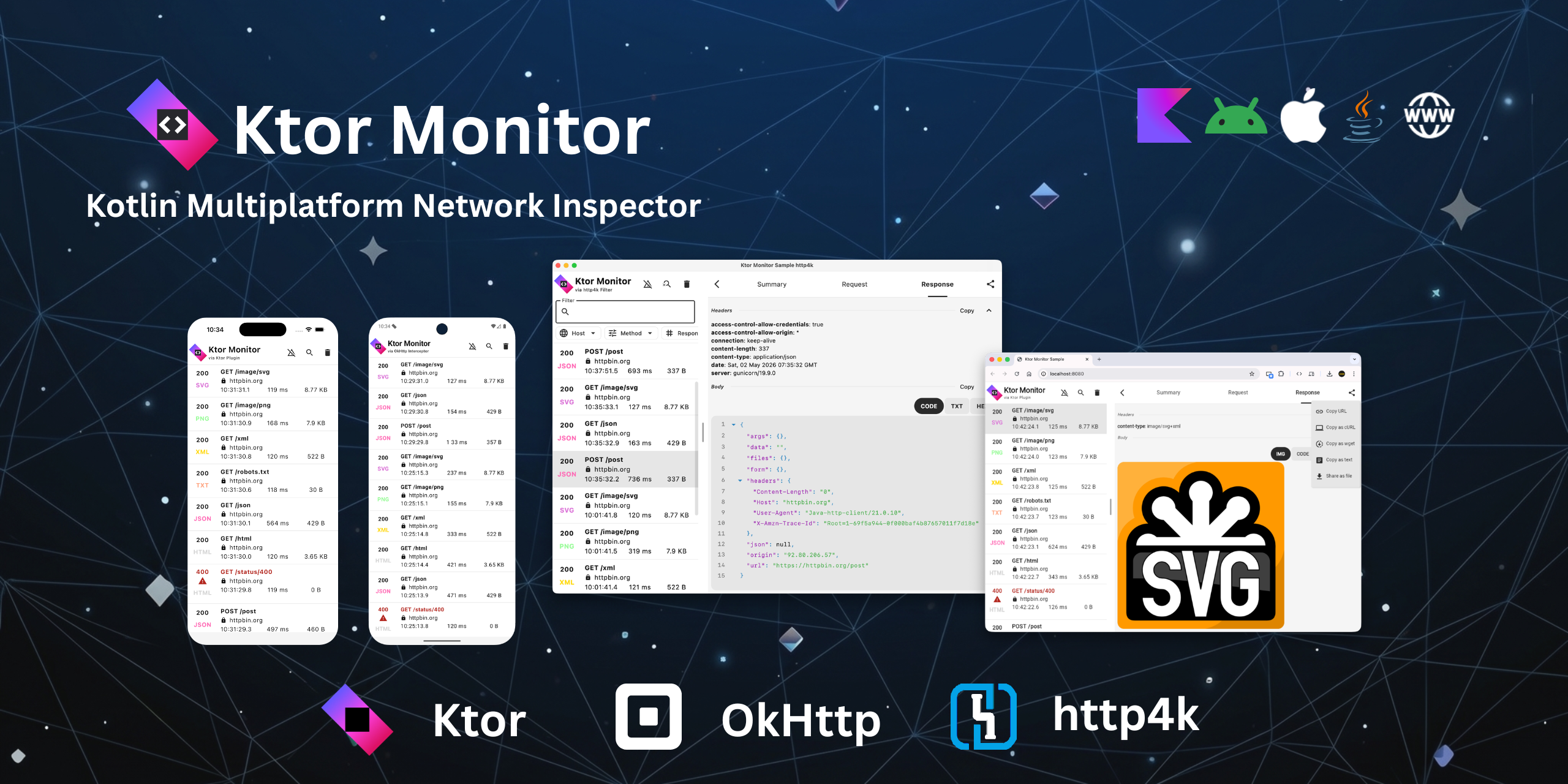
Powerful tool to monitor Ktor Client, OkHttp and http4k requests and responses, making it easier to debug and analyze network communication.
Automatically checked · GitHub checked 2026-11-13
Overview


 KtorMonitor
Powerful tool to monitor Ktor Client, OkHttp and http4k requests and responses, making it easier to debug and analyze network communication.
🌍 Live Demo
Try the live web demo: DEMO
✨ Features
- 🌐Ktor Network Monitoring: Real-time interception and logging of Ktor Client traffic.
- 🌐OkHttp Network Monitoring: Real-time interception and logging of OkHttp traffic.
- 🌐http4k Network Monitoring: Real-time interception and logging of http4k traffic.
- 📱Kotlin Multiplatform (KMP): Full support for Android, iOS, Desktop (JVM), Wasm, and JS.
- 🛠️Highly Configurable: Customize retention periods, content length limits, and notification behavior.
- 🔒Security First: Redact sensitive headers (e.g., Authorization).
- 📂Data Export: Save request/response details to local files for easier debugging or sharing.
- 📤Bulk Share: Export multiple calls in JSON, Text, Markdown, cURL/Wget, or URLs for easy sharing and replay.
- 🎨Rich Previews: Built-in viewers for JSON, XML, HTML, CSS, YAML, MARKDOWN, Form Data, Image (JPG, PNG, SVG, GIF, WEBP).
- 📡SSE & WebSockets: Track one-way streams (SSE) and bidirectional traffic (WebSockets).
- 🛡️Production Safe: No-Op version to ensure monitoring code is excluded from your production builds.
- 🤖AI Integration: Install the AI SKILL and let AI agents query calls via MCP.
🤖 AI Integration
Install AI SKILL
Install the AI SKILL (for Copilot, Claude, Cursor and others) using skills.sh:
npx skills add CosminMihuMDC/KtorMonitor --skill ktormonitor
Use MCP
Let AI agents (Copilot, Claude, Cursor, ...) query the calls captured by KtorMonitor at runtime, on any platform, independent of the HTTP client used.
dependencies {
    debugImplementation("ro.cosminmihu.ktor:ktor-monitor-mcp:1.18.1")
    releaseImplementation("ro.cosminmihu.ktor:ktor-monitor-mcp-no-op:1.18.1")
}
KtorMonitor.MCP.start {
    appName = "MyApp" // recommended: shows which app is which in list_apps
    // host = "127.0.0.1"
    // port = 2991
    // token = null
}
See MCP for the companion JAR setup and connectivity per platform.
📦 Setup (Kotlin Multiplatform) for Ktor Client

kotlin {
    sourceSets {
        commonMain.dependencies {
            implementation("ro.cosminmihu.ktor:ktor-monitor-logging:1.18.1")
        }
    }
}
For Release Builds (No-Op)
To isolate KtorMonitor from release builds, use the ktor-monitor-logging-no-op variant. This ensures the monitor code is not included in production artifact.
kotlin {
    sourceSets {
        commonMain.dependencies {
            implementation("ro.cosminmihu.ktor:ktor-monitor-logging-no-op:1.18.1")
        }
    }
}
📦 Setup (Android) for Ktor Client
dependencies {
    debugImplementation("ro.cosminmihu.ktor:ktor-monitor-logging:1.18.1")
    releaseImplementation("ro.cosminmihu.ktor:ktor-monitor-logging-no-op:1.18.1")
}
For Android minSdk < 26, Core Library Desugaring is required.
 Install Ktor Client Plugin
HttpClient {

    install(KtorMonitorLogging) {
        sanitizeHeader { header -> header == "Authorization" }
        filter { request -> !request.url.host.contains("cosminmihu.ro") }
        showNotification = true
        retentionPeriod = RetentionPeriod.OneHour
        maxContentLength = ContentLength.Default
    }
}
sanitizeHeader- sanitize sensitive headers to avoid their values appearing in the logsfilter- filter logs for calls matching a predicate.showNotification- Keep track of latest requests and responses into notification. Default is true. Android and iOS only. Notifications permission needs to be granted.retentionPeriod- The retention period for the logs. Default is 1h.maxContentLength- The maximum length of the content that will be logged. After this, body will be truncated. Default is 250_000. To log the entire body useContentLength.Full.
📦 Setup (Android & JVM) for OkHttp
dependencies {
    debugImplementation("ro.cosminmihu.ktor:ktor-monitor-okhttp-interceptor:1.18.1")
    releaseImplementation("ro.cosminmihu.ktor:ktor-monitor-okhttp-interceptor-no-op:1.18.1")
}
For Android minSdk < 26, Core Library Desugaring is required.
 Install OkHttp Interceptor
OkHttpClient.Builder()
    .addInterceptor(
        KtorMonitorInterceptor {
            sanitizeHeader { header -> header == "Authorization" }
            filter { request -> !request.url.host.contains("cosminmihu.ro") }
            showNotification = true
            retentionPeriod = RetentionPeriod.OneHour
            maxContentLength = ContentLength.Default
        }
    )
    .build()
sanitizeHeader- sanitize sensitive headers to avoid their values appearing in the logsfilter- filter logs for calls matching a predicate.showNotification- Keep track of latest requests and responses into notification. Default is true. Android and iOS only. Notifications permission needs to be granted.retentionPeriod- The retention period for the logs. Default is 1h.maxContentLength- The maximum length of the content that will be logged. After this, body will be truncated. Default is 250_000. To log the entire body useContentLength.Full.
Note: Install it with
addInterceptor, notaddNetworkInterceptor. OkHttp does not run network interceptors for WebSocket calls, so a WebSocket handshake would not be logged. To also log WebSocket frames, open the socket withclient.newMonitoredWebSocket(request, listener)instead ofclient.newWebSocket(...). WithaddInterceptor, redirects are logged as a single call.
📦 Setup (Android & JVM) for http4k
dependencies {
    debugImplementation("ro.cosminmihu.ktor:ktor-monitor-http4k-filter:1.18.1")
    releaseImplementation("ro.cosminmihu.ktor:ktor-monitor-http4k-filter-no-op:1.18.1")
}
For Android minSdk < 26, Core Library Desugaring is required.
 Install http4k Filter
KtorMonitorFilter {
    sanitizeHeader { header -> header == "Authorization" }
    filter { request -> !request.uri.host.contains("cosminmihu.ro") }
    showNotification = true
    retentionPeriod = RetentionPeriod.OneHour
    maxContentLength = ContentLength.Default
}.then(JavaHttpClient())
sanitizeHeader- sanitize sensitive headers to avoid their values appearing in the logsfilter- filter logs for calls matching a predicate.showNotification- Keep track of latest requests and responses into notification. Default is true. Android only. Notifications permission needs to be granted.retentionPeriod- The retention period for the logs. Default is 1h.maxContentLength- The maximum length of the content that will be logged. After this, body will be truncated. Default is 250_000. To log the entire body useContentLength.Full.
🧩 Integration
Add the UI component to your application based on your targeted platform.
Compose Multiplatform (Common)
- Use
KtorMonitorComposable
@Composable
fun Composable() {
    KtorMonitor()
}
Android
- If
showNotification = trueand android.permission.POST_NOTIFICATIONS is granted, the library will display a notification showing a summary of ongoing KTOR activity. Tapping on the notification launches the fullKtorMonitor. - Apps can optionally use the
KtorMonitor()Composable directly into own Composable code. - For Android minSdk < 26, Core Library Desugaring is required.
iOS
-
If
showNotification = trueand notification permission is granted, the library will display a notification showing a summary of ongoing KTOR activity. -
Use
KtorMonitorViewController
fun MainViewController() = KtorMonitorViewController()
struct KtorMonitorView: UIViewControllerRepresentable {
    func makeUIViewController(context: Context) -> UIViewController {
        MainViewControllerKt.MainViewController()
    }

    func updateUIViewController(_ uiViewController: UIViewController, context: Context) {}
}

struct ContentView: View {
    var body: some View {
        KtorMonitorView()
                .ignoresSafeArea()
    }
}
Desktop (Compose)
- Use
KtorMonitorWindowComposable
fun main() = application {

    var showKtorMonitor by rememberSaveable { mutableStateOf(false) }
    KtorMonitorWindow(
        onCloseRequest = { showKtorMonitor = false },
        show = showKtorMonitor
    )

}
- Use
KtorMonitorWindowComposable withKtorMonitorMenuItem
fun main() = application {

    var showKtorMonitor by rememberSaveable { mutableStateOf(false) }
    Tray(
        icon = painterResource(Res.drawable.ic_launcher),
        menu = {
            KtorMonitorMenuItem { showKtorMonitor = true }
        }
    )

    KtorMonitorWindow(
        show = showKtorMonitor,
        onCloseRequest = { showKtorMonitor = false }
    )

}
Desktop (Swing)
- Use
KtorMonitorPanelSwing Panel
fun main() = application {

    SwingUtilities.invokeLater {
        val frame = JFrame()
        frame.add(KtorMonitorPanel, BorderLayout.CENTER)
        frame.isVisible = true
    }

}
Wasm / Js
- Web targets store the data with SQLite WASM and need a small Web Worker (
WebWorkerSQLiteDriverdoes not ship one). Copysqlite.worker.jsinto your web project (e.g.{project}/webpack-resources/sqlite.worker.js) and alias it in webpack. The data is kept in memory, so no special HTTP headers are required.
// {project}/webpack.config.d/sqlite.js
const path = require('path');

config.resolve = {
    modules: ['node_modules', path.resolve(__dirname, '../../node_modules')],
    fallback: {
        fs: false,
        path: false,
        crypto: false,
        os: false,
    },
    alias: {
        ...(config.resolve && config.resolve.alias),
        'ktor-monitor-sqlite-worker/sqlite.worker.js': path.resolve(__dirname, '../../../../webpack-resources/sqlite.worker.js'),
    },
};
ComposeViewport {
    App()
}
✍️ Feedback
Found a bug or have a feature request? File an issue.
🙌 Acknowledgments


Community discussions on Slack — join us in the #ktormonitor channel.
Documentation is available at KtorMonitor Documentation.
API is available at KtorMonitor API.
KtorMonitor is available also on JetBrains' klibs.io.
KtorMonitor on Context7.
Some parts of this project are reusing ideas that are originally coming from Chucker.
Thanks to ChuckerTeam for Chucker!
Thanks to JetBrains for Ktor and Kotlin!
Medium article: Ktor Monitor
💸 Sponsors
KtorMonitor is maintained and improved during nights, weekends and whenever team has free time. If you use KtorMonitor in your project, please consider sponsoring us.
You can sponsor us by clicking ♥ Sponsor.

🙏🏻 Credits
KtorMonitor is brought to you by these contributors.