
claude-council
Claude Code plugin that asks several AI coding agents the same question and shows their answers side by side. Gemini, OpenAI, Grok, Perplexity, Kimi and any model OpenRouter routes to over API; codex, antigravity, grok, kimi and cursor CLIs on subscription auth; ollama locally. Codex specialists take coding tasks on th
Automatically checked · GitHub checked 2026-11-14
Overview
A Claude Code plugin that asks AI coding agents the same question in parallel. Compare their answers when one model's bias could mislead you: architecture decisions, debugging dead ends, security reviews, or framework choices.

Where it runs
| Where | What you get |
|---|---|
| Claude Code in a terminal | /claude-council:ask, every seat, and the pane beside the chat. |
| Claude Desktop, Code tab | The same plugin and the same commands. The pane opens in Desktop's side panel. |
| Claude Desktop, an ordinary chat | The Desktop extension: five tools, a seat picker and an answers panel in the chat. macOS and Linux. |
In both, Claude can also call the council as a tool. It asks which seats and how verbose first, then shows a Send card, and nothing leaves your machine until you confirm it.
claude.ai chat and Cowork run in a sandbox that can block calls to other providers, so the council does not work there.
Install
You need curl and jq on macOS, Linux, or Windows through Git Bash.
/plugin marketplace add hex/claude-marketplace
/plugin install claude-council
Give it at least one provider in the shell you start Claude Code from:
export OPENAI_API_KEY="..."
# Or GEMINI_API_KEY, XAI_API_KEY, PERPLEXITY_API_KEY,
# KIMI_API_KEY, OPENROUTER_API_KEY
Or store the keys in the plugin's config. Run /plugin configure claude-council,
fill in the API key rows, and choose Save configuration. Claude Code keeps them in
its secure storage, not in a settings file. The council's mod sets each stored
key as its variable for the whole session, so every command Claude Code starts,
in every project, gets the stored key in place of one your shell exports.
The OpenRouter models row takes the model ids OPENROUTER_MODELS takes, so
the router's seats need no export either.
Stored keys need Claude Code 2.1.287 or later. The desktop app's plugin
Settings tab takes them too, for sessions on that computer. They never reach
claude.ai chat or Cowork. API keys covers where they are kept,
when the mod does not load, and how a cleared key behaves.
The codex, agy (Antigravity), grok, kimi, and cursor-agent CLIs use
your existing subscriptions without an API key. Claude Code itself, the
Copilot CLI and OpenCode can sit too, when named in --providers. A local
ollama model needs no key or external network. With none of these, --local uses Claude
subagents. See provider selection and
local councils.
First run in 60 seconds
Read what gets sent and saved before asking about your code.
/claude-council:status
/claude-council:ask "Should I use UUID or BIGINT primary keys for a SaaS users table?"
Each provider answers independently. Claude writes a synthesis of their agreement, disagreements, and recommendation. Agreement is not verification: the models share your description and its assumptions. The synthesis names the premise that could change the answer.
Claude Desktop
The plugin needs Claude Code. For an ordinary Claude Desktop chat there is a
Desktop extension, council-<version>.mcpb, that gives Claude five tools:
council_ask, council_pick, council_result, council_status and
council_settings. It runs on macOS and Linux only, because it starts the
council's bash scripts.
- Download
council-<version>.mcpbfrom the latest release. To build it yourself, runbash extension/build.shin a clean checkout. It needsnpmand writesdist/council-<version>.mcpb. - Double-click the file. Desktop warns that the extension gets access to everything on your computer and is not verified by Anthropic. Both hold for any extension installed from a file: its server runs as you, with your files and network, and Anthropic has not reviewed it. Install only a package you built or trust.
- In Settings, Extensions, Claude Council, Configure, paste a key for each
provider you want: Gemini, OpenAI, xAI, Perplexity, Kimi, OpenRouter. An
empty field leaves that provider's API out. Desktop stores the keys. For a
question, each key goes only to its own vendor's seats: the vendor's API,
and its CLI agent when one is installed (
codexgets the OpenAI key,agythe Gemini key,grokthe xAI key,kimithe Kimi key). A status check is different: it starts each installed CLI agent butclaudeandopencodewith every key set. - In a chat, ask Claude to open the council settings. A panel in the chat lists each keyed provider's models, fetched live from that provider. Pick one per provider, or switch on up to 12 OpenRouter models, one seat each. Every change saves at once and applies to the next question.
- Ask Claude to put a question to the council. Desktop asks you to approve the tool call, and that approval is the only check before the question leaves your machine. A panel under the tool call shows each seat's answer, or its error, in a card of its own headed by the seat's name and its vendor's logo, and Claude writes the synthesis below it. Desktop waits for the whole run, from seconds to a few minutes.
Asking at once
Name the seats or a verbosity (standard, brief or detailed) in your message, or say to just ask everyone, and Claude runs the question at once, on every default seat at standard unless you named others. Claude passes your question as you asked it, adding context only when it depends on earlier messages the council cannot see.
The picker
Otherwise, as in "ask the council: which queue should we
use?", Claude opens council_pick, a panel with the question, a switch per
seat and the three verbosities. Claude then waits, in the same turn, in
council_result for the picker's run.
- Press Ask. The answers appear in that panel, and the line under them says "Claude is writing the synthesis".
- Claude writes the synthesis with no message from you. When every seat fails, Claude says what failed.
When no seat answers, the panel says so and Ask works again.
Changing a model in the picker
On an API seat or an OpenRouter seat the model in grey is a button: click it to pick another model from that provider's live list (OpenRouter's has a filter box). The choice saves at once, as the settings panel's would, and applies to this question and the ones after it. An OpenRouter seat changes only its own model; adding or removing OpenRouter seats stays in the settings panel.
When Claude is no longer waiting
Claude waits at most 11.5 minutes from when the picker opened. If it has stopped waiting by the time the answers are in, or you press Ask a second time in the same panel:
- Desktop puts "Synthesise the council's answers (run 3f9a2c)." in the message box, under a caution about malicious content, and the line under the answers says to press Enter. The panel cannot send that message itself.
- Claude then fetches that run's answers with
council_resultand writes the synthesis. - If Desktop refuses the message, the line instead gives the words to send
yourself (
Ask Claude: "synthesise council run 3f9a2c"). - The extension keeps the last 5 runs in which a seat answered; after that, ask the council again.
A question with no providers named goes to every provider with a key and to
every CLI agent the scripts find (codex, agy, grok, kimi,
cursor-agent, ollama) in your PATH, ~/.local/bin, ~/bin,
/opt/homebrew/bin or /usr/local/bin. claude, copilot and opencode
get it only when the question names them. A CLI agent answers on its own
login, so it receives the question even when its vendor's key field is
empty; apart from its own vendor's key it gets no key from the form. The
reference lists the files it
keeps and its limits.
Features
| Capability | Guide |
|---|---|
| Ask providers together, or name one in plain words | Command examples |
| Choose providers and pin a standing roster | Provider selection |
| Assign specialist roles | Roles |
| Have providers challenge each other's answers | Debate |
| Gather code context with agents before asking | Agent mode |
| Use Claude subagents without an external provider | Local council |
| Include relevant files or choose your own | Auto-context |
| Attach a screenshot | Image input |
| Ask about the current conversation | /advise |
| Run in the background and fetch the result | Background jobs |
| Export the answers to a file | Export |
| Show only the synthesis | Quiet mode |
| Watch answers arrive and retry failed seats | The pane |
| Get a note from one seat while Claude works | Heads-up side-check |
| Have a second model review the diff before Claude stops | Stop-gate review |
| Ask the council from a Claude Desktop chat | Claude Desktop |
| Call the scripts without Claude Code | Direct script usage |
The reference lists every flag, variable, model default, and limit. Architecture covers the implementation. TESTING.md covers tests, releases, and adding a provider.
Heads-up side-check
Opt in through the "Heads-up side-check" row in /config or the project's
.claude/council-heads-up.json. One seat, codex by default, checks recent
turns and tool results while Claude works. For a Write or an Edit, it gets the
text Claude wrote. The note shows what went where.
Learn more expands it; Tell Claude puts a draft in the prompt without sending
it. Read the data limits and off switch
and the heads-up guide.
The pane
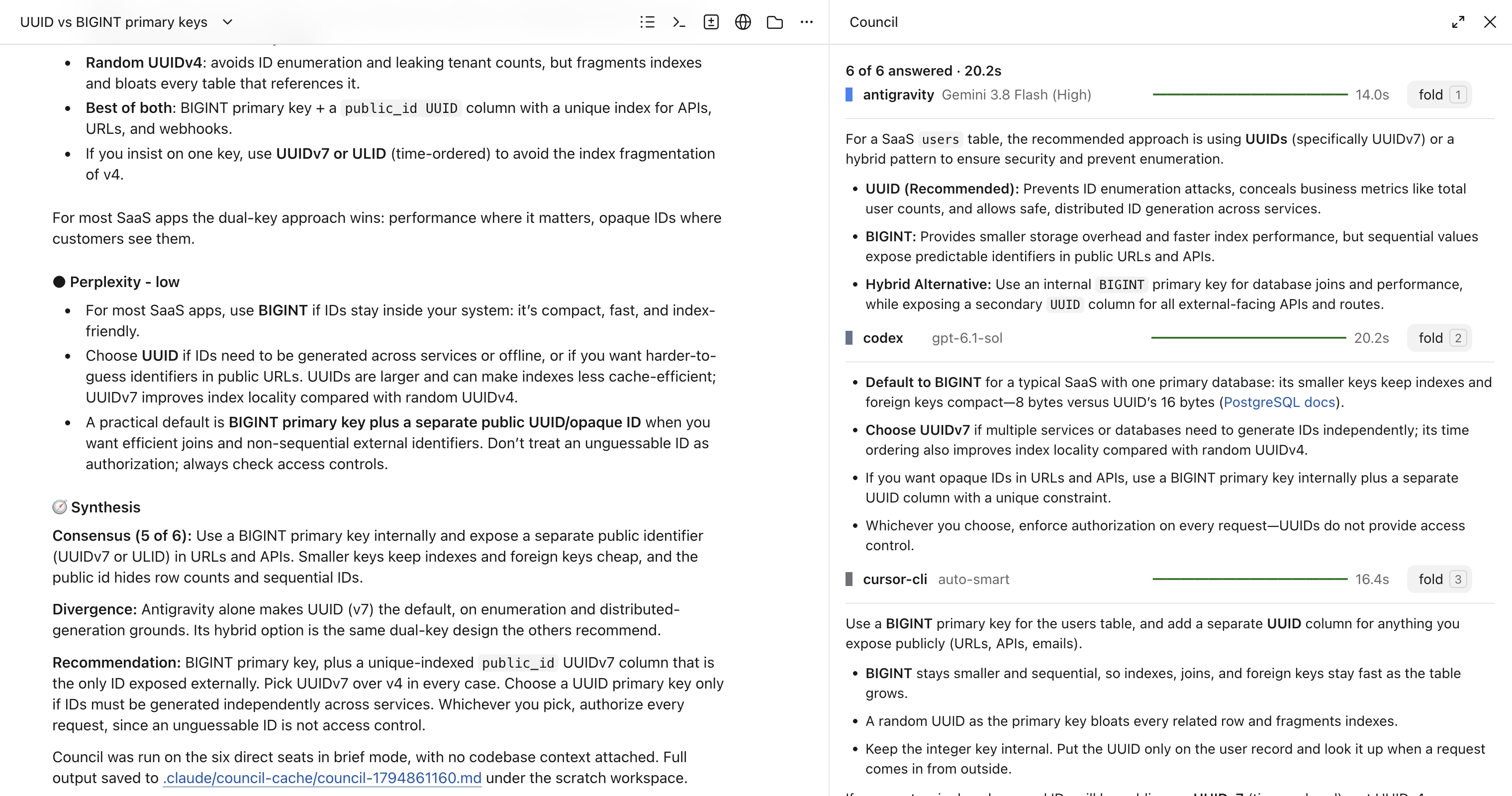
On Claude Code 2.1.287 or later, the pane opens inside Claude Code,
as in the animation above. Each seat has one row with its model, a bar for
its state, its time, and a button for what it does now: cancel, retry, open,
or fold. When the run ends,
the synthesis opens at the top with the answers folded below it. Reopen the
last run with /council-pane. Inside tmux, the mod asks once which pane you want.
The mod guide lists keys, settings, limits, and when the mod does not load. It also lets Claude call the council as a tool; every call asks you first.
What the mod runs, reads and sends
The mod makes no network calls of its own. It starts the programs below
from an argument array, never a shell string, and never hands bash -c a
script. Your text reaches model providers only through the first two:
bash scripts/run-council.shwhen Claude calls the council tool and you chooseSend to the council. It sends your question to the providers you set up.bash scripts/heads-up.sh, only with the heads-up side-check on. It reads this session's transcript (by default the last 5 turns and up to 8 tool results of 2,000 characters each) and sends that digest to one seat,codexunless you pick another. The run directory keepsdigest.mdandprompt.md, exactly what left the machine, until the mod reads the result and removes it. The codex seat runs in that directory under a codex home of its own: your model and effort, a link to yourauth.jsonso a token refresh reaches your login (without one, yourCODEX_API_KEYorOPENAI_API_KEYsigns codex in), and none of your plugins, hooks,AGENTS.md, skills or MCP servers.bash scripts/query-council.sh --list-default-modelswhen Claude calls the council tool, to list the seats it may offer you and to check the seats it names. It reads your configuration and sends nothing.bash scripts/seat-info.sh discover,model <seat>orallowlisted <seat>during/heads-up setupand/heads-up on <seat>. It checks which seats this machine can run and sends nothing.codex debug modelsduring/heads-up setupwith the codex seat, to list its models. That command belongs to codex, and so does any request it makes.kill -0 <pid>to check a council run is still alive. It sends no signal.rm -rfandmv -fon its own run directories under$TMPDIR/council-mod.<session id>, to clean up a finished run and to answer the retry offer.
It writes files in that $TMPDIR directory, including model.json and
avoid.txt, which heads-up.sh reads. Outside it, it writes one file,
.claude/council-heads-up.json in the project, and only from
/heads-up setup, /heads-up on, /heads-up off or a note's Turn off.
That file is the heads-up switch. Claude Code itself does not read it.
It sets environment variables in Claude Code's own process. With an API key
or the OpenRouter models list stored in the plugin's config, it sets that
variable, such as OPENAI_API_KEY or OPENROUTER_MODELS, when the session
starts. Every command Claude Code starts after that gets the stored value in
place of the one your shell exports, the same as an export would. Before a council run it sets COUNCIL_MOD_PANE_DIR.
It touches the prompt in two places. With wake_on_async_done on, it
submits The background council job <id> has finished. Fetch it with /claude-council:result <id> and summarise it. once a background job
finishes. A note's Tell Claude puts a draft in the prompt box, and you decide
whether to send it.
It reads the text of each Bash command Claude runs, only to spot a call
to run-council.sh. Just before that call it sets COUNCIL_MOD_PANE_DIR,
so the run draws in this pane, and clears it when tmux owns the pane. It reads TMPDIR and TMUX. It turns on the
claude-council.heads_up setting only when you pick "every project" in
/heads-up setup.

Without the mod, tmux opens a side pane that streams answers and each
provider's status. It offers to retry failed seats. Esc closes it.
--no-pane or COUNCIL_NO_PANE=1 turns it off. Outside both pane modes,
answers arrive in the chat. See terminal integration.
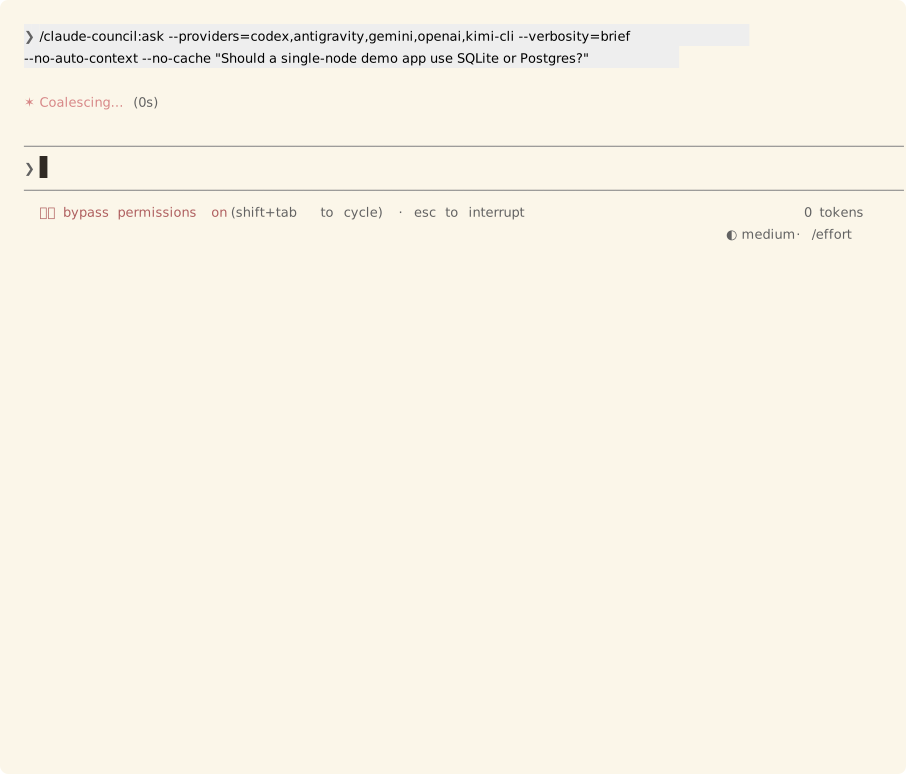
The council and tmux animations show real answers to "Should a single-node demo app use SQLite or Postgres?" Codex and Antigravity use subscriptions; Gemini and OpenAI use their APIs. Kimi is a rate-limit fixture. The heads-up animation uses a fake seat and a real Claude Code host. Capture scripts and raw frames record how to reproduce them.
What a CLI seat loads
Every CLI seat runs from an empty directory, $TMPDIR/claude-council-<uid>/seat,
where <uid> is your numeric user id. The CLAUDE.md, AGENTS.md, rules,
skills, hooks and MCP servers of the project you ask from don't reach it. The
directory doesn't limit what a seat can read: codex, for example, can still
open any file by its full path.
The directory is read-only. That stops a seat writing a file there, but not a
seat that changes the mode first. A seat also refuses to start when it finds
anything in it, and names the path so you can look before you remove it. A file
that lands while other seats are running can reach them; the next seat to start
refuses. A seat also refuses to start when TMPDIR sits inside a git
repository, and names it: a CLI would take the whole repository as the seat's
project.
The seats below also run under a home of their own, in
$TMPDIR/claude-council-<uid>/seat-home. It links only to what the CLI needs to
sign in and start. Only you can open either directory, and a seat refuses to
start when one of them belongs to another user or is a symlink.
| Seat | No longer loads | Still loads |
|---|---|---|
cursor-cli | Skills and plugins from ~/.cursor, ~/.claude, ~/.codex, ~/.grok and ~/.agents, Cursor and Claude hooks, ~/.cursor/mcp.json | Team commands from your Cursor dashboard (read from the CLI's bundle, not seen in a run) |
grok-cli | Claude plugins, ~/.agents skills, grok's memory across sessions | Your ~/.grok config and the hooks in ~/.grok/hooks, since no grok setting turns them off. The seat home links your login keychain (macOS) and ~/.docker/run, for Docker Desktop's socket |
antigravity | On macOS: your ~/.gemini rules, skills, MCP servers and saved conversations | On Linux: everything under ~/.gemini, because where agy keeps its login there is not confirmed |
opencode | The ~/.claude and ~/.agents skills, agents and CLAUDE.md | Your login and session history in ~/.local/share/opencode |
codex | Your plugins, hooks, skills, memories and MCP servers. Each question gets its own codex home with your model, your effort and a link to auth.json | Nothing. With no auth.json and cli_auth_credentials_store set to keyring or auto, your login is in the system keyring, which codex can't read from another home, so the seat runs under your own codex home and the answer starts with a note. An exported OPENAI_API_KEY doesn't change that; an exported CODEX_API_KEY still signs codex in ahead of any login, as it does when you run codex yourself. Set cli_auth_credentials_store = "file" and run codex login again to isolate it. With no login at all, the seat stops and says so |
claude-cli | The git status and commit instructions a repository adds | Admin policy and your organisation's instructions |
kimi-cli, copilot-cli | The project's files | Your home: kimi's hooks in ~/.kimi-code/config.toml, copilot's skills in ~/.copilot and ~/.agents |
Cursor and Antigravity keep the model you picked in their own config: the seat
reads it from your real home and passes it on. On Windows the seats keep your
home, because the native CLIs find it through USERPROFILE.
Seat isolation has each seat's details.
Troubleshooting
| Problem | Fix |
|---|---|
| Cloned the repo and nothing loads | Don't clone into ~/.claude/plugins/. pluginDirectories is not a setting. Follow running from a local clone. |
| No providers found | Run /claude-council:status. Export keys in the shell that starts Claude Code, store them with /plugin configure claude-council, or use --local. |
| A stored key is not used | After saving one with claude plugin configure in a shell, restart Claude Code. Stored keys need the council's mod, which loads on Claude Code 2.1.287 or later and not under --safe-mode or disableAllHooks. Without it, export the key in your shell. |
| A different model answered | A header such as grok-4.7 (grok-latest unavailable) records a model fallback. Setting that provider's _MODEL variable disables fallback. |
| No pane | Use tmux, or update to Claude Code 2.1.287 or later for the pane inside Claude Code. The mod guide lists what stops it loading. |
| Updating | Run /plugin update claude-council, then restart Claude Code. |